31
4.6.3 Recording
The recording menu is where the user can make adjustments to how and when the NVR records video. The
recording menu has 3 tabs: Encode, Option, and Schedule.
4.6.3.1 Encode Tab
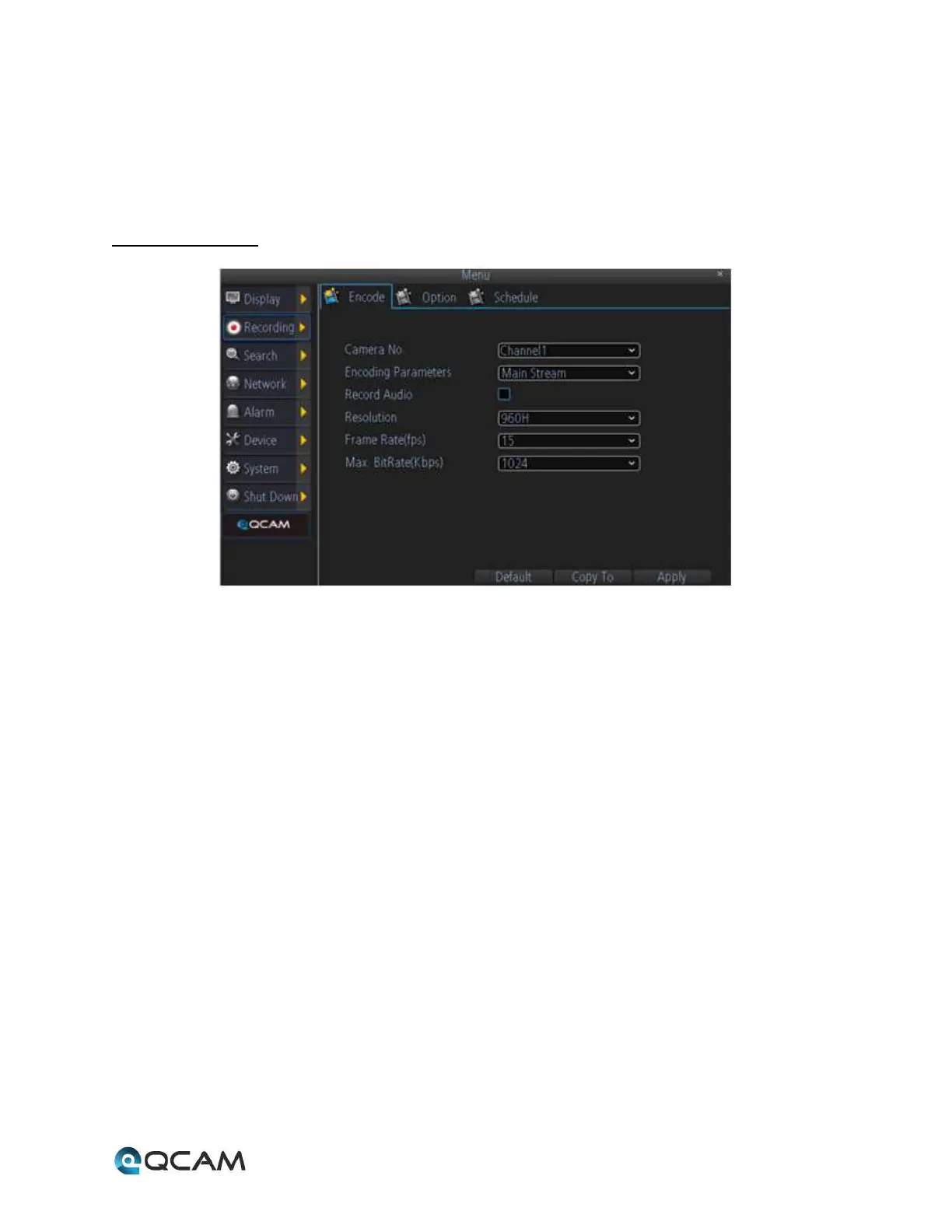
Below is an explanation of the fields on this screen:
• Camera No: This dropdown box allows the user to choose the camera/channel to edit. The Camera No. is the
same as the number written on the rear panel next to the Ethernet port used to connect the camera.
• Encoding Parameters: This dropdown box allows the user to select which encoding parameter to edit for the
camera/channel selected.
• Record Audio: This checkbox allows the user to enable or disable audio recording for the specified channel.
• Resolution: This dropdown box allows the user to select the resolution of the recorded video for the specified
channel.
• Frame Rate (FPS): This dropdown box allows the user to select the frame rate for the specified channel’s video
recording.
• Max Bit Rate (Kbps): This dropdown box allows the user to select the maximum bit rate for the specified
channel’s video recording.



 To Next Page