7
The NVR supports many different network protocols such as TCP/IP, PPPoE, DHCP, DDNS, UPnP, ONVIF, and
RTSP. Additionally, the NVR also supports remote access, remote playback, remote media downloads, remote
configuration, and remote PTZ control.
• Others
The NVR supports front panel, mouse, and IR control operations, as well as multi-level user management,
which allows each user to have individual NVR access rights. The NVR also keeps a detailed log that describes
and records any including operations, alarms, information, and exceptions.
2 Device and Peripheral Details
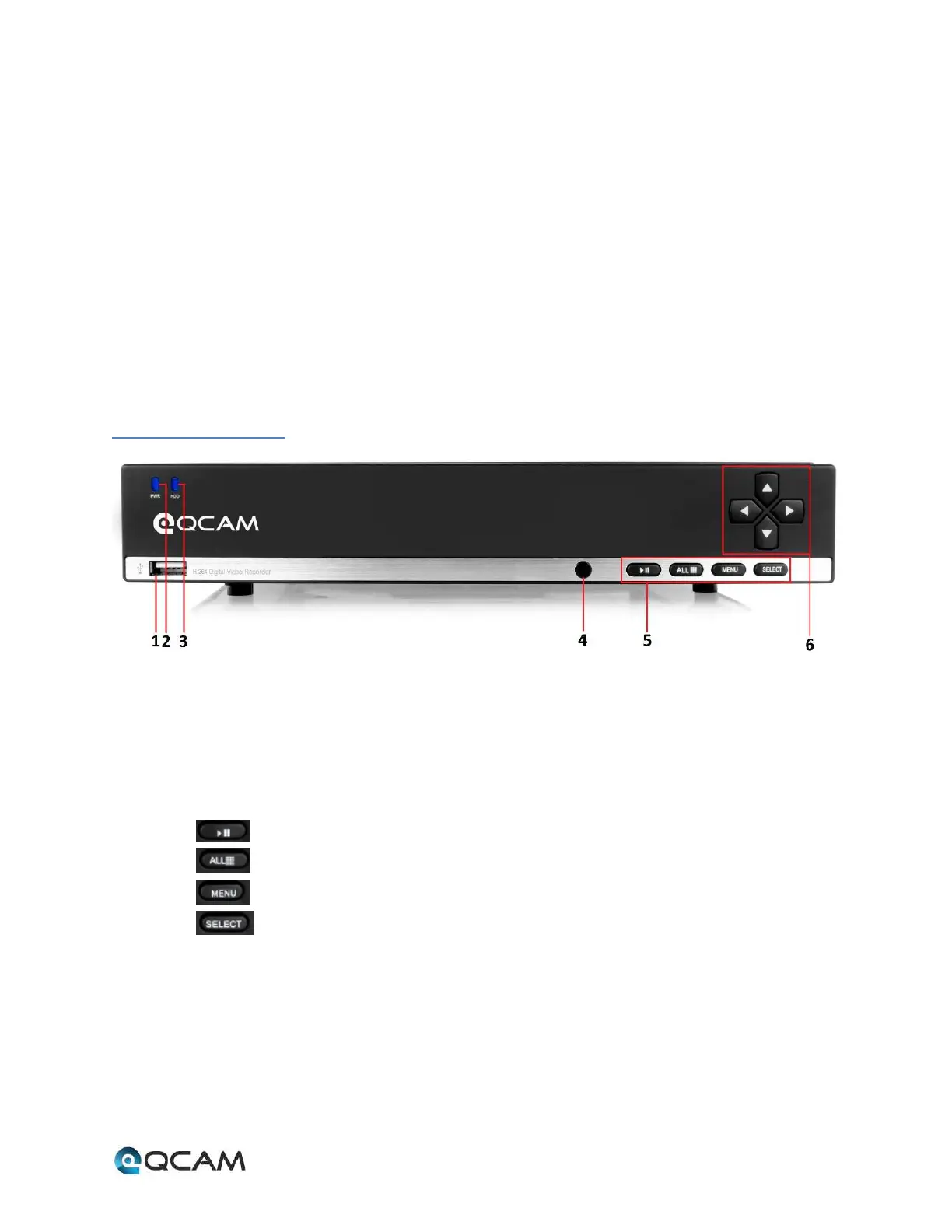
2.1 Front Panel
The controls on the front panel include:
1. USB Port: The USB port allows the NVR to interface with devices such as a mouse or an external hard drive.
2. POWER: The POWER indicator lights up when NVR is powered on.
3. HDD: The HDD indicator lights up when the hard drive is active, and flashes rapidly when recording.
4. IR Receiver: This panel is the receiver for IR remote.
5. Function Button:
a. Play / Pause button is used for playback control
b. ALL button is used to live-view all the channels
c. Menu button is used to pop-up the main menu
d. Select button is used to confirm a selection in any of the menu modes
6. Direction Button: DIRECTION buttons are used to navigate between different fields and items in menus. In
Preview mode, these buttons can be used to cycle through channels.



 To Next Page