8
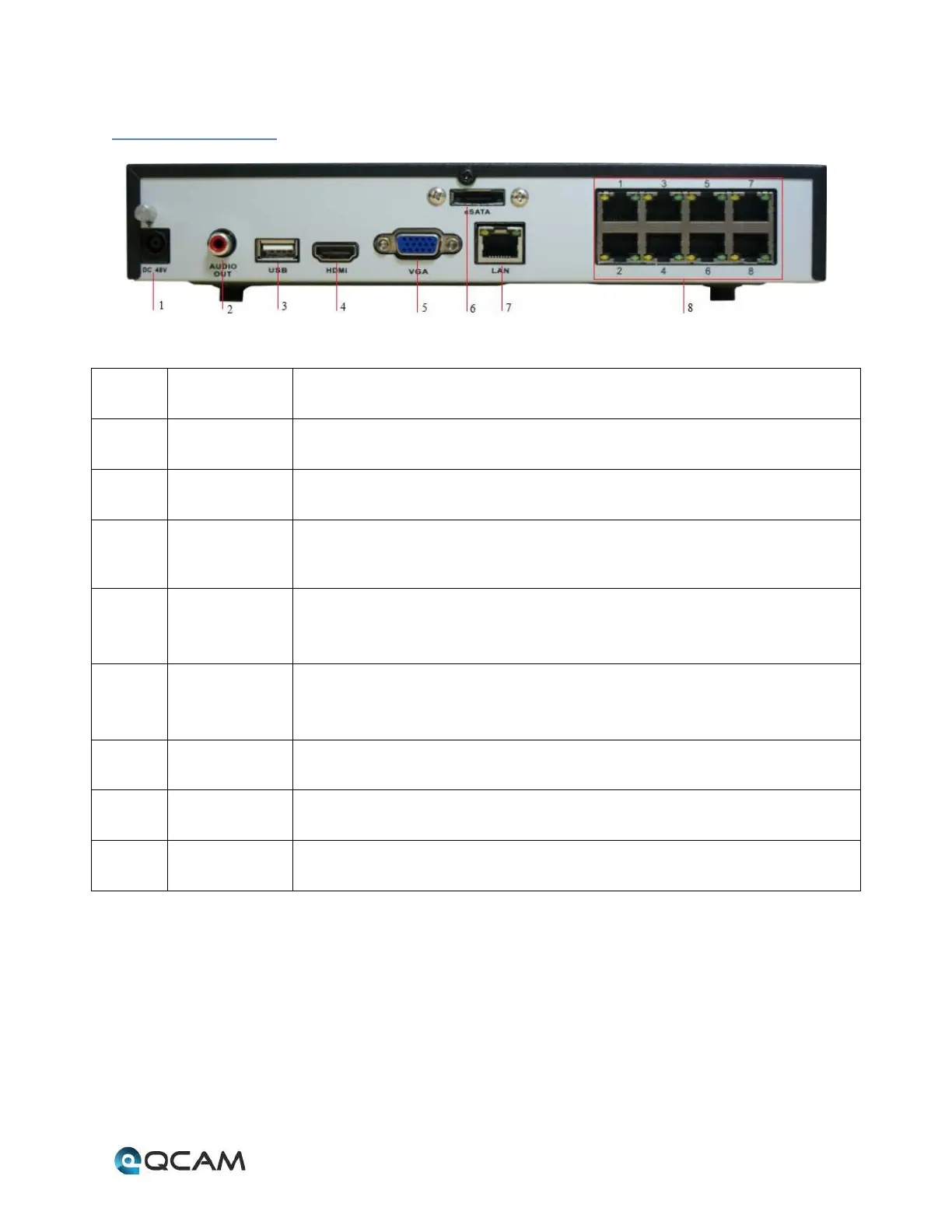
2.2 Rear Panel
Number Item Description
1 DC POWER IN DC power input port. Requires a 12V DC Power Adapter.
2 AUDIO OUT RCA connectors for audio output. Allows for connection with audio output devices.
3 USB Connector for USB device. Allows for connection with external hard drives, flash drives,
USB mouse, or USB keyboard.
4 HDMI
High definition audio and video signal output port. It transmits uncompressed high
definition video and multiple-channel data to the HDMI port of the display device.
5 VGA
VGA video output port. Output analog video signal. Can connect to the monitor to
view ananlog video output.
6 eSATA eSATA port. Allows for connection of an eSATA HDD for recording or backup purposes.
7 LAN Ethernet port. Allows for connection to a Local Area Network (LAN).
8 POE ports Connector for POE IP camera.



 To Next Page