
 Need help?
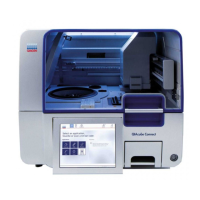
Do you have a question about the Qiagen EZ2 Connect and is the answer not in the manual?
Provides an overview of the manual's sections and appendices.
Information on contacting QIAGEN Technical Services for support.
Describes the purpose and intended applications of the EZ2 system.
Outlines the competence and training needed for EZ2 users.
Explains the meaning of WARNING and CAUTION symbols used in the manual.
Details on correct usage to avoid hazards and damage.
Warnings regarding the weight and lifting of the instrument.
Guidelines for safe electrical operation and maintenance.
Parameters like temperature and humidity.
Handling potentially infectious samples and reagents safely.
Safety precautions when using hazardous chemicals.
Proper collection and disposal of consumables and waste.
Safety precautions related to moving parts and the hood.
Warning about hot surfaces of the heating system.
Information about UV LED lamp and barcode scanner hazards.
Safety precautions related to instrument maintenance.
Explains various symbols found on the EZ2 Connect and EZ2 Connect Fx instruments.
Explains the automated nucleic acid purification process.
Identifies and describes the external components of the EZ2 instrument.
Details the 10.1-inch color touchscreen and its GUI.
Explains the function of the hood for contamination and UV protection.
Describes the 3 USB ports and their usage for drives, scanners, etc.
Location and function of the Ethernet and power cord ports.
Importance of proper ventilation and function of the barcode scanner.
Overview of internal components like pipettor head, racks, magnet module.
Details the 24-channel pipettor head and its piercing unit.
Describes the worktable, cartridge racks, and heating system.
Explains the heating system and the tray for spill containment.
Describes the function of the magnet module for particle capture.
Explains the camera's role and the UV LED light for decontamination.
Explains the internal LED light modes (blinking/constant).
Requirements for the installation site.
Specifies the EZ2's power requirements (voltage, frequency).
Importance of proper grounding (earthing) for safety.
Step-by-step instructions for unpacking the EZ2 instrument.
Key actions required before operating the EZ2.
Steps for the first-time login and initial system setup.
Procedure for calibrating the camera exposure.
Overview of GUI operations like run setups, status checks, and settings.
Description of elements in the User Interface toolbar, content, and footer.
How to use the on-screen keyboard for text input.
Steps to start the instrument and log in.
Adjusting settings, managing users, protocols, and software.
Setting device name, date, time, and format.
Adjusting instrument settings like audio and brightness.
Creating and editing user accounts with administrator/operator roles.
How administrators can edit existing user accounts.
How administrators can delete and deactivate user accounts.
How users and administrators can change passwords.
Setting password policies, expiration, and login attempt limits.
How to install new protocols and update the instrument software.
Configuring LAN and Wi-Fi connection settings.
Steps to configure the QIAsphere Base connection.
Guide to setting up a protocol run.
Choosing application, kit, and protocol for the run.
Setting values for protocol parameters.
Selecting sample positions on the worktable diagram.
How to enter and generate sample IDs.
How to add optional notes to samples.
Instructions for loading the cartridge rack.
Instructions for loading the tip rack.
How to cancel the protocol setup process.
Starting the protocol run and monitoring its progress.
Explains the load check feature for EZ2 Connect Fx.
Information displayed upon completion of a protocol run.
How to stop a protocol run at any time.
Sample recovery feature and saving run reports.
Details the information included in EZ2 run reports.
Steps for setting up the worktable, including loading labware.
Instructions for loading and unloading reagent cartridges.
Instructions for loading and unloading tips and labware.
How to use the 2D handheld barcode scanner.
Procedures for logging out and powering off the instrument.
Recommended detergents and disinfectants for cleaning.
Methods for disinfecting and removing contamination.
Procedures required after each run.
Procedures required at the end of each day.
Procedures required once a week.
Procedure to reduce pathogen and nucleic acid contamination using UV.
Information on contacting QIAGEN Technical Service for servicing.
Information needed when contacting technical support.
Table of common operational issues and suggestions.
Power, fuse, environmental, and noise specifications.
Conditions for transporting and storing the EZ2 instrument.
Dimensions, weight, and hardware features of the EZ2.
 General
| Brand | Qiagen |
|---|---|
| Model | EZ2 Connect |
| Category | Laboratory Equipment |
| Language | English |



 To Next Page