EasyManua.ls Logo

QNAP TBS-464 - User Manual

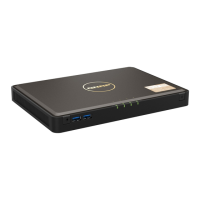
QNAP TBS-464
49 pages
Print Icon
To Next Page IconTo Next Page
Loading...
TBS-464
TBS-464
User Guide
Document Version: 1
05/10/2021

Questions and Answers

QNAP TBS-464 Specifications

General IconGeneral
Processor cores4
Processor modelN5105
Processor familyIntel® Celeron®
Processor frequency2 GHz
Processor manufacturerIntel
Processor boost frequency2.9 GHz
On-board graphics card modelIntel® UHD Graphics
Number of processors supported1
Flash memory4000 MB
Internal memory8 GB
Internal memory typeDDR4
RAID levels0, 1, 5, 6, 10, JBOD
RAID supportYes
Supported file systemsFAT32, NTFS, ext3, ext4
Storage drive interface-
Storage drives installedNo
Supported storage drive typesSSD
Total installed storage capacity0 TB
Number of storage drives installed0
Supported storage drive interfacesM.2
Ethernet LAN data rates100, 1000, 2500 Mbit/s
USB 2.0 ports quantity3
Ethernet LAN (RJ-45) ports2
Chassis typeDesktop
Cooling typeActive
Product colorBlack
Number of fans1 fan(s)
Cable lock slot typeKensington
TypeNAS
Noise level25 dB
Device classHome & Home Office
Backup featuresCloud
Browser supportedMozilla Firefox, Microsoft Edge, Google Chrome, Apple Safari
Security algorithms256-bit AES, FIPS 140-2, HTTPS, SNMPv2, SNMPv3
Storage temperature (T-T)-20 - 70 °C
Operating temperature (T-T)0 - 40 °C
Operating relative humidity (H-H)5 - 95 %
AC input voltage100 - 240 V
Power supply locationExternal
Power consumption (sleep)18 W
Power consumption (typical)28 W
Power supply unit (PSU) capacity65 W
Cables includedAC, LAN (RJ-45)
Operating system version5.0.0
Operating system installedQNAP Turbo System
Harmonized System (HS) code84714100
Weight and Dimensions IconWeight and Dimensions
Depth165 mm
Width230 mm
Height30 mm
Weight800 g
Package weight1700 g

Summary

Product Overview

Hardware Specification

Details the technical specifications, including CPU, memory, storage, and network.

Installation and Configuration

Installing M.2 Solid-State Drives

Provides step-by-step instructions for installing M.2 SSDs.

Connecting USB Expansion Units

Explains how to connect external storage expansion units.

QTS Installation

Outlines the methods for installing the QNAP QTS operating system.

Installing QTS Using Qfinder Pro

Details the process of installing QTS via the Qfinder Pro utility.

Installing QTS Using the Cloud Key

Describes the steps for installing QTS using a Cloud Key.

Installing QTS Using an HDMI Connection

Explains how to install QTS via an HDMI connection.

Basic Operations

Power Button

Explains how to power the NAS on and off using the power button.

Reset Button

Details the procedures for performing basic and advanced system resets.

NAS Migration

NAS Migration Requirements

Lists the prerequisites for migrating data and settings to a new NAS.

Migrating a NAS

Provides instructions for performing a direct NAS migration.

Migrating NAS Data Using HBS 3

Explains data migration using HBS 3 for unsupported models.

Preparing the Destination NAS

Guides on setting up the target NAS for data migration.

Troubleshooting

Forcing Qfinder Pro or myQNAPcloud to Locate the NAS

Provides steps to resolve NAS discovery issues.

Recovering Unintentionally Removed Hard Drives

Explains how to recover data from removed drives using RAID technology.

Related product manuals