EasyManua.ls Logo

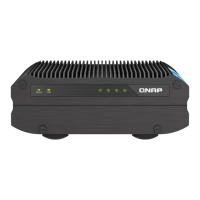
QNAP TS-i410X - User Manual

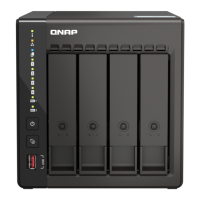
QNAP TS-i410X
45 pages
Print Icon
To Next Page IconTo Next Page
Loading...
TS-i410X
User Guide
Document Version: 2
29/09/2022

Questions and Answers

QNAP TS-i410X Specifications

General IconGeneral
RAID levels0, 1, 5, 6, 10, JBOD
RAID supportYes
Storage drive capacity0 GB
Supported file systemsFAT32, HFS+, exFAT, ext3, ext4
Storage drive interface-
Storage drives installedNo
Storage drive sizes supported2.5 \
Supported storage drive typesHDD & SSD
Total installed storage capacity0 TB
Number of storage drives installed0
Number of storage drives supported4
Supported storage drive interfacesSerial ATA III
Operating system version5.0.1
Operating system installedQNAP QTS
Server operating systems supportedWindows Server 2008 R2, Windows Server 2012, Windows Server 2012 R2, Windows Server 2016, Windows Server 2019
Ethernet LAN data rates1000, 2500, 5000, 10000 Mbit/s
Copper ethernet cabling technology10BASE-T
Storage temperature (T-T)-45 - 85 °C
Operating temperature (T-T)-40 - 70 °C
Operating relative humidity (H-H)5 - 95 %
TypeNAS
Device classSmall & Medium Business
Backup featuresCloud, iSCSI LUN
Browser supportedApple Safari, Google Chrome, Microsoft Edge, Mozilla Firefox
Output voltage9 - 36 V
AC input voltage100 - 240 V
Power supply locationExternal
Power consumption (sleep)17.628 W
Power consumption (typical)25.592 W
Power supply unit (PSU) capacity90 W
Chassis typeTower
Cooling typePassive
Product colorBlack
LED indicatorsLAN, Power, SSD, Status
Cable lock slot typeKensington
HDMI version1.4b
Ethernet LAN (RJ-45) ports2
Processor modelx6425E
Processor familyIntel Atom®
Processor frequency3 GHz
Processor manufacturerIntel
Flash memory4096 MB
Internal memory8 GB
Cables includedAC, LAN (RJ-45)
Number of screws16
Weight and Dimensions IconWeight and Dimensions
Depth254 mm
Width180 mm
Height65 mm
Weight2540 g
Package weight3730 g

Summary

1. Preface

About This Guide

Provides information about the device and step-by-step instructions on installing the hardware.

Audience

Intended for consumers and storage administrators with a basic understanding of storage and backup concepts.

Document Conventions

Explains symbols used in the guide for notes, important notes, tips, and warnings.

2. Product Overview

About the TS-i410 X

Describes the TS-i410X NAS features like 10 GbE connectivity, 4K HDMI output, and operation in harsh environments.

Hardware Specifications

Details the technical specifications of the TS-i410X, including processor, memory, storage, and connectivity.

Package Contents

Components

Front Panel

Illustrates and labels the components located on the front panel of the NAS.

Rear Panel

Illustrates and labels the components located on the rear panel of the NAS.

Drive Numbering

Shows the numbering scheme for the drive bays on the NAS for identification.

Safety Information

Installation Requirements

Lists the environmental, hardware, and tool requirements for safely installing the NAS.

Setting Up the NAS

3. Installation and Configuration

Hardware Installation

Details the process of installing drives and connecting expansion units to the NAS.

Installing 2.5-inch Solid-state Drives

Step-by-step guide for installing 2.5-inch SSDs into the NAS drive trays.

Connecting USB Expansion Units

Explains how to connect QNAP USB expansion units to the NAS for increased storage.

QTS Installation

Details the methods for installing the QNAP QTS operating system on the NAS.

Installing QTS Using Qfinder Pro

Provides a step-by-step guide for installing QTS via the Qfinder Pro utility.

Set the date and time

Instructions for configuring the NAS date and time settings, including NTP synchronization.

Configure the network settings

Guide on setting up IP addresses, including DHCP and static IP configurations.

Installing QTS Using the Cloud Key

Step-by-step guide for installing QTS using the cloud key method for initial setup.

4. Basic Operations

Power Button

Explains how to use the power button for turning the NAS on, off, and force power off.

Reset Button

Details the procedures for performing basic and advanced system resets on the NAS.

LEDs

Explains the meaning of different LED indicators on the NAS for system status.

Audio Alert

Describes the different audio alerts and their associated meanings and frequencies.

5. NAS Migration

NAS Migration Requirements

Lists prerequisites and compatibility for direct NAS migration between models.

Status and Setting Changes after NAS Migration

Details how settings and data are affected after migrating to a new NAS.

Migrating a NAS

Provides step-by-step instructions for performing direct NAS migration.

Migrating NAS Data Using HBS 3

Explains data migration using HBS 3 when direct migration is not supported.

Preparing the Destination NAS

Steps to prepare the target NAS for data migration, including pool and volume creation.

Creating a One-Way Sync Job

Guide for setting up a one-way synchronization job for data backup or replication.

Importing Local Users or Group Settings to the Destination NAS

Steps to transfer user and group configurations from a source NAS to a destination NAS.

6. Troubleshooting

Forcing Qfinder Pro or myQNAPcloud to Locate the NAS

Steps to help Qfinder Pro or myQNAPcloud find the NAS during installation if it's not detected.

Hot-Swapping Failed Drives

Instructions for replacing a failed drive without powering down the NAS.

Recovering Unintentionally Removed Healthy Drives

Describes how to recover RAID groups after accidental drive removal from the NAS.

Support and Other Resources

Lists available support resources, documentation, and links from QNAP.

7. Glossary

Glossary Terms

Defines key terms such as Cloud Key, myQNAPcloud, Qfinder Pro, and QTS.

8. Notices

Limited Warranty

Details QNAP's limited warranty terms, period, and how to review statutory rights.

Disclaimer

Provides legal disclaimers regarding the document's information, QNAP products, and liability.

Regulatory Notices

Compliance statements for CE, UKCA, and FCC standards, ensuring device conformity.

Other Regulatory Notices

Compliance statements for VCCI and BSMI standards, indicating device conformity.

China RoHS Compliance

Details compliance with Chinese RoHS standards for hazardous substances in the product.

Related product manuals