EasyManua.ls Logo

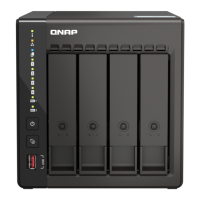
QNAP TS-453E - User Manual

QNAP TS-453E
58 pages
Print Icon
To Next Page IconTo Next Page
Loading...
TS-x53E
TS-253E
TS-453E
User Guide
Document Version: 1
05/07/2022

Other manuals for QNAP TS-453E

Questions and Answers

  • D
    Donald GreenAug 8, 2025
    What to do if Qfinder Pro or myQNAPcloud is unable to locate the QNAP Server during QTS installation?
    • C
      cpayneAug 8, 2025
      If Qfinder Pro or myQNAPcloud can't find your QNAP Server during QTS installation, it might be due to faulty drives or data. To resolve this: 1. Power off the QNAP Server. 2. Remove all drives. 3. Power on the QNAP Server. 4. Use Qfinder Pro or myQNAPcloud to locate the server. 5. Reinsert the drives. 6. Continue with the QTS installation.
  • W
    wsalazarAug 23, 2025
    What to do if drives failed in QNAP Server during hot-swapping?
    • S
      Shannon PattonAug 23, 2025
      If a drive fails in your QNAP Server during hot-swapping, follow these steps: 1. Log on to QTS. 2. Go to `Main Menu > Storage & Snapshots > Storage > Disks/VJBOD`. 3. Locate the failed drive. 4. Prepare a new hard drive with the same or larger capacity than the failed one. 5. Remove the failed drive from the device. 6. Wait for 20 seconds or until the device beeps twice. 7. Remove the failed drive from the drive tray. 8. Insert the new drive into the drive tray. 9. Install the new drive. The NAS beeps twice. 10. Go to `Main Menu > Storage & Snapshots > Storage > Storage/Snapshots`. 11. Locate the volume containing the new drive and verify its status is Rebuilding.

QNAP TS-453E Specifications

General IconGeneral
GPUIntel UHD Graphics
Flash Memory4 GB (Dual boot OS protection)
Drive Bays4 x 3.5-inch SATA 6Gb/s, 3Gb/s
Hot-swappableYes
M.2 SSD Slot2 x M.2 2280 PCIe Gen3 x1
SSD Cache Acceleration SupportYes
Network Interface2 x 2.5GbE RJ45
Form FactorTower
LED IndicatorsStatus, LAN, USB, HDD 1-4
Kensington Security SlotYes
Operating SystemQTS 5.0
ProcessorIntel Celeron J6412
CPU Architecture64-bit x86
Memory8 GB DDR4 (4 GB x 2)
Memory Slot2 x SO-DIMM
Drive Compatibility3.5-inch SATA hard disk drives, 2.5-inch SATA solid state drives
Maximum Internal Raw Capacity64 TB (16 TB drive x 4)
ButtonsPower, Reset
Power Supply Unit100-240V
Fan1 x 120mm
Operating Temperature0°C to 40°C (32°F to 104°F)
Operating Humidity5% to 95% RH

Related product manuals