Contents
1. Preface
About This Guide........................................................................................................................................................3
Audience..................................................................................................................................................................... 3
Document Conventions.............................................................................................................................................3
2. Product Overview
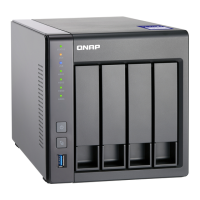
About the TS-x33........................................................................................................................................................4
Hardware Specications............................................................................................................................................4
Package Contents...................................................................................................................................................... 6
Components............................................................................................................................................................... 7
Front Panel.............................................................................................................................................................7
Rear Panel.............................................................................................................................................................. 8
Drive Numbering.................................................................................................................................................10
Safety Information...................................................................................................................................................10
Installation Requirements...................................................................................................................................... 11
Setting Up the NAS.................................................................................................................................................. 12
3. Installation and Conguration
Hardware Installation..............................................................................................................................................13
Drive Installation.................................................................................................................................................13
Connecting USB Expansion Units......................................................................................................................31
QTS Installation........................................................................................................................................................33
Installing QTS Using Qnder Pro...................................................................................................................... 34
Installing QTS Using the Cloud Key...................................................................................................................36
4. Basic Operations
Power Button........................................................................................................................................................... 40
Reset Button.............................................................................................................................................................40
LEDs...........................................................................................................................................................................41
USB One Touch Copy Button.................................................................................................................................. 43
Audio Alert................................................................................................................................................................43
5. NAS Migration
NAS Migration Requirements.................................................................................................................................45
Status and Setting Changes after NAS Migration................................................................................................45
Migrating a NAS....................................................................................................................................................... 46
Migrating NAS Data Using HBS 3...........................................................................................................................47
Preparing the Destination NAS......................................................................................................................... 47
Creating a One-Way Sync Job.............................................................................................................................48
Importing Local Users or Group Settings to the Destination NAS................................................................49
6. Troubleshooting
Hot-Swapping Failed Drives....................................................................................................................................51
Forcing Qnder Pro or myQNAPcloud to Locate the NAS.................................................................................. 51
Recovering Unintentionally Removed Healthy Drives........................................................................................ 51
Support and Other Resources................................................................................................................................52
7. Glossary
Cloud Key.................................................................................................................................................................. 53
myQNAPcloud.......................................................................................................................................................... 53
TS-x33 User Guide
1


 To Next Page
 Loading...