EasyManua.ls Logo

Qrontech QVIA QR790 - User Manual

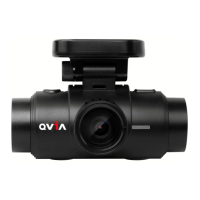
Qrontech QVIA QR790
32 pages
Print Icon
To Next Page IconTo Next Page
Loading...
ADAS feature is available only with GPS option. With the new feature 'Pseudo Speed', ADAS will still be functioning in areas where GPS signal is not acquired.
However the accuracy of ADAS information can be affected.
The manufacturer is not held responsible for any damage that may arise due to incorrect operation of ADAS.
The accuracy of ADAS information may vary due to changing road and weather conditions. Please use the information for reference purposes only.
Qvia App can be downloaded from Google Play Store, and the App Store.
OS versions required for Qvia App : Android 4.0 or higher, iOS 5.0 or higher.
Wi-Fi connection may sometimes be unstable or unavailable depending on surrounding environments and types of smart devices.
Information on Qvia App contained in this User Guide may be different from the one installed on the user's smart device depending on the application version or dash camera model.
With the Format-Free function, the memory card needs to be formatted after changing settings.
With the Format-Free function, the memory card efficiency can be affected.
With the Format-Free function, old video files can sometimes be played when using other media players (e.g. Window Media Player)
When recorded in low light conditions, video image may contain some noise.
QR790
2CH DASH CAM (Wi-Fi + ADAS)
User Guide
ver. 1
[Download QVIA Application
from Google Play Store]
[Download QVIA Application
from the App Store]
Question and Answer IconNeed help?

Do you have a question about the Qrontech QVIA QR790 and is the answer not in the manual?

Summary

Instructions For Use

Device Installation

Provides guidance on properly installing the dash cam, including placement and lens adjustment.

Memory Card Management

Details memory card usage, formatting, backup procedures, and potential issues.

ADAS Features and Calibration

Covers ADAS capabilities like LDWS, FCWS, FCMD, and the auto-calibration process.

Product Features

ADAS and Vibrator Functions

Details ADAS features (LDWS, FCWS, FCMD) and the vibrator alert system.

Installation Guide

Step-by-Step Installation Process

Guides users through the physical mounting and connection of the dash camera.

Hardwiring the Continuous Power Cable

Explains the procedure for connecting the power cable directly to the vehicle's fuse box.

Device Operations

Basic Operations and Recording Modes

Covers starting/stopping recording, different recording modes, and basic playback.

Qvia App Usage Guide

Guides on downloading, connecting, using SD Card, and app settings/information.

Product Specifications

Qrontech QVIA QR790 Specifications

General IconGeneral
GPSYes
Frame Rate30 fps
G-SensorYes
Parking ModeYes
Loop RecordingYes
Video Resolution (Front)1920x1080
StorageMicroSD
BatterySuper Capacitor
Image SensorSony Exmor
Night VisionYes
Dimensions35mm