EasyManua.ls Logo

QUAD 66 - Operating the Quad 66 Preamplifier; Control Panel Operation; Preamplifier Control Functions; Stand-By Mode

QUAD 66
16 pages
Print Icon
To Next Page IconTo Next Page
To Previous Page IconTo Previous Page
Loading...
Example: The
quickest
way from
preset
18 to
preset
2 is to step upwards
through 19 and 1
,
eg;
press
track
>
three
times.
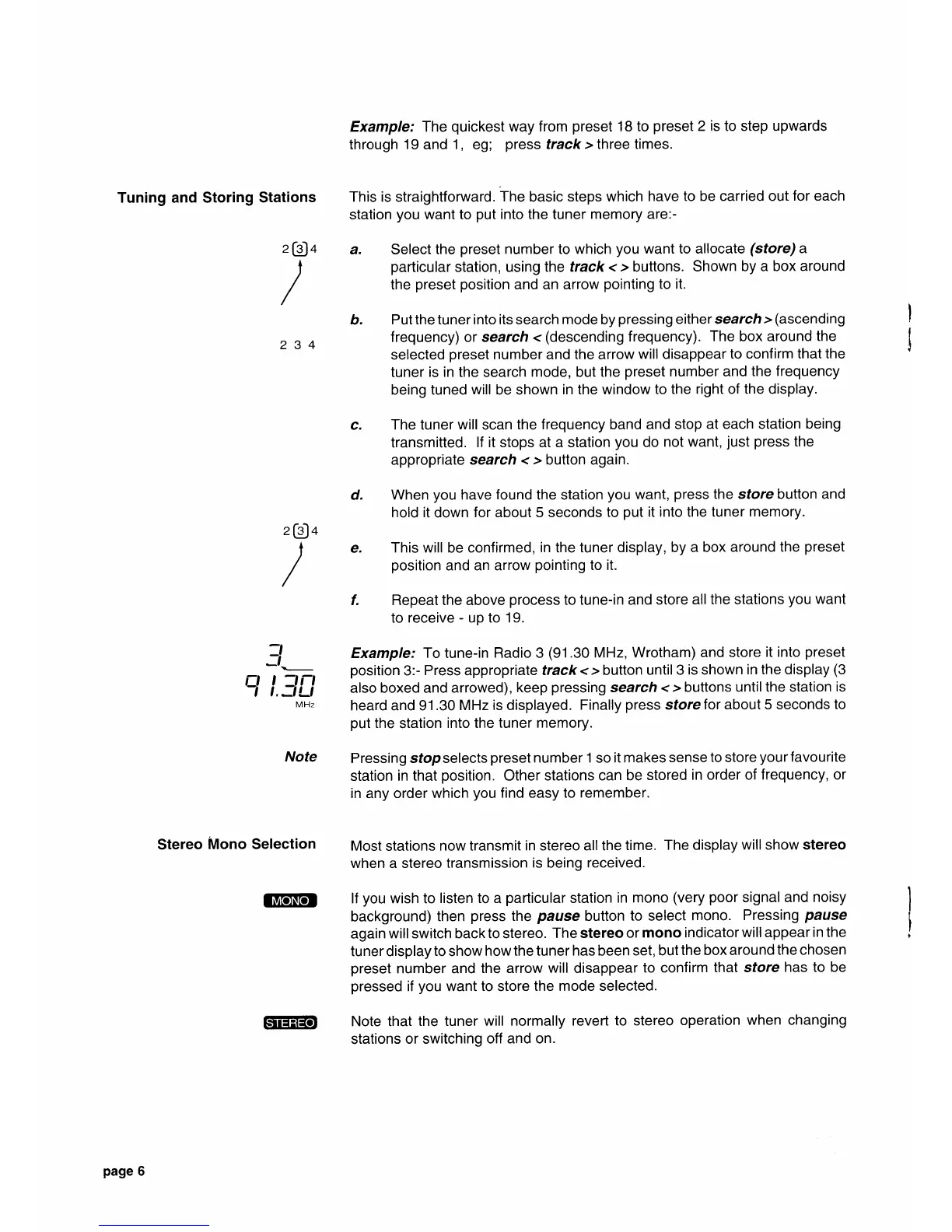
Tuning and Storing
Stations
This is straightfoMard.
The
basic
steps which have to
be carried out for each
station
you
want
to
put
into the tuner
memory are:-
4
a. Select
the
preset
number
to
which
you
want to allocate
(store)
a
particular
station, using
the track <
>
buttons.
Shown
by a box
around
the
preset position
and an arrow
pointing
to it.
b.
Put the tuner into its search
mode
by
pressing
either search
>
(ascending
2 3
4
f requency) or search
<
(descending
frequency).
The box around the
selected
preset
number and
the
arrow
will
disappear
to confirm that
the
tuner
is in the search
mode,
but
the
preset
number and
the
frequency
being tuned
will
be shown
in the window
to the
right of the display.
c.
The tuner
will
scan
the frequency band
and stop
at each station
being
transmitted.
lf it stops at a station
you
do
not want,
just
press
the
appropriate search
< >
button again.
d.
When
you
have
found
the station
you
want,
press
the sfore button and
hold it
down
for about 5 seconds
to
put
it into the tuner
memory.
4
e.
This will
be
confirmed,
in
the tuner
display, by
a box around
the
preset
position
and
an arrow
pointing
to it.
f. Repeat the above
process
to tune-in and
store
all the stations
you
want
to
receive
-
up to 19.
:l
Example,'
To
tune-in
Radio 3
(91.30
MHz, Wrotham)
and store
it into
preset
-'\-
^^sition
3:-
Press
appropriate
track
< >
button
until 3
is shown
in the display
(3
fJ
|
-'
-' Yvt
, i,:iLi
also boxed and arrowed),
keep
pressing
search
< > buttons
until the station
is
MHz
heard and 91.30
MHz is displayed.
Finally
press
store
for about 5 seconds
to
put
the
station
into the
tuner memory.
Note
Pressing sfopselects
preset
number
1
so
it makes
sense
to
store
your
favourite
station
in that
position.
Other stations
can be
stored
in order of
frequency, or
in
any
order which
you
find easy to
remember.
Stereo
Mono Selection
Most
stations
now transmit
in
stereo
all the
time.
The display
will show stereo
when a stereo
transmission
is
being
received.
lilTdNtrl
lf
you
wish to
listen to
a
particular
station
in
mono
(very
poor
signal and
noisy
background)
then
press
the
pause
button
to select
mono.
Pressing
pause
again
will switch back to stereo.
The stereo
or
mono indicator
will appear
in the
tuner display
to
show
how the tuner has been set,
but
the box around
the chosen
preset
number and
the arrow
will
disappear
to confirm
that store
has to be
pressed
if
you
want
to
store
the mode selected.
GfiEEffir
Note that
the tuner
will normally revert
to stereo
operation
when changing
stations
or switching off
and on.
z
[e]
/
z
[eJ
/
page
6

Other manuals for QUAD 66

Related product manuals