I
I
I^
I
fil/tilNfor
GfilEH5I
Signal Strength
lndication
SPECIAL
SEARCH
FEATURE
It is
possible
to store
mono
operation
with
a
particular
station
by selecting
mono
(pressing
pause)
and
then
pressing
the sfore button
for
about 5 seconds.
The
box around the
preset position
and the arrow appears
as confirmation.
lf
necessary, this
can be done
when initially tuning and storing
the
station.
To change a station
previously
stored as
mono
back
to stereo,
press
pauseto
select stereo and then the sfore button
to
store
it
again.
The
approximate
signal strength is
shown
by the bar
graph
to
the right
of
the
display.
The
more
segments lit the stronger the signal and
the
better
the tuner
performance.
ldeally
at
least
6 segments should be
lit for a
good
signal to
noise
ratio
(minimum
background noise) with
stereo
transmissions.
The
diagram
shows the effect
on the tuner
performance
depending
on the number of bar
segments
lit.
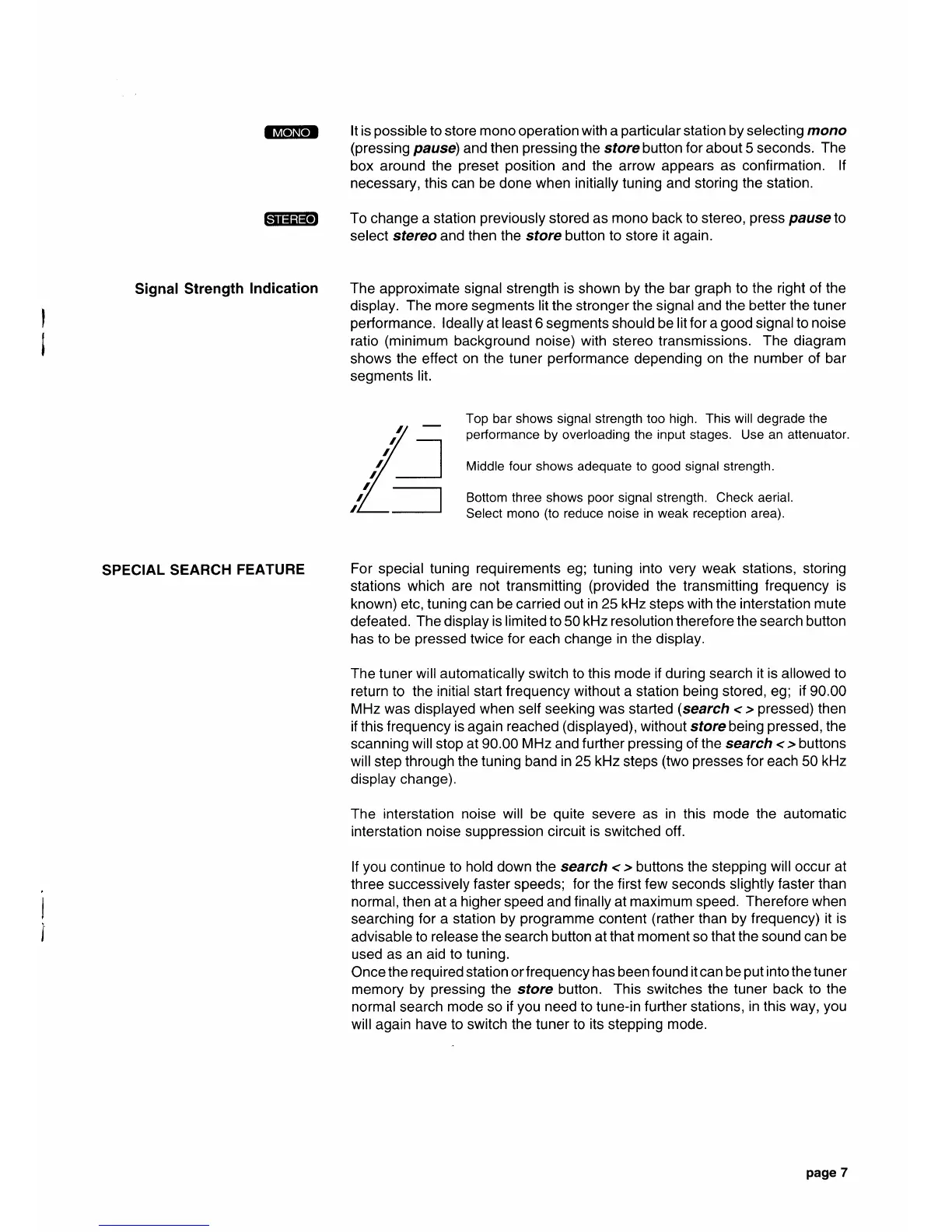
Top bar shows signal strength too high. This will degrade
the
performance
by overloading the input stages. Use an attenuator.
Middle
four
shows adequate to
good
signal strength.
Bottom three shows
poor
signal strength. Check aerial.
Select
mono
(to
reduce noise in weak reception area).
For special tuning
requirements
eg; tuning
into very weak stations, storing
stations
which are not transmitting
(provided
the transmitting
frequency is
known) etc, tuning can be carried out
in 25kHz
steps
with the interstation mute
defeated.
The display
is limited
to 50 kHz
resolution
therefore
the
search button
has to
be
pressed
twice for each change in the display.
The tuner will automatically switch to this mode if during search
it is
allowed
to
return
to
the initial start frequency without
a station
being stored, eg;
if
90.00
MHz was displayed when self seeking was started
(search
< >
pressed)
then
if
this
frequency is again reached
(displayed),
withoul store being
pressed,
the
scanning will stop at 90.00
MHz
and
f
urther
pressing
of
the search <
>
buttons
will step through
the tuning
band
in 25 kHz
steps
(two
presses
for
each 50
kHz
display change).
The
interstation noise will
be
quite
severe
as in this mode the automatic
interstation
noise
suppression circuit
is
switched
off.
lf
you
continue
to hold down the search <
>
buttons the stepping
will occur at
three
successively
faster
speeds;
for
the
first few
seconds slightly
faster than
normal, then at a
higher
speed and
finally
at
maximum speed.
Therefore when
searching
for a station by
programme
content
(rather
than by
frequency) it is
advisable to
release the
search
button at that moment so that the sound can be
used as an aid
to tuning.
Once
the
required
station
orf requency has been found it can be
put
into the tuner
memory by
pressing
the store button.
This
switches
the tuner back to the
normal
search
mode so if
you
need to tune-in further stations,
in this
way,
you
will
again
have to switch the tuner to
its
stepping
mode.
page
7



 To Next Page