11
2
Horn
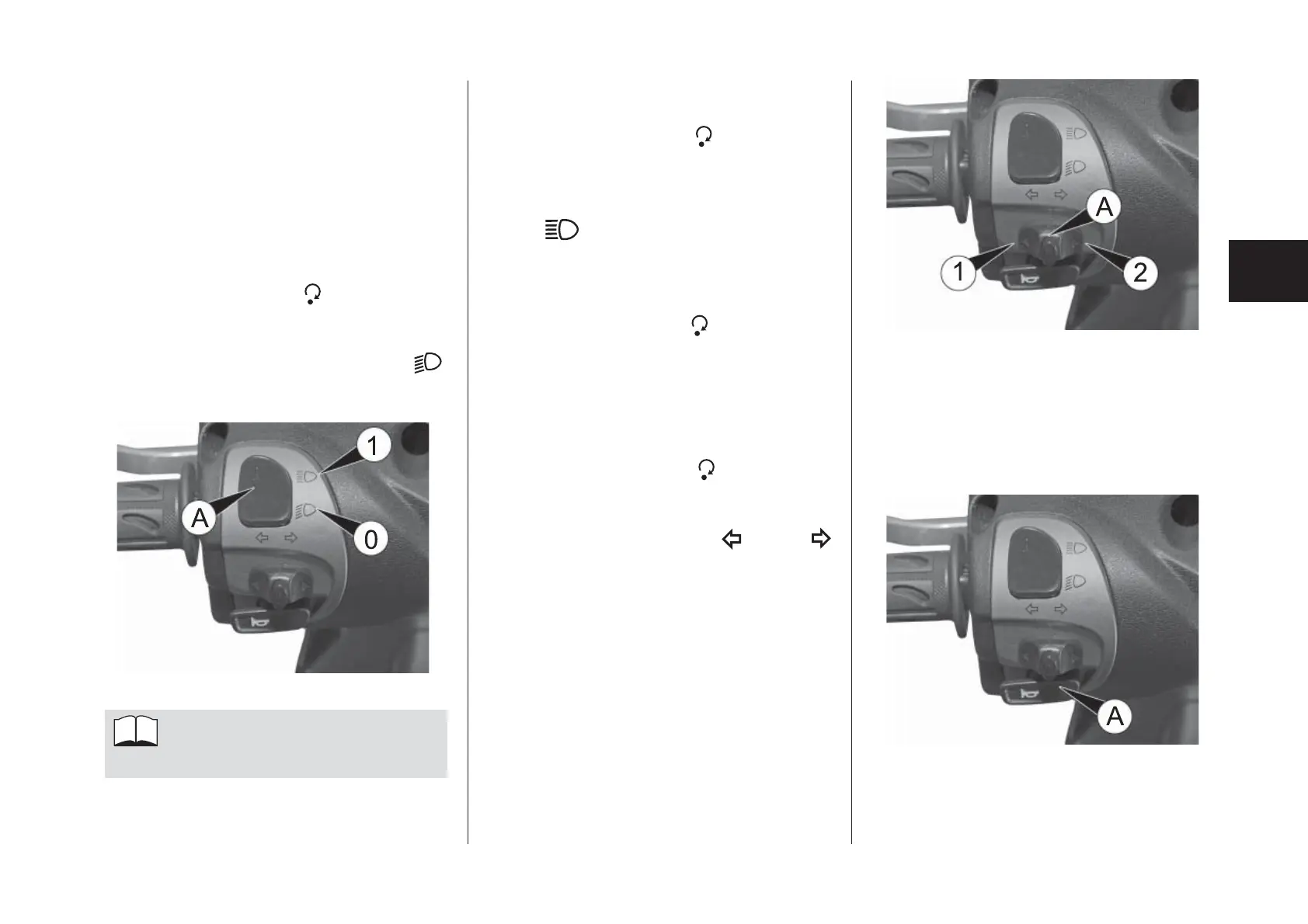
To sound the horn, press and hold down
button A fi g. 4.
Full-beam headlights
With the key in position
, turn selector
A fi g. 2 to position 1 in order to turn on
the full beam headlights; this is indicated
by the following light on the instrument
panel:
.
Flasher
With the key in position
, you can fl ash
the lights by pressing selector A fi g. 2
(momentary position).
Turn signals
With the key in position
, place selec-
tor A fi g. 3 in position 1 or position 2 to
operate the right or left turn signals (mo-
mentary positions). The left
or right
turn signal indicator light will light up on
the instrument panel depending on the
selector position.
To deactivate the turn signals, press but-
ton A fi g. 3 on the selector.
HANDLEBAR CONTROLS, LEFT-
HAND SIDE
The controls on the left-hand side of the
handlebar include: full beam headlights,
fl asher, turn signals, horn.
Dipped headlights
With the key in position
and selector A
fi g. 2 in position 0, the dipped headlights
are turned on; this is indicated by the fol-
lowing light on the instrument panel:
.
The dipped headlights al-
ways stay on.
fi g. 3
fi g. 4
HANDLEBAR CONTROLS, LEFT-
HAND SIDE
fi g. 2



 To Next Page