Need help?
Do you have a question about the QualGear QG-TM-092-BLK and is the answer not in the manual?
Specifies the tilt, swivel, and leveling ranges for TV positioning.
Recommends regular checks for security and safety of the wall mount.
Use a stud finder and level to locate and mark stud centerlines and edges for mounting.
Drill pilot holes and secure the wall mount using lag bolts and washers.
Mark and drill holes using a template and masonry bit for concrete anchors.
Insert concrete anchors, then lag bolts and washers to fix the wall mount.
Attach adapter brackets to a flat-backed TV using appropriate screws and washers.
Attach adapter brackets to a curved/recessed TV using suitable screws, washers, and spacers.
Hang the TV onto the wall mount, close the latches, and secure them with screws.
Attach cable clips and route TV cables through them, allowing slack for movement.
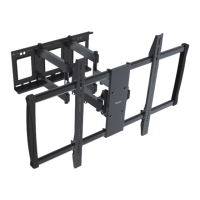
This document describes the QualGear QG-TM-092-BLK Heavy Duty Full Motion TV Wall Mount, an accessory designed to inspire and enhance your viewing experience.
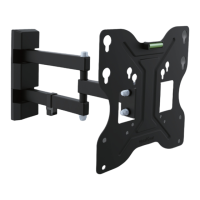
The QualGear QG-TM-092-BLK is a robust, full-motion TV wall mount designed to securely hold flat panel and curved televisions. Its primary function is to provide a flexible and adjustable mounting solution, allowing users to optimize their viewing angle and position. The mount enables a wide range of motion, including tilting, swiveling, and leveling, to accommodate various room layouts and personal preferences. It is engineered for heavy-duty use, ensuring stability and safety for larger televisions. The installation process is detailed for both wooden stud walls and concrete/brick walls, providing clear instructions and necessary hardware for each scenario.
The QG-TM-092-BLK offers extensive adjustability to achieve the perfect viewing angle:
Tilting: The mount allows for a tilt range of -15° to +5°. This feature is crucial for reducing glare from lights or windows and for optimizing the vertical viewing angle, especially when the TV is mounted higher or lower than eye level. Adjustments can be made by hand, but it's important to ensure the tightness of the screws at the head of the mount using the provided Allen key. If screws are too tight or too loose, it can impede smooth adjustment. For lighter TVs, screws may need to be slightly loosened, while for heavier TVs, they may need to be tightened to maintain position.
Swiveling: The mount provides a swivel range of -45° to +45° at its pivot points. This full-motion capability allows the TV to be turned left or right, making it ideal for rooms with multiple viewing areas or for adjusting the screen to face different parts of a room. This flexibility ensures that viewers can enjoy an optimal picture from almost any position.
Leveling: Fine-tuning the horizontal alignment of the TV is possible with a leveling adjustment of -3° to +3°. This ensures that the television is perfectly straight, correcting any minor misalignments that might occur during installation.
Adapter Brackets: The mount includes adapter brackets that can be attached to the back of the TV. The manual provides clear guidance on selecting the appropriate screws, washers, and spacers for different TV types, including flat back panels and curved or recessed back panels. This adaptability ensures compatibility with a wide range of television models.
Cable Management: Integrated cable clips are provided to help organize and conceal cables, contributing to a clean and tidy appearance. Users can attach these clips to the mount's arm using screws and then run their cables through them. It is advised to leave some slack in the cables to allow for full arm movement without strain.
Installation Versatility: The mount is designed for installation on both wooden stud walls and concrete/brick walls. Detailed, step-by-step instructions are provided for each wall type, including how to locate studs, drill pilot holes, insert anchors, and secure the mount. Specific hardware is included for each wall type, such as lag bolts for wooden studs and concrete anchors for concrete walls.
Safety Features: The manual emphasizes several safety precautions, such as not exceeding the maximum rated weight, using an assistant for heavy lifting, and ensuring that mounting screws are anchored into the center of wooden studs. It also warns against over-tightening screws, which can damage components and reduce holding power.
To ensure the long-term security and functionality of the QualGear QG-TM-092-BLK, regular maintenance is recommended:
Regular Security Checks: Users should periodically check that the wall mount is secure and safe to use. This involves visually inspecting the mount and its connections to the wall and the TV for any signs of loosening, wear, or damage.
Tightness of Screws: As part of regular maintenance, it is advisable to check the tightness of all screws, particularly those connecting the mount to the wall and the TV to the adapter brackets. While tightening, it's crucial to follow the "do NOT over tighten" warning to prevent damage to the components.
Cleaning: The mount can be wiped clean with a soft, dry cloth to remove dust and maintain its appearance. Avoid using harsh chemicals or abrasive cleaners that could damage the finish.
Professional Assistance: If any questions arise regarding the instructions or warnings, or if there are concerns about the mount's security or functionality, users are encouraged to contact their local distributor or QualGear technical support via email. This ensures that any issues are addressed by qualified professionals, maintaining the safety and integrity of the installation.
Warranty: The product comes with a 1-year limited warranty, covering manufacturing defects. Users should refer to the warranty information provided by QualGear for specific terms and conditions.
By adhering to the usage guidelines and maintenance recommendations, users can ensure a safe, stable, and aesthetically pleasing installation of their television with the QualGear QG-TM-092-BLK Heavy Duty Full Motion TV Wall Mount.
 General
| Product Name | QualGear QG-TM-092-BLK |
|---|---|
| Category | Racks & Stands |
| Product Type | TV Stand |
| Color | Black |
| VESA Compatible | Yes |
| VESA Compatibility | 200x200 to 600x400 |
| Number of Shelves | 2 |
| Material | Steel |
| Adjustment | Height |

 To Next Page