Quatech Freedom USB Adapter User’s Manual Making external connections
Making external connections
RS-232 serial connections
The Freedom USB-100 RS-232 adapters all come with standard male
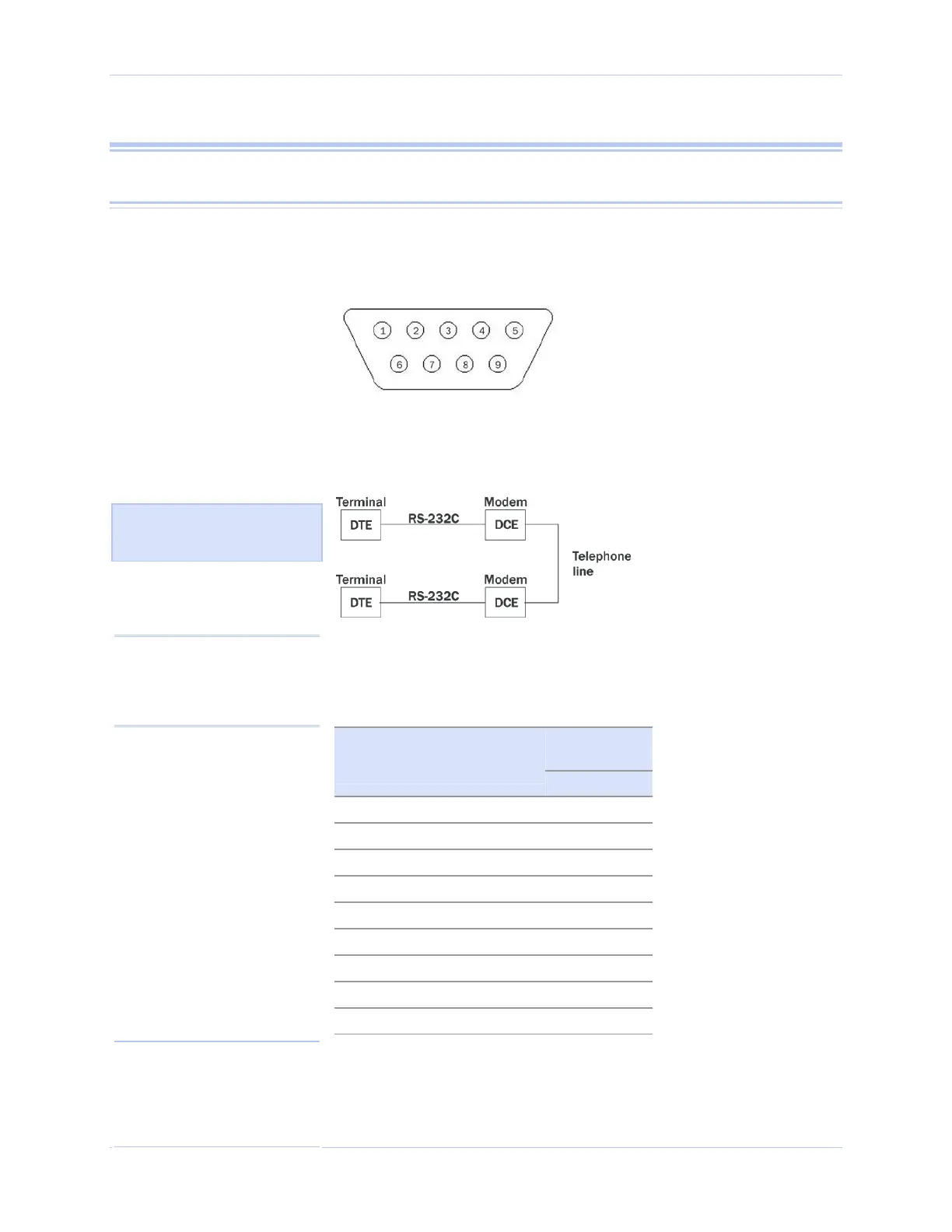
DB-9 connectors. The figure below shows the pin designations.
Figure 37 - RS-232 DB-9 pin designations
RS-232-C devices are classified by their function as either Data
Terminal Equipment (DTE) or Data Communication Equipment
(DCE).
Figure 38 - Use of DTEs and DCEs in a communication link
Figure 38 illustrates role of
TE and DCE devices in a
communications link.
Freedom USB-100 adapters are DTE devices that conect to peripheral
equipment through a male DB-9 connector. The following table lists
the serial port connector definitions.
Table 3 - RS-232 DB-9 signal definitions
DTE
connection
RS-232 signal
description
DB-9
Data Carrier Detect (DCD) 1
Receive Data (RxD) 2
Transmit Data (TxD) 3
Data Terminal Ready (DTR) 4
Signal Ground 5
Data Set Ready (DSR) 6
Request To Send (RTS) 7
Clear To Send (CTS) 8
Ring Indicate (RI) 9
DTE- and DCE-type devices have complementary pinouts that allow
terminals and modems to connect directly using a one-to-one cable as
shown in Figure 39.
Rev 2.02 (2/24/2004) Page 29
Note: In many applications,
DCEs are unnecessary. This
allows you to use a null modem
cable (modem eliminator cable)
to directly connect two DTE-
type devices.
Note: A DTE devices is the
communication source. A DCE
device provides a communication
channel between two DTE-type
devices.



 To Next Page