Quatech Freedom USB Adapter User’s Manual Making external connections
Testing RS-422/485 ports
Making a loopback
Step Procedure Description
Step 1 Turn off the computer.
Step 2 Connect the following signals on serial
port 1. Repeat for each serial port.
AuxOut+ (pin 1) to AuxIn+ (pin 5)
TxD+ (pin 2) to RxD+ (pin 4)
TxD– (pin 7) and RxD– (pin 8)
AuxOut– (pin 6) to AuxIn– (pin 9)
Repeat for each serial port.
Use any kind of conductive wire, even a
paper clip.
Step 3 Turn on the computer. You are now ready to test each port
individually.
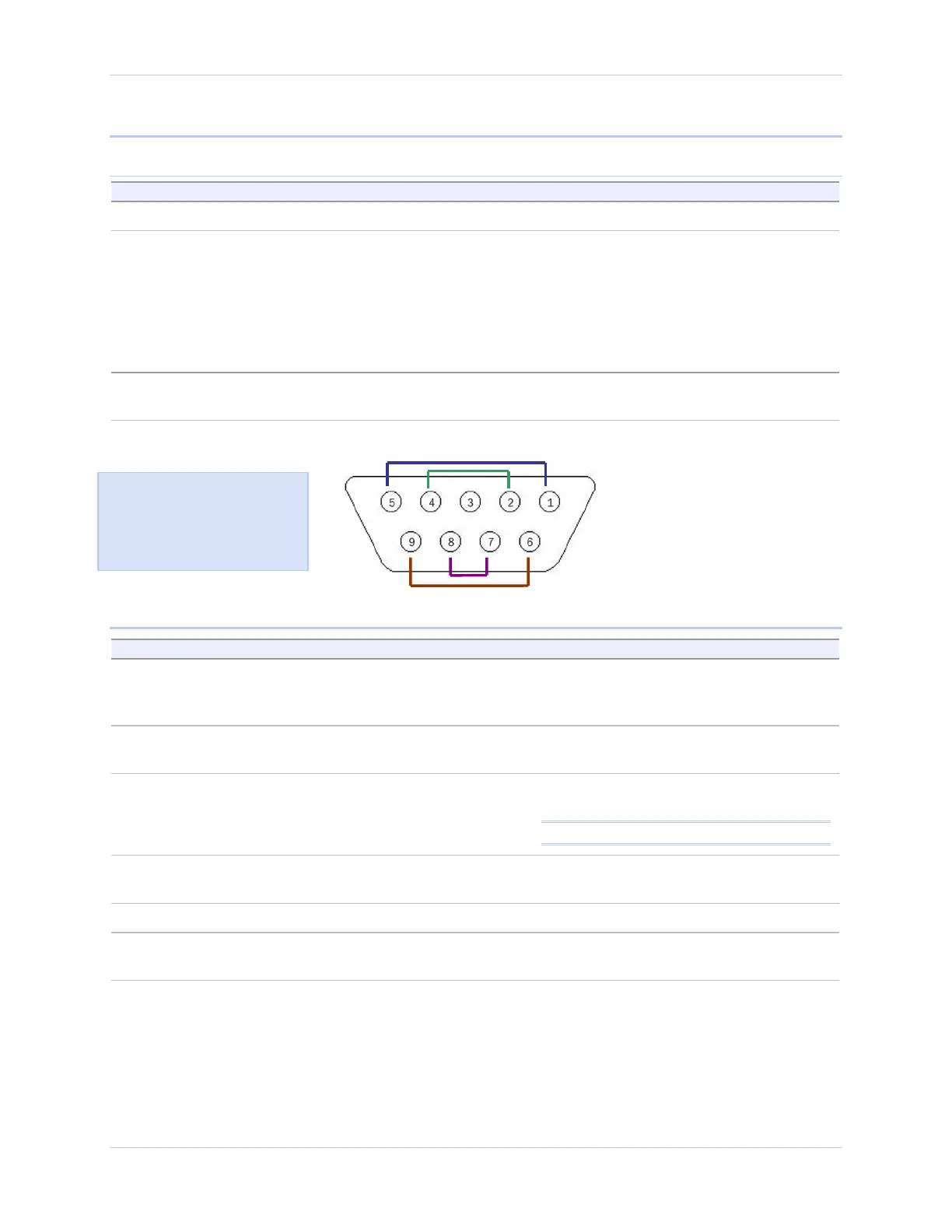
Figure 43 - RS-422/485 DB-9 connector
Install wire jumpers to connect the
following signals:
AuxOut+ (pin 1) to AuxIn+ (pin 5)
TxD+ (pin 2) to RxD+ (pin 4)
TxD– (pin 7) to RxD– (pin 8)
AuxOut– (pin 6) to AuxIn– (pin 9)
Figure 43 illustrates the
jumper location for a loopback
on the RS-422/485 DB-9
connector for Freedom USB-
200/300s.
Running Hyperterminal
Step Procedure Description
Step 1 Launch HyperTerminal. In Windows, select Programs/
Accessories/ Communications/
HyperTerminal.
Step 2 Create a new session. When prompted, give the session any
name you wish.
Step 3 Select the COM # associated with port 1
from the drop down list.
You are now set up to test the first serial
port.
Note: Leave all settings at default.
Step 4 With the session open, type any text. If the text you type is echoed on the
screen, the port is functioning properly.
Step 5 Close the session.
Step 6 Repeat steps 2 through 5 for each serial
port.
If the text you type is echoed on the
screen, the port is functioning properly.
Rev 2.02 (2/24/2004) Page 33



 To Next Page