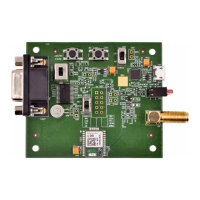
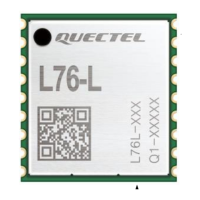
The Quectel L76 EVB (Evaluation Board) is a development kit designed for GNSS (Global Navigation Satellite System) modules, specifically the L76 series. It serves as a comprehensive platform for evaluating and testing the L76 GNSS module, providing various interfaces and features to facilitate development and integration into user applications. The board is designed to offer timely and comprehensive service to customers, with support available from Quectel's headquarters and local offices.
Function Description
The L76 EVB's primary function is to enable the evaluation and testing of the L76 GNSS module. It provides the necessary hardware interfaces and a demo tool (PowerGPS) to interact with the module, receive GNSS data, and analyze its performance. The board supports both GPS and GLONASS satellite systems, allowing for robust positioning and navigation applications.
Key functional aspects include:
- GNSS Data Reception: The EVB allows the L76 module to receive satellite signals and output NMEA (National Marine Electronics Association) messages, which contain essential navigation data such as latitude, longitude, altitude, time, and satellite information.
- Communication Interfaces: It offers multiple ways to communicate with the L76 module, including Micro-USB and UART (Universal Asynchronous Receiver/Transmitter) interfaces. These interfaces are crucial for configuring the module, sending commands, and receiving data.
- Power Supply: The main power for the EVB is supplied via the Micro-USB interface, simplifying power management during development.
- Antenna Support: The board includes an antenna interface that supports both active and passive GNSS antennas. By default, an LNA (Low Noise Amplifier) is installed on the EVB, but it can be reconfigured for testing without the LNA.
- Module Control: Various switches and buttons are provided on the EVB for controlling the L76 module's power, reset, and standby modes, offering direct hardware control during testing.
- Status Indication: LED indicators are integrated to display the operating status of the module, such as successful power-on, message output, and fix status.
- Performance Testing: The EVB, in conjunction with the PowerGPS tool, facilitates detailed performance testing, particularly for TTFF (Time to First Fix) under different start conditions (hot, warm, cold, full).
Important Technical Specifications
While specific electrical characteristics of the L76 module itself are detailed in separate documents (L76_Hardware_Design, L76_Protocol_Specification, L76_Reference_Design), the EVB provides the necessary infrastructure for its operation.
Key technical aspects of the EVB include:
- Communication Ports:
- Micro-USB: Serves as the main power supply and a data communication interface.
- UART Port (DB9 connector): Provides an alternative data communication interface, with specific pins for RXD (Receive Data), TXD (Transmit Data), and GND (Ground).
- Antenna Interface: A dedicated connector for connecting GNSS antennas. The board's LNA layout allows for flexibility in antenna configuration.
- Operating Voltage: The main power is supplied via Micro-USB.
- Baud Rate: The L76 module supports a default baud rate of 9600bps for data communication.
- Test Points (J106): A set of test points are available for advanced debugging and monitoring, including signals like 32K/DRIN, AADET_N (Active antenna open circuit detection), 1PPS (1 pulse per second), STANDBY, RESET, TXD1, and RXD1.
- Switches and Buttons:
- S1 (POWER): Controls the power supply via Micro-USB.
- S2 (Serial port alternation switch): Toggles between Micro-USB and UART for data communication.
- S3 (STANDBY): Controls the module's entry and exit from standby mode.
- K1 (FORCE_ON button): Wakes up the module from backup mode.
- K2 (RESET button): Resets the module.
- LED Indicators:
- L1 (TXD1): Flashes upon successful power-on and message output (Micro-USB or UART1). Extinct indicates failure to power on.
- L2 (1PPS): Flashes at 1Hz upon successful fix. Extinct indicates no fix.
Usage Features
The L76 EVB is designed for ease of use in a development environment.
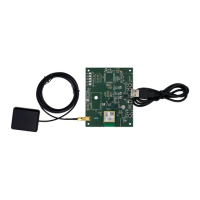
- Kit Contents: The EVB kit typically includes the L76 EVB board, a USB cable for power and data, and a 3.3V GNSS active antenna.
- Driver Installation: For Micro-USB data communication, a specific driver (CP210x) needs to be installed. Quectel provides these drivers on their FTP server, and they can also be downloaded from the internet.
- PowerGPS Demo Tool: The PowerGPS tool (version V2.2.0 or later) is a crucial software component for interacting with the EVB. It provides a graphical user interface to:
- View GNSS Status: Display CNR (Carrier-to-Noise Ratio) messages, time, position, speed, and precision.
- Sky View: Visualize satellite positions and tracking status.
- NMEA Text: Show raw NMEA data output from the module.
- Send MTK Commands: Allow users to send specific MTK commands to the L76 module for configuration and control.
- Automatic TTFF Testing: Configure and execute TTFF tests under various start conditions (hot, warm, cold, full) and with different numbers of test runs. This feature includes setting reference points, defining TTFF time-out values, and viewing test results and logs.
- Communication Setup: Users can select the appropriate COM port and baud rate (default 9600bps) in PowerGPS to establish a connection with the EVB. The S2 switch on the board determines whether Micro-USB or UART is used for communication.
- Antenna Configuration: The EVB allows for the use of either active or passive antennas. The LNA can be bypassed by moving specific components (C109 to R112 and R118 to R105) if testing without the LNA is desired.
- Standby Mode: The S3 switch allows developers to test the module's power-saving standby mode. The K1 button can be used to wake the module from backup mode.
Maintenance Features
The L76 EVB is primarily a development tool, and its maintenance focuses on ensuring proper functionality and troubleshooting.
- Documentation: Comprehensive documentation, including this user guide, hardware design, protocol specifications, and reference designs, is provided by Quectel to assist with understanding and maintaining the EVB and L76 module.
- Technical Support: Quectel offers technical support through their headquarters and local offices, providing assistance for any issues encountered during development or testing. This includes support for documentation errors and general technical queries.
- Driver Updates: Keeping the Micro-USB drivers updated is important for stable communication. Users can access the latest drivers from Quectel's FTP server or relevant online sources.
- Software Updates: The PowerGPS tool may receive updates, and using the latest version ensures access to new features and bug fixes.
- Troubleshooting with LEDs: The onboard LEDs (L1 and L2) provide immediate visual feedback on the module's operational status, aiding in initial troubleshooting steps for power-on and GNSS fix issues.
- Test Points: The J106 test points offer advanced diagnostic capabilities, allowing engineers to probe specific signals on the board for detailed troubleshooting and performance analysis.
- Component Reconfiguration: The ability to reconfigure the LNA (by moving components) demonstrates a level of maintainability for specific testing scenarios, allowing developers to adapt the board to different antenna setups.
- Log Files: The PowerGPS tool stores testing results and logs in the installation path, which can be reviewed for post-analysis and debugging.
Overall, the Quectel L76 EVB is a well-equipped and user-friendly platform that provides developers with the necessary tools and interfaces to efficiently evaluate, test, and integrate the L76 GNSS module into various applications, supported by comprehensive documentation and technical assistance.

 Need help?
 General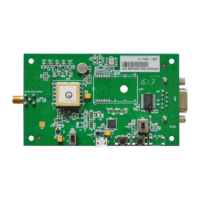


 To Next Page
