Page 27
Index of plugs
If you have problems identifying your serial plug, you will nd a list of all relevant plugs for your vehicle here.
Your plug is not listed? Please contact our Customer Service staff. Our contact information can be found on page 28.
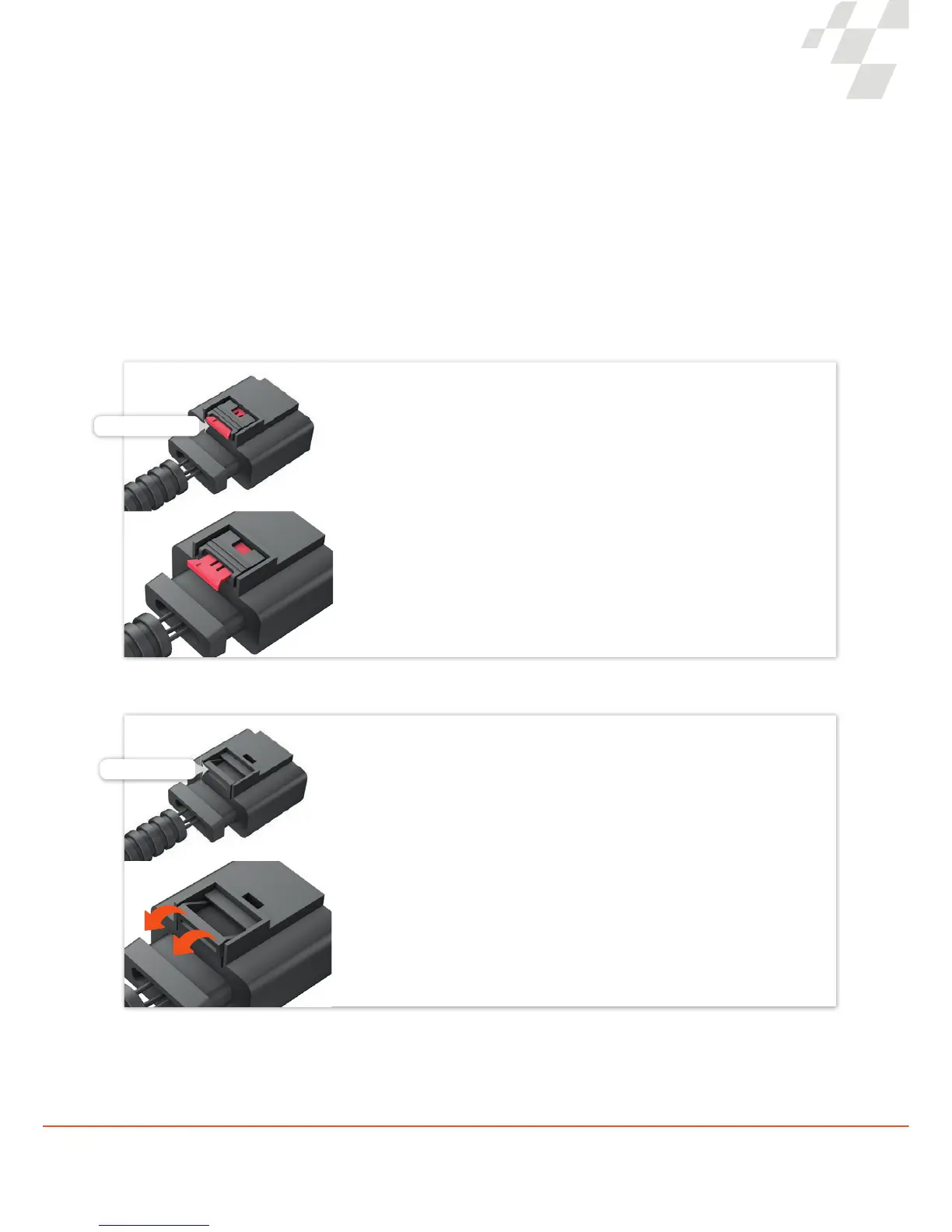
Locking clip
The plugs are locked to the connection sockets by means of a locking clip.
Press the locking clip and pull the plug.
Because the plug is often connected very tightly to the socket, it is helpful,
when pressing the locking clip, to rst push the plug towards the connection
socket before subsequently pulling on it.
In addition, temperature uctuations in the engine bay can result in a type
of “vacuum effect” between the plug and the socket. This can be solved by
lightly “wiggling” the plug.
Locking clip
In the rst step, the red locking clip is pulled out.
Press the red locking clip, which functions as a lever for loosening the plug
and pulling it out.
Because the plug is often connected very tightly to the socket, it is helpful,
when pressing the locking clip, to rst push the plug towards the connection
socket before subsequently pulling on it.
In addition, temperature uctuations in the engine bay can result in a type
of “vacuum effect” between the plug and the socket. This can be solved by
lightly “wiggling” the plug.
Plug variant I
Plug variant II


 To Next Page