23
remember that, during adjustment, the antenna should be set to its working position, e.g. at
the initial point of a suggested survey line. It is from this moment that Georadar adjustment
is started. The cursor is controlled using keys
or
. Menu options are selected using keys
Enter, Space or
.
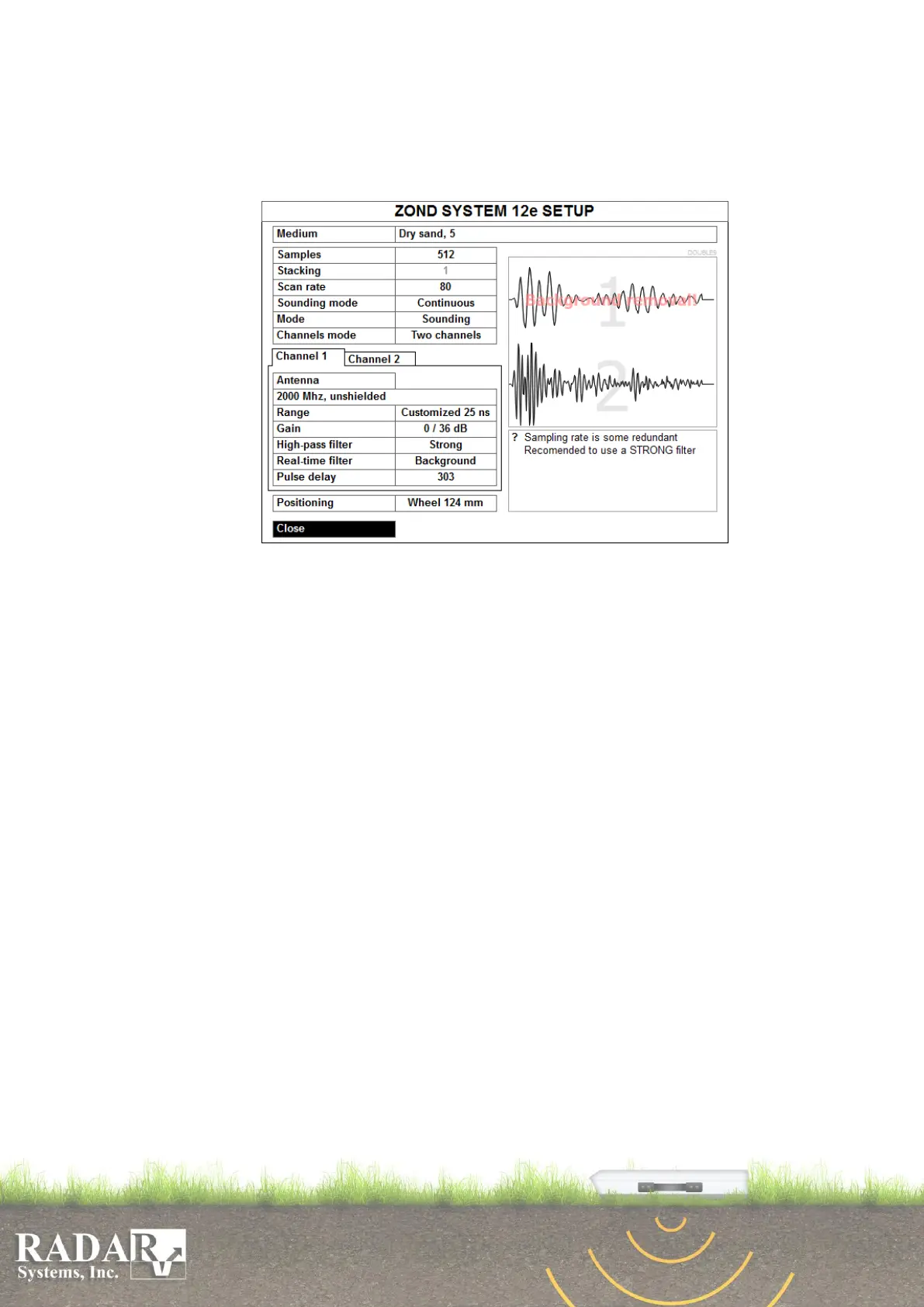
Fig. 8.1b. Double channel and Advanced georadars adjustment dialog box.
Medium – setting the medium that you intend to sound. Choose the closest medium
out of the provided list. Permittivity used for depth calculations is shown to the right
of the name of a respective medium.
Samples – number of samples in a trace. Using Zond-12e Advanced it is possible to
set 1024, 512, 256 or 128 samples. In all other Zond-12 models this parameter equal
512 and may not be changed. If you reduce samples rate traces rate is increasing
proportionally. But user has to be very attentive to the information under signal
window to avoid situation when number of samples is not enough for correct signal
digitizing.
Stacking – setting a number of traces which will be added together in the course of
sounding. Stacking contributes to suppression of noise and interference and to increase
of the depth rating. However, it should be remembered that stacking decreases the
trace arrival velocity times the number of stacking, and it may necessitate the antenna
moving velocity to be decreased with the objective of information loss avoidance. If
the parameter is set to 1, no staking is performed.
Scan rate – traces per second. The value is adjusting automatically when samples and
stacking are set, In Zond-12e Advanced the maximum value is 320 at 128 samples and
stacking =1. In all other Zond-12e models the maximum value is 80 for Dual Channel
version and 56 for Single Channel.
Sounding mode – here, two options are available, namely Continuous or Stepped.
The first mode is the most frequently used one suggesting that, once you start
sounding, Georadar will perform continuous sounding until you terminate the process
by pressing key Esc or button Stop. Stepped profiling is used in certain cases where it
is impossible to draw the antenna continuously along the route or it is necessary to
achieve the deepest sounding possible. But this will require more time for a sounding


 To Next Page