60
Appendix C. PrismClicker
Tool overview
PrismClicker is a small tool which allows the Prism2 software (version 2.60.02
and above) to simulate mouse clicks for third party software. It is designed to simulate
different mouse clicks on remote computer by pressing “Start”, “Stop”, “Pause”, “Resume”
and “Mark” in Prism2 acquisition mode.
PrismClicker is able to work via Serial Communication (by Bluetooth for
example) or via TCP/IP communication protocol.
Starting the tool
It is strongly recommended to start PrismClicker as an Administrator (right click
on PrismClicker.exe file and chose “Run as administrator”). Application starts minimized
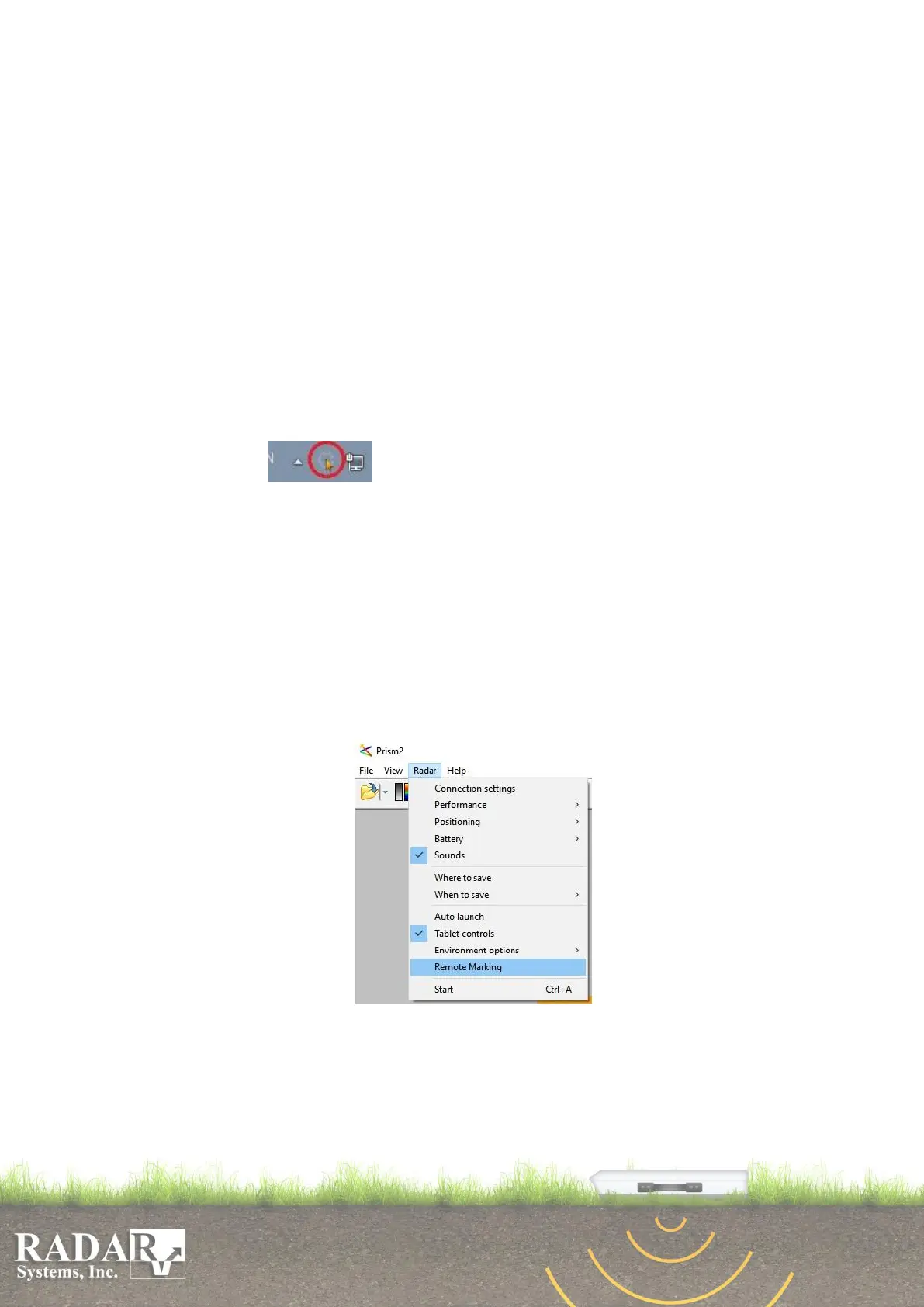
creating tray icon . User needs to configure it first, to be able to use it. There
are two different configurations, the first one is the Connection Setup and the second one is
the Click Setup. User has to run the Prism2 software and setup the Prism2 to work with
PrismClicker before starting the Connection Setup.
Configuring the Prism2
Prism2 can work with both Serial and TCP/IP communications at the same time.
User has to enable and configure any of those protocols that are needed for connection
with the PrismClicker application.
Go to “Remote Marking” item of “Radar” menu
Fig.C1. Prism2 Remote Marking menu
Enable and configure connection you are going to use in the Remote Marking
dialog window:


 To Next Page