56
Appendix A. Changing the Control Unit IP address
1. Turn ON Zond-12e Control Unit, computer configured according to p.8 of
present User’s Manual, start up the Prism2 software.
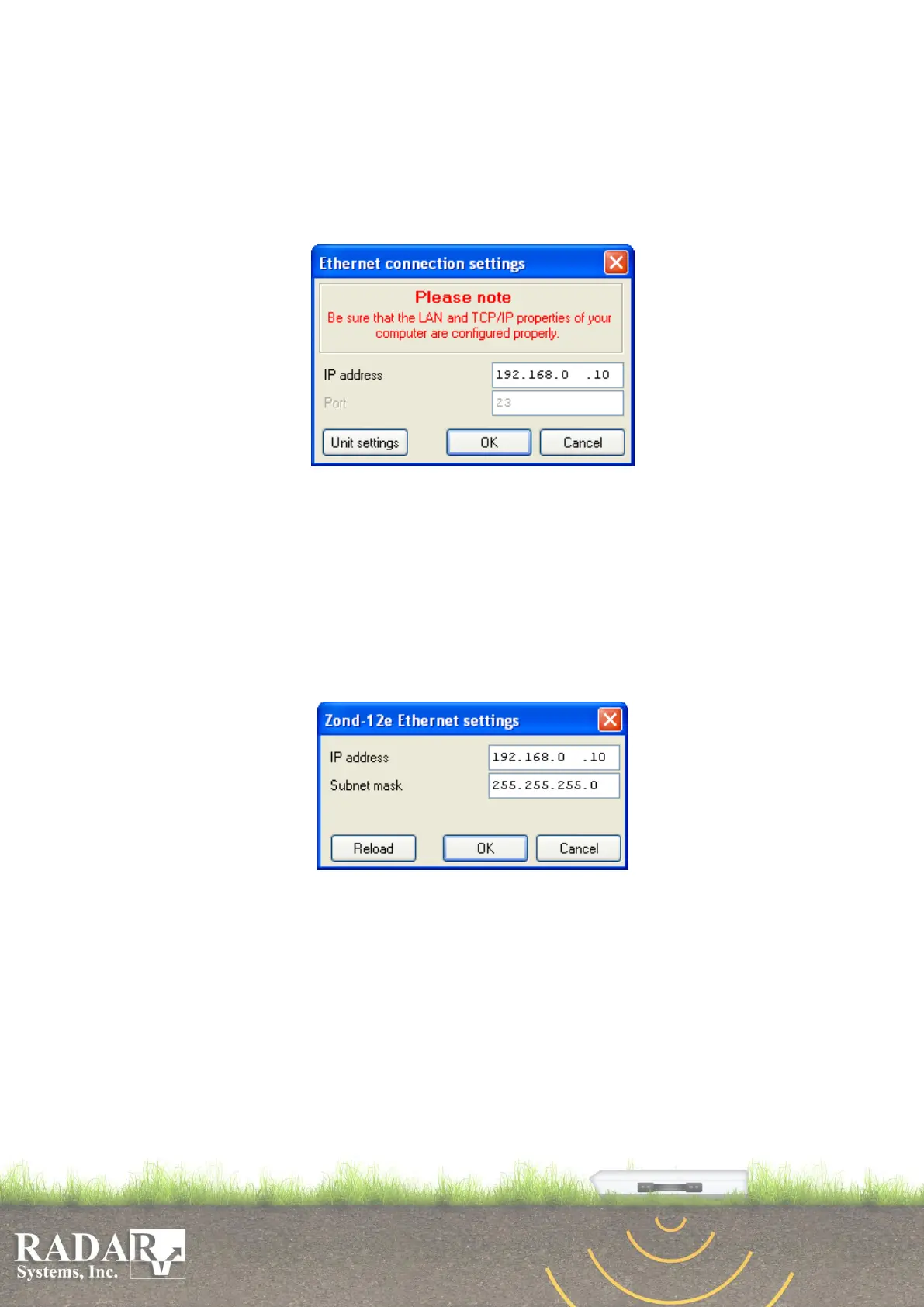
2. Enter Radar / Connection settings Menu option. The Ethernet connection
settings dialog box appears.
Fig. A1. Ethernet connection settings dialog box.
3. In IP address section will be Control Unit present IP address of. As default it is
192.168.0.10
4. Click the Unit settings button. The Zond-12e Ethernet settings dialog box
appears.
Note: Please use the Connection troubleshooter if the error message
appears.
Fig. A2. Zond-12e connection settings dialog box.
5. Enter the new desirable Control Unit IP address in the IP address section.
6. Enter the new desirable Control Unit subnet mask in the Subnet mask section.
7. Press the OK button.
Note: Please use the Connection troubleshooter if the error message
appears.
8. Press the OK button of Ethernet connection setting dialog box.


 To Next Page