40
11. Radiolocation Sounding Data File Processing
Processing task is to extract useful signals and suppress noise, interference and non-
informative signals. Therefore, before processing, you need to define parameters that are
different for the signals and interference. This may be amplitude, trajectory or spectral
characteristics. The software contains all and any tools required for analysis of the said
characteristics, such as Trace inspection and Average spectrum.
If your analysis shows that the signal and interference have path differences, use path
processing procedures, i.e. Horizontal LP-filter, Horizontal HP-filter, Migration,
Flattening, Topography, X-interpolation, Reverse or Background removal. In case of
spectral differences, use filters: Ormsby bandpass or Notch filter. In case of amplitude
differences, Amplitude correction, Envelope will be helpful. To draw up in depths scale
profiles you will need Moveout correction and Time-depth conversion.
All available processing procedures are described below. The processing result is
always displayed in the same window where initial file (before processing) has been
displayed in "Prism2" Software. To save processed file use File/Save menu option. If you
unsatisfied with processing results or if you would like to change procedure parameters,
you can undo processing results selecting Processing / Undo processing or by pressing
button . If you would like to redo data processing, select option Processing/redo
processing or press button .
Each processing could be applied to the active profile or to all opened profiles by
pressing on buttons Apply or Apply To All correspondingly.
Sometimes it is necessary to consequently apply several processing procedures to
achieve the desired result. You can use Processing flow for this purpose, what could be
used for multiple processing. Processing flow is described below, at the end of this section.
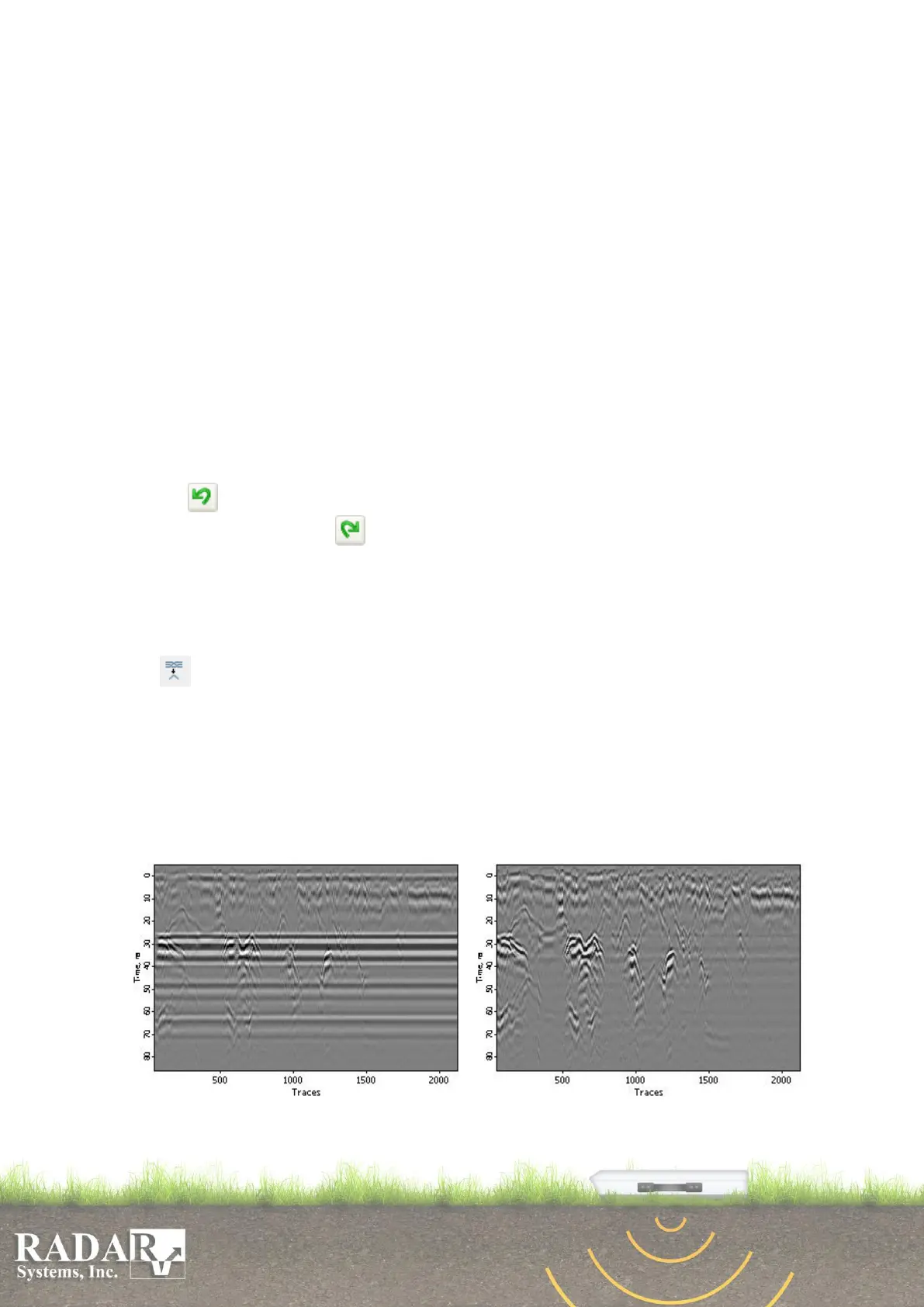
Background removal – the term speaks for itself. Under some sounding
conditions, a signal happens to have “background” which may be seen on the profile as
horizontal lines that do not change their intensity and time position and may mask the
real reflected signals. In these cases, this procedure can ensure efficient background
suppression. The algorithm is as follows: Summation and normalization are carried out
to calculate the profile averaged trace which is then subtracted from each trace of the
original profile. To avoid direct sounding signal removal, you can specify window
height wherein background subtraction will be made.
Fig.11.1. Example of path procedure effect. Left - original profile; right - result.


 To Next Page