EasyManua.ls Logo

Radio Shack 20-136 - User Manual

Radio Shack 20-136
28 pages
Print Icon
To Next Page IconTo Next Page
Loading...
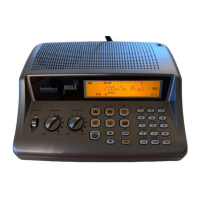
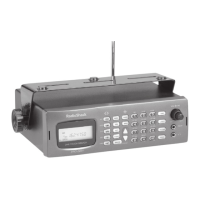
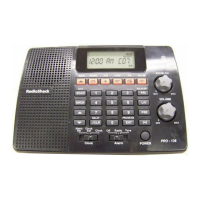
Thank you for purchasing your 200 Channel Desktop Radio Scanner from
RadioShack. Please read this user’s guide before installing, setting up and
using your new scanner.
20-136
PRO-136
www.radioshack.com
Scanner
AC adapter
Antenna
User’s guide
Preprogrammed frequency list
Quick start guide
Desktop Radio Scanner
What’s Included

Questions and Answers

  • S
    Sandra JeffersonAug 1, 2025
    What to do if my Radio Shack 20-136 is on but not scanning?
    • D
      Dana GoldenAug 1, 2025
      If your Radio Shack Scanner is on but not scanning, it might be due to the SQUELCH not being adjusted correctly. Try adjusting the SQUELCH. Also, ensure you have frequencies stored in more than one channel, as the scanner may not scan if only one or no channels are stored.
  • D
    david59Aug 6, 2025
    Why is my Radio Shack 20-136 Scanner reception poor?
    • M
      Michael BellAug 6, 2025
      Poor or no reception on your Radio Shack Scanner can be due to a loose antenna. Ensure an antenna is securely connected to the scanner. Alternatively, the scanner might be receiving interference or electrical noise. Try moving the scanner or its antenna away from the source of interference and change the height or angle of the antenna.
  • T
    Travis CastroAug 12, 2025
    How to fix 'Error' on Radio Shack 20-136?
    • H
      Heather WileyAug 12, 2025
      If an 'Error' appears on your Radio Shack Scanner, it indicates a programming error. Re-enter the frequency correctly, making sure to include the decimal point.
  • M
    Mary McdanielAug 19, 2025
    What to do if the light is flashing on my Radio Shack 20-136?
    • M
      Morgan ChenAug 19, 2025
      If the light is flashing on your Radio Shack Scanner, it means the batteries are low. Replace them to resolve the issue.
  • K
    Kelsey RossAug 25, 2025
    What does it mean when my Radio Shack 20-136 Scanner shows (not flashing)?
    • T
      Tiffany MorrowAug 25, 2025
      If your Radio Shack Scanner shows (not flashing), it indicates that batteries are not installed. Install batteries to power the device.

Summary

Scanner Setup

Connecting the Antenna

Instructions for attaching the provided or an external antenna to the scanner.

Powering Your Scanner

Steps to connect the AC adapter for powering the scanner.

Installing Batteries

Guide on inserting AA batteries for backup power or primary operation.

Turning on the Scanner

Step-by-step instructions for powering on and preparing the scanner for use.

Setting the Clock;Alarm

Procedure for setting the current time and configuring alarm functions.

Alarm Function

Details on how to configure the alarm to sound a tone or use radio audio.

Programming Frequencies into Channels

Guide on how to store specific radio frequencies into memory channels.

Searching

Fine Tune

Method for searching up or down from a specific frequency.

Scanning

Scanning Stored Channels

How to initiate scanning of programmed frequencies in selected banks.

Weather Scan

Instructions for scanning weather radio frequencies.

Advanced Programming

Troubleshooting

Resetting your Scanner

Steps to reset the scanner to factory defaults to resolve issues.

Radio Shack 20-136 Specifications

General IconGeneral
BrandRadio Shack
Model20-136
CategoryScanner
LanguageEnglish

Related product manuals