EasyManua.ls Logo

Radio Shack 20-163 - User Manual

Radio Shack 20-163
66 pages
Print Icon
To Next Page IconTo Next Page
Loading...
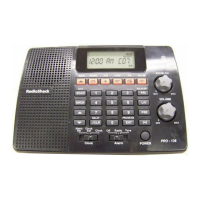
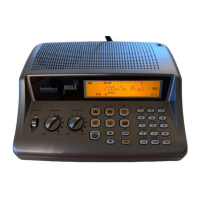
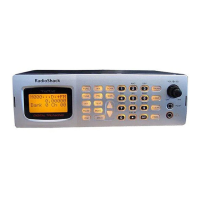
Thank you for purchasing your Triple Trunking Mobile / Base Radio Scanner
from RadioShack. Your scanner scans conventional frequencies and
trunked systems. Please read this user’s guide before installing, setting up
and using your new scanner.
20-163
Triple Trunking
Mobile / Base Radio Scanner
www.radioshack.com
What’s Included
Scanner Antenna Screw (2)
Mounting bracket DIN sleeve and keys (2) Rubber washer (2)
Lock washer (2) Rubber feet (3) Knob (2)
AC adapter DC cable with fuse User’s Guide
Preprogrammed Frequency Addendum

Other manuals for Radio Shack 20-163

Questions and Answers

  • A
    Annette McmahonJul 31, 2025
    What to do if my Radio Shack 20-163 does not function?
    • J
      Jennifer WhiteJul 31, 2025
      If your Radio Shack Scanner is not functioning, ensure the AC or DC adapter is properly connected. The adapter's barrel plug should be fully inserted into the PWR jack, with the center tip set to positive. If using a DC adapter, unplug it from the power source and clean the socket. Also, check the adapter’s internal fuse.
  • C
    Charlene VargasAug 6, 2025
    How to fix a Radio Shack 20-163 that does not scan?
    • R
      Randy NewmanAug 6, 2025
      If your Radio Shack Scanner isn't scanning, first, try turning the squelch clockwise. If that doesn't work, save more frequencies into the channels.
  • M
    Mary RojasAug 11, 2025
    How to fix a Radio Shack Scanner that is not scanning?
    • S
      Steven TurnerAug 11, 2025
      If your Radio Shack Scanner isn't scanning, it could be due to a couple of reasons. First, the squelch might not be adjusted correctly; try turning the SQ knob clockwise. Second, you might not have any or enough channels stored in the scanner; try saving more frequencies into the channels.
  • D
    dvalenzuelaAug 18, 2025
    Why is my Radio Shack 20-163 reception so poor?
    • J
      Jeffrey CunninghamAug 18, 2025
      If your Radio Shack Scanner doesn't receive stations or the reception is poor, first, check the antenna connection. Then, adjust the squelch setting. Also, ensure the attenuator is off, as it might be preventing the reception of weak signals. If these steps don't resolve the issue, try turning the scanner off and then on again, or initialize the scanner.
  • B
    Bobby YoungAug 25, 2025
    What to do if Radio Shack Scanner shows error when uploading from computer?
    • C
      Christina WatsonAug 25, 2025
      If your Radio Shack Scanner displays an error message during upload or download from a computer, especially if you're using Windows XP, it might be due to a missing USB cable driver. To fix this, download and install the “Windows XP Driver to resolve PC connection error” file from the scanner’s Product Support page or the Software Download page on www.RadioShack.com. Ensure the correct COM port is selected in device manager, then try your connection again.

Summary

Installing Your Scanner

Dashboard Installation

Steps for installing the scanner within a vehicle's dashboard.

Connecting the Antenna

Procedure for attaching the scanner's antenna for optimal reception.

Powering Your Scanner

Instructions for connecting the scanner to a power source, either AC or DC.

Scanner Setup and Configuration

Frequency, Mode, and Channel Definition

Explains frequencies, modes, and steps for defining new channels.

Searching for Transmissions

Seek Search and Preprogrammed Banks

Using Seek Search and navigating through preprogrammed search bands.

Signal Stalker II Operation

Utilizing Signal Stalker II for advanced signal detection and special signal analysis.

Scanning Operations

Priority Scanning and Weather Alerts

Setting up Priority scanning and receiving NOAA weather alerts.

Trunking System Setup

Trunking Bank and Mode Configuration

Configuring banks for trunking systems and selecting operational modes (Motorola, EDACS, LTR).

Motorola Trunking Setup

Detailed setup for Motorola Type I/II systems, including fleet maps and frequencies.

Legal and Regulatory Information

Addendum: Preprogrammed Frequencies

Radio Shack 20-163 Specifications

General IconGeneral
TypeHandheld Scanner
Channels200
Modulation TypesAM, FM
Power Supply4 x AA batteries or external power adapter
BandsVHF, UHF, Air
Channel Steps5, 12.5 kHz
ModeManual
AntennaTelescoping

Related product manuals