Radtel RT-490 User Manual Page 16 of 29
DTMF ENCODE
1) Quick Transmitting DTMF Encode:
In transmitting status, press digit keys, ,*,# to transmit DTMF encode 0-9,
ABCD*#. Press key to continuously encode transmit then, release key to end
encode transmitting
2) Transmitting DTMF Encode after editing:
In standby mode, press [#] key to enter DTMF edit menu and Input 0-9,
ABCD*#, if less than 6 digits press [#] to end edit. Then Press PTT key to
transmit DTMF.
a) In edit mode:
i) Press to delete encode
ii) Press exit DTMF edit mode.
GPS FUNCTION
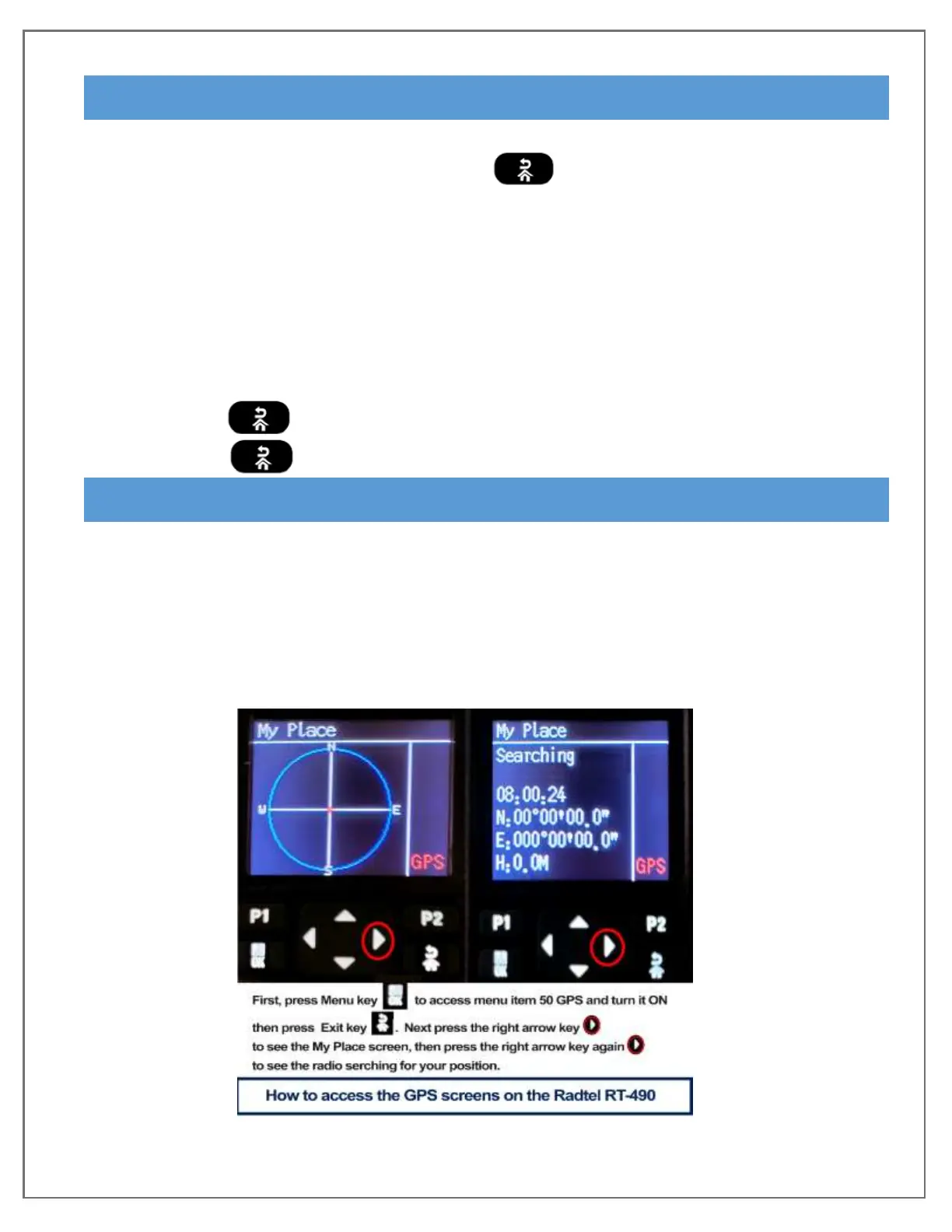
Press the [Right arrow] to enter the GPS positioning interface.
- GPS mode is not available if Blue Tooth is ON
- GPS interface option can also switch coordinate display mode and image mode.
- GPS includes a backtracking function and GPS can store the starting point position in
advance. The GPS provides real time viewable direction and distance from current
position to ensure that you won’t get lost in the wild.


 To Next Page