RADTEL RT-490 User Manual Page 4 of 29
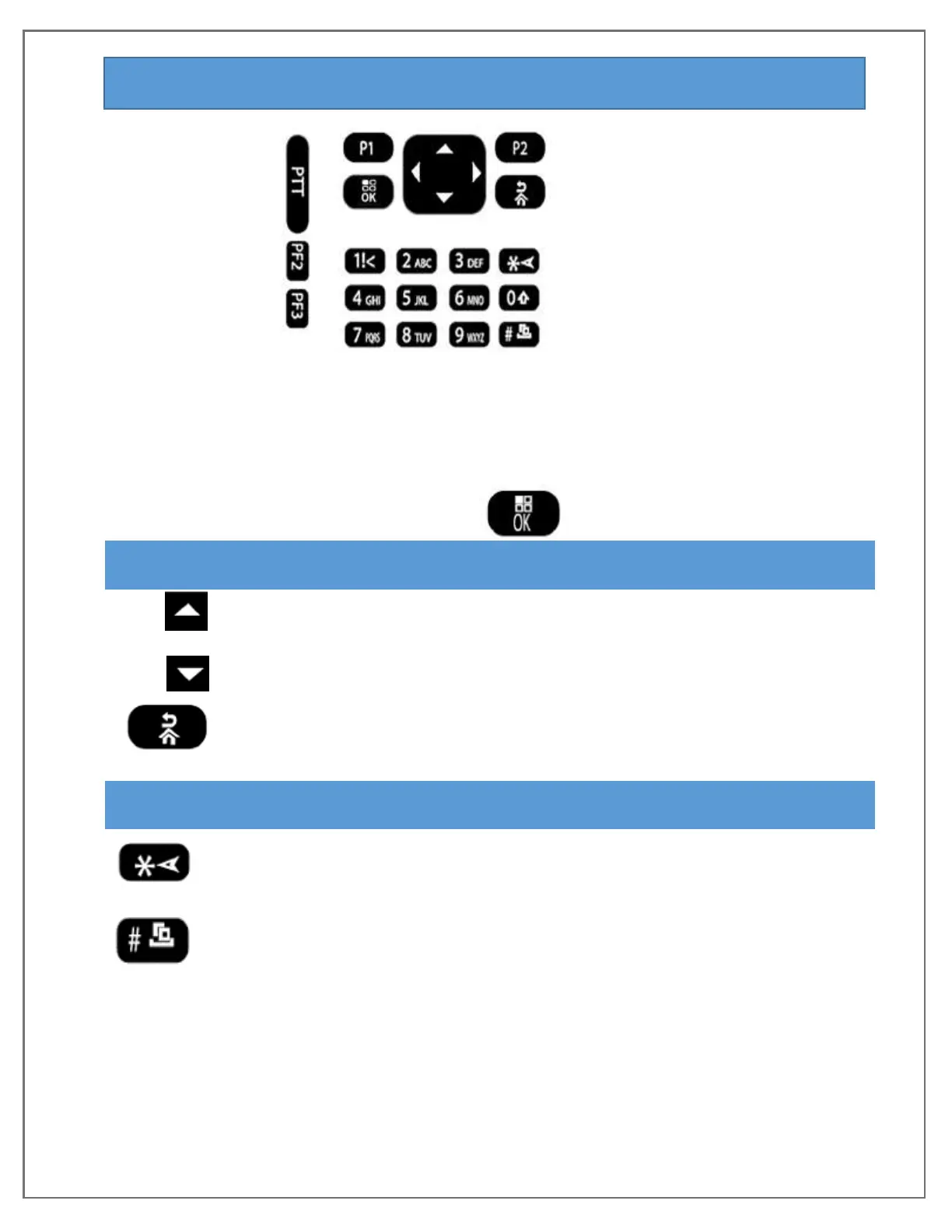
KEYPAD FUNCTION DESCRIPTION
1. P1 - Short press: Switch A/B band.
Long press: In channel mode, switch to channel display mode
2. P2 - Short press: Switch frequency mode and channel mode.
Long press: Turn on/off ANI name display function
Functional keypad - Select/confirm
ENTER MENU, THEN SELECT OPTION IN MENU LIST
Long press to quickly change menu option in Scan mode, or to
change scan direction Up
Long press to quickly change menu option in Scan mode, or to
change scan direction down
In the input state, undo clears information that has been Input
NUMERIC KEYPAD
Input information while in programming menu or to
input non-standard CTCSS/DCS and if needed use key
Short Press: Switch cycles through
Reverse Frequency/Talk around/Normal mode
Long press: Lock/unlock keypad
Long press: (over 2 seconds): cycles between
Active frequency/Channel scan
Short press in DTMF edit: Use * key to end if less than 6 digits
Short press in FM mode: Activates FM channel scanning
[SOS] Key Long press to enter SOS function, short press to exit SOS


 To Next Page