ESP-9V Battery-Operated Controller
5
Set Zone Watering Run Times
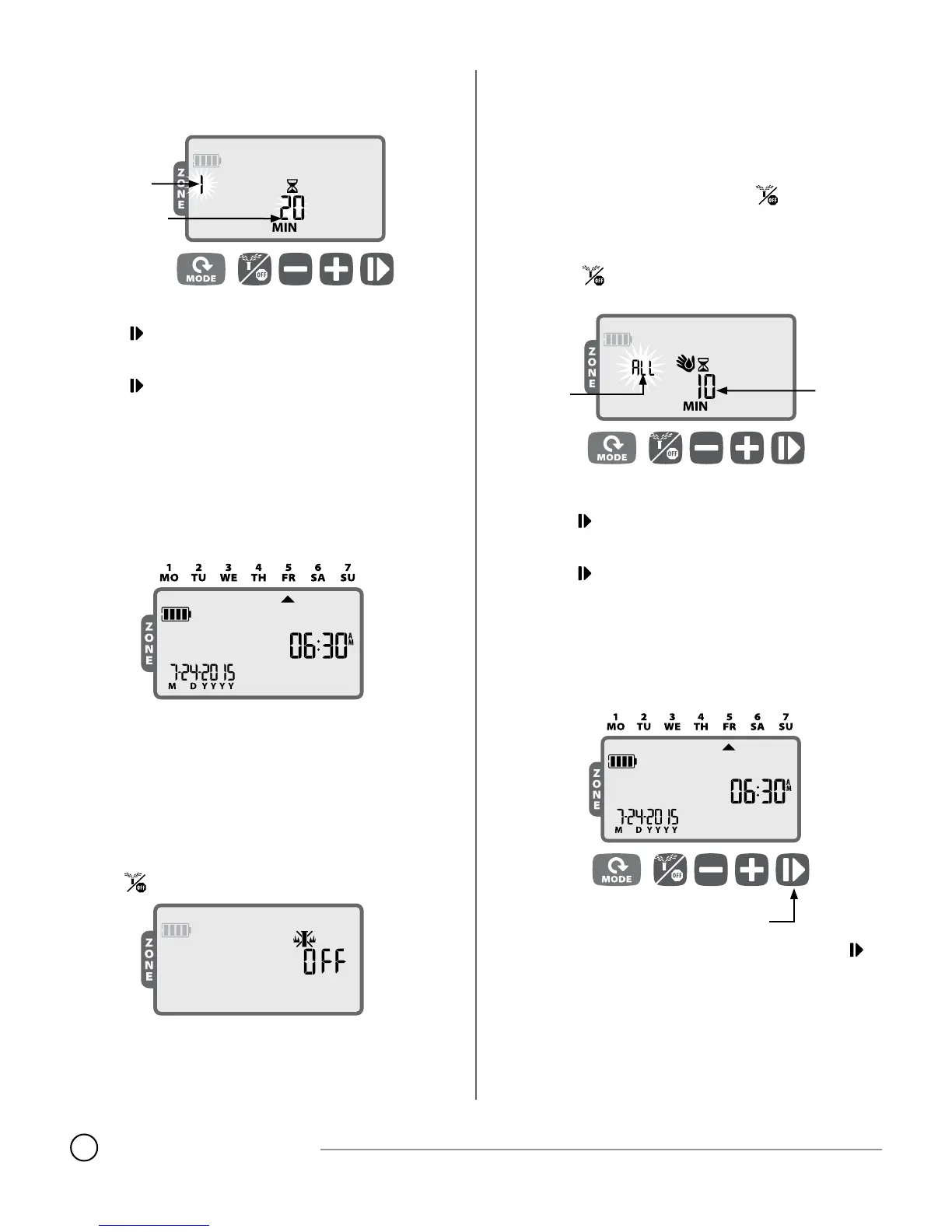
Press the MODE button until the Watering Run Times screen is
displayed.
SET ZONE
RUN TIME
SELECT
ZONE
Press
+
or
–
to select the Zone Number; then
press
Press
+
or
–
to set the Run Time (in minutes); then
press
REPEAT for additional Zones as desired.
NOTE: Run Times can be set between 1 to 240 minutes.
When programming is complete, press the MODE button until
the AUTO RUN screen is displayed.
Auto Run
Press the MODE button until the AUTO RUN screen is displayed.
In AUTO RUN mode, the ESP-9V will irrigate each zone per its pro-
grammed schedule. If any zones are scheduled to run at the same time
and day, your controller will place those zones in a queue and irrigate
one valve at a time, starting with the lowered numbered zone rst.
NOTE: After 5 minutes of inactivity, the controller will revert to
AUTO RUN mode (unless the controller is in OFF) and turn o the
display. Press any key to turn the display back on.
Off
Press the
button until the OFF screen is displayed.
Selecting the OFF mode will cancel any active watering and prevent
any irrigation from starting automatically.
NOTE: Select the AUTO RUN mode to resume normal operation.
Programmed irrigation schedules will NOT run if the controller is
left in OFF mode.
NOTE: If you intend to stop automatic irrigation only for a few
days, we suggest you use the “Delay Watering” feature described
in page 12.
NOTE: To re-initiate watering, press the
button again to re-
turn to AUTO RUN mode.
Manual Watering
Press the button until the Manual Watering screen is
displayed.
SET
RUN
TIME
CHOOSE
ALL ZONES
OR ANY
ONE ZONE
Press
+
or
–
to select ALL Zones or ONE zone; then
press
Press
+
or
–
to set the Run Time for the selected Zones; then
press to begin watering.
NOTE: To water the scheduled runtime for each zone: Press
–
when setting manual runtime until the screen shows “SCH” MIN.
One-touch Manual Start
Water ALL zones immediately according to their previously
scheduled run times:
ONE-TOUCH
MANUAL START
With the controller in AUTO RUN mode, press and hold for
3 seconds to begin watering all zones that have a programmed
runtime.



 To Next Page