Refer to the Understand The Features Of Your Vehicle section of your vehicle's Owner's
Manual on the DVD for further details.
NOTE:
• The Uconnect
®
Phone requires a mobile phone equipped with the Bluetooth
®
Hands-Free Profile, Version 1.0 or higher.
• Most mobile phones/devices are compatible with the Uconnect
®
system, however
some mobile phones/devices may not be equipped with all of the required features
to utilize all of the Uconnect
®
system features.
• For Uconnect
®
Customer Care:
• U.S. residents visit UconnectPhone.com or call 1-877-855-8400.
• Canadian Residents visit UconnectPhone.com or call, 1-800-465–2001 (Eng-
lish) or 1-800-387-9983 (French).
Pairing (Wirelessly Connecting) Your Mobile Phone To The Uconnect® System
Mobile phone pairing is the process of establishing a wireless connection between a
cellular phone and the Uconnect system.
NOTE:
• To use the Uconnect
®
Phone feature, you first must determine if your mobile
phone and software are compatible with the Uconnect
®
system. Please visit
UconnectPhone.com for complete mobile phone compatibility information.
• Mobile phone pairing is not available while the vehicle is in motion.
• A maximum of 10 mobile phones can be paired to the Uconnect
®
system.
Start Pairing Procedure On The Radio
Uconnect® 5.0:
1. Place the ignition in the ACC or ON
position.
2. Press the “Phone” button.
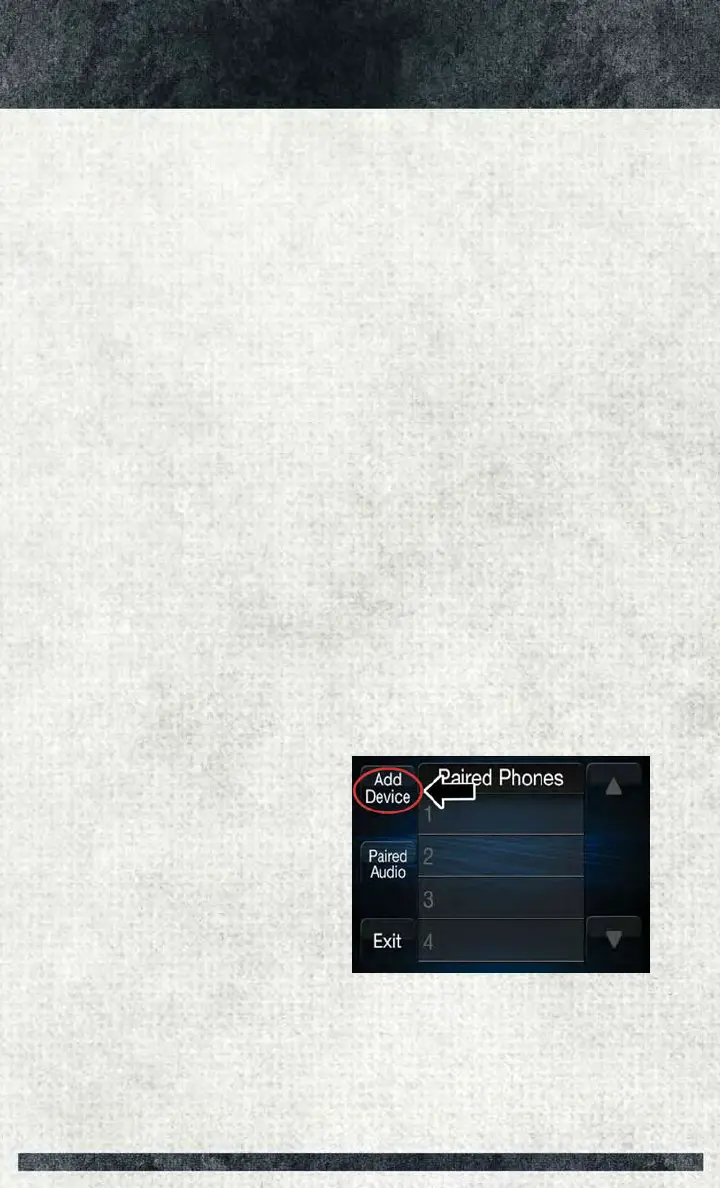
3. Select “Settings.”
4. Select “Paired Phones.”
5. Select “Add device.”
• Uconnect
®
Phone will display an
“In progress” screen while the sys-
tem is connecting.
Uconnect® 5.0
ELECTRONICS
42














 To Next Page