14
RAMSET
www.ramsetinc.com
RAM 100 • 1000 • 5500
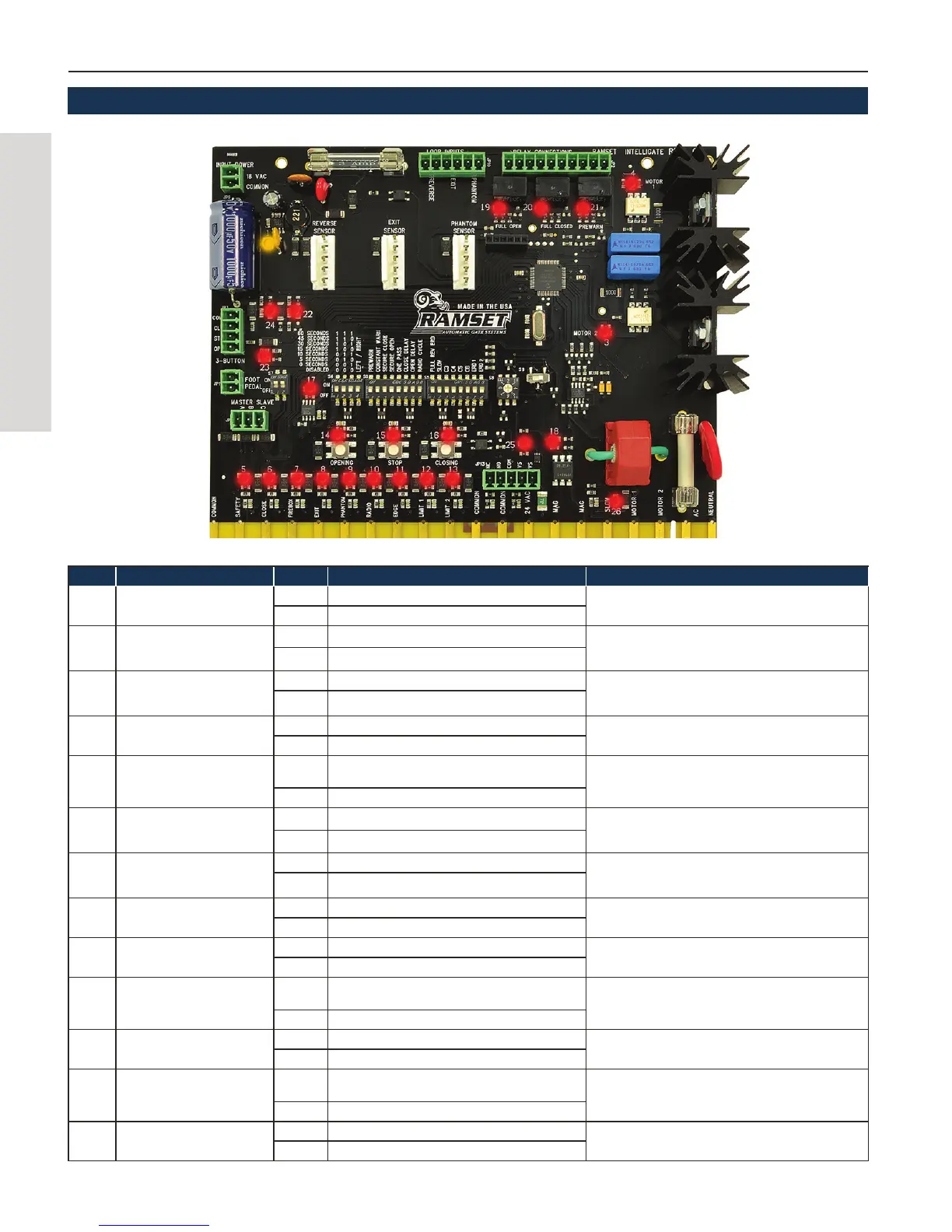
LED # FUNCTION STATUS RESULTS TROUBLESHOOT
1 Power
ON 18-24V AC/DC Present
Check 115VAC, Check 3A Fuse, Check Transformer
OFF No input power
3-4 Motor 1 & 2
ON Motor is running
Check 15A SB fuse, Check 115V AC, check motor over-
load button (red)
OFF Motor is stopped
5-11
Accessories (Safety, Close,
Firebox, Exit, Phanton, Radio,
Edge
ON Triggered by Accessory Disconnect the accessories, if LED goes 'off' then acces-
sory is bad or not properly aligned
OFF Normal status
12-13 Limit 1 & 2
ON Gate is on a limit
Check limit switch & wiring
OFF Gate is in between limits
14-16
Opening, Stop, Closing
ON
One of these LEDs is always 'on'. Gate is either
opening, closing or stopped.
If LEDs 14, 15 & 16 are all OFF, then the control board
needs to be repaired/replaced.
OFF ---
17 Communication
ON Blinks when processing signals
If LED is always 'on' or never 'on' then control board
needs to be repaired/replaced.
OFF ---
18 Mag Lock
ON Energizes mag lock when closing or closed. If not energizing when lit, check mag lock transformer,
voltage on mag lock & mag lock
OFF De-energized when gate is opening or opened.
19-20 Full Open, Full Closed
ON Gate is on a limit
Check dip switch A4, make sure the chain was connected
in the right position
OFF Gate is inbetween limits
21 Pre Warn & Constant Warn
ON Relay for pre warn or constant warn is active
Make sure dip switch B1 or B2 is 'on'. Make sure an
alarm/light has been added to the relay connections plug
OFF Pre warn & active warn is not active
22
3-Button Stop or Foot Pedal
Switch
ON
Either the 3-button stop or foot pedal switch is being
triggered
Check foot pedal switch & stop button on JP3 & JP11.
Check S7 configuration.
OFF Normal status
23-24 3-Button Open, 3-Button Close
ON 3-button is triggering the open or close
Check the 3-button station or anything connected to JP3.
OFF Normal status
25
Monitored Anti- Entrapment
Device
ON
Anti-entrapment device is being triggered or
disconnected
Make sure all 5 wires are correctly connected to JP13.
Make sure the anti-entrapment device is working and
aligned.
OFF normal status
26 Slow Down
ON Gate is in slow start/stop mode
Check dip switch C2.
OFF Slow down mode is turned off
INTELLIGATE LED LAYOUT


 To Next Page