12
4. Clock
DocNo.020-0002 - Overview - 90 Ceramic - Generic
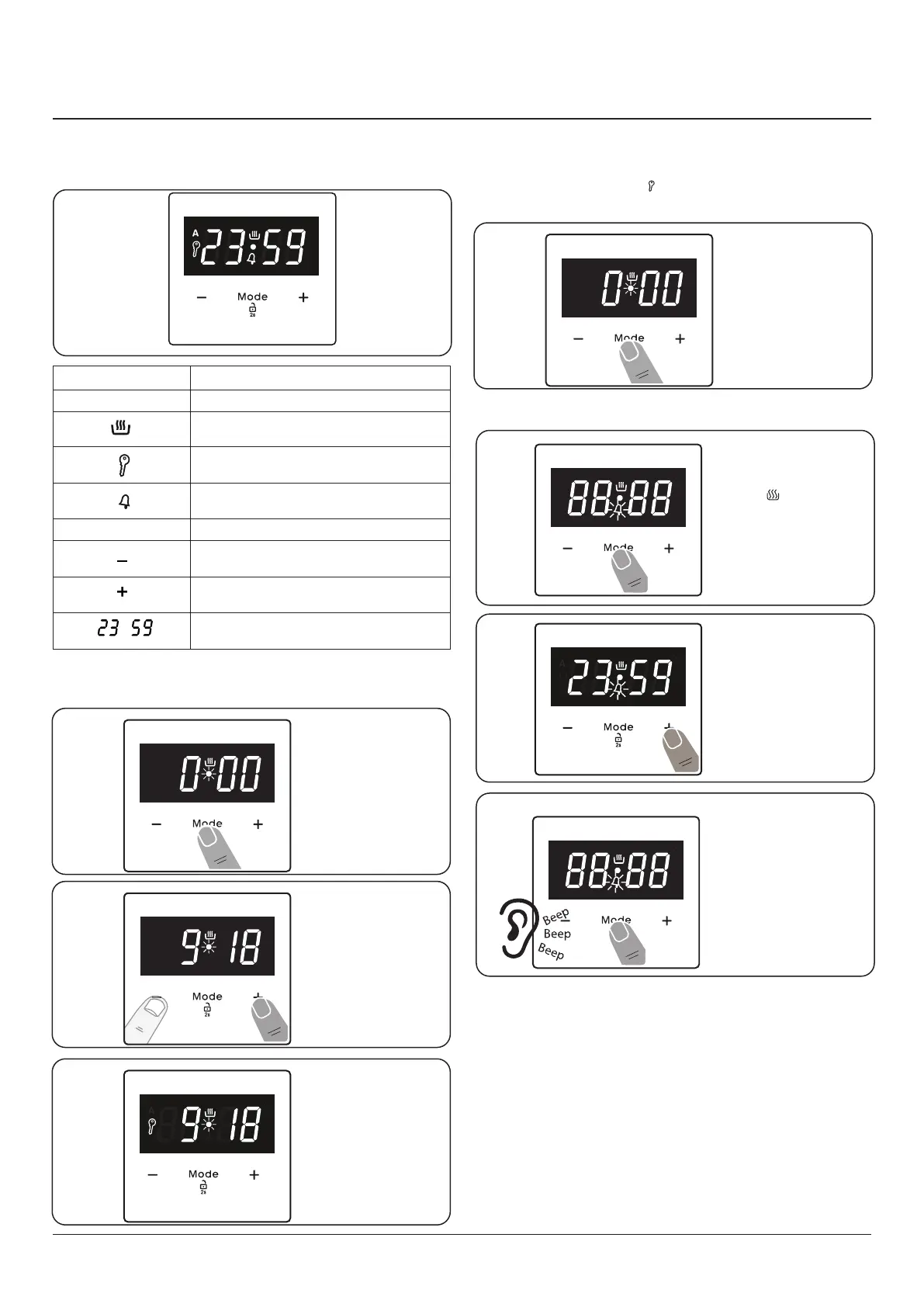
The time must be set before you start using the oven.
Following the power connection, the symbol “A” and “00:00”
or “12:00” will ash on the display.
Fig. 4.1
Function Description
A Auto Cooking
Manual Cooking
Key Lock
Minute Minder
Mode Mode Function
Decrease Timer
Increase Timer
Timer Display
Step. 1
Step. 1
Step. 2
Step. 3
Setting the time The clock must be set to the time of
day before the oven will work
Key Lock
The key lock automatically activates after the timer has not
been used for 7 seconds. “ ” symbol will appear and remain
illuminated.
Press either [+] or
[-] buttons to set
the clock..
After a few
seconds, the dot
will stop ashing
and will remain
illuminated.
To unlock the
timer buttons,
press and hold the
“MODE” button for 2
seconds. The desired
operation can then
be carried out.
Step. 1
Press either [+] or
[-] buttons to set
the tiimer.
Once the specied
time has elapsed an
alarm will sound. To
stop the alarm press
the MODE button.
Setting the minute minder
Note: The cook
symbol [ ] remains
visible during
normal operation.
Step. 2
Step. 3


 To Next Page