14
Step. 1
Step. 1
Step. 2
Step. 3
Step. 4
Step. 5
Step. 2
Step. 3
Step. 6
Step. 4
Step. 5
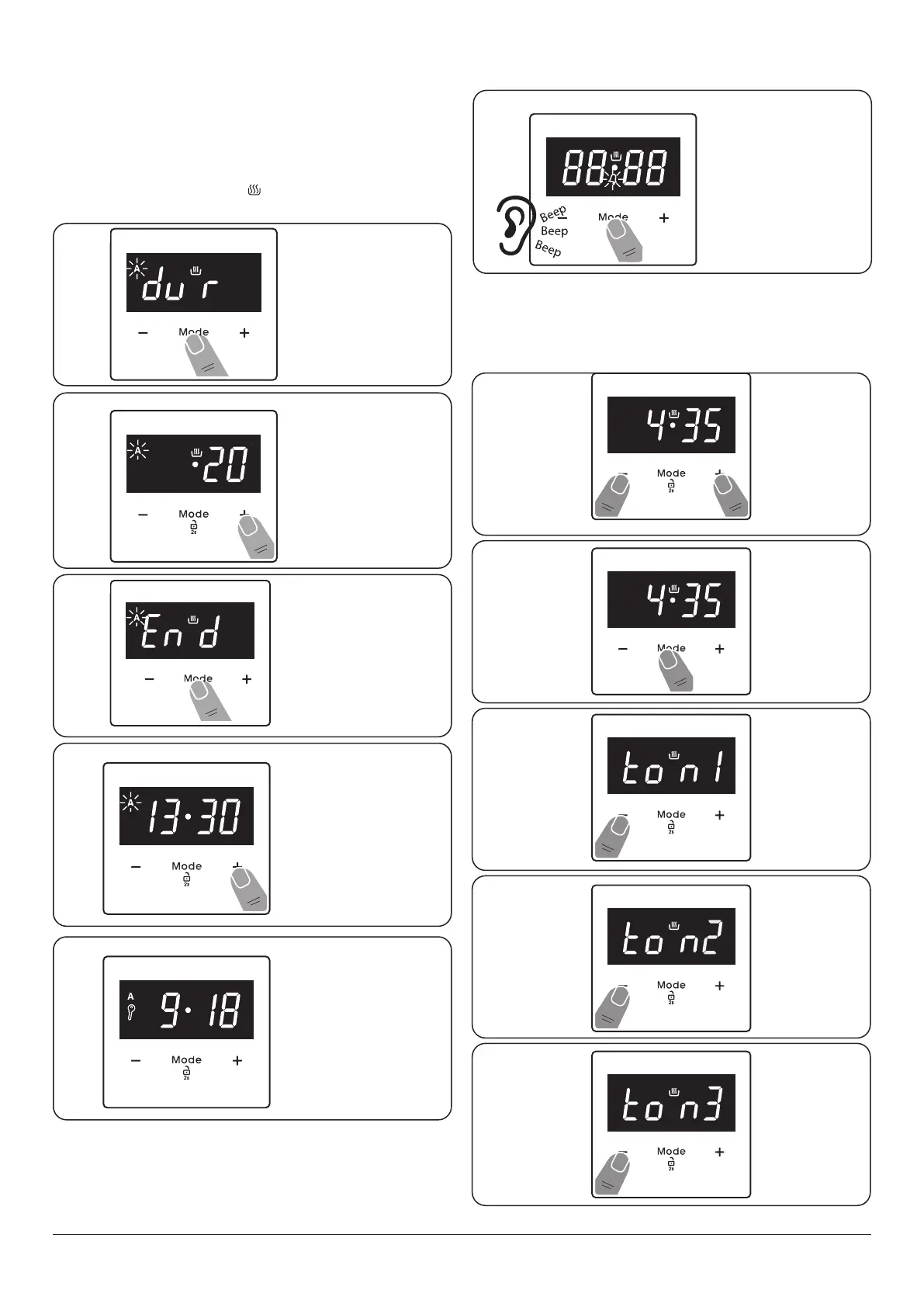
Press “MODE” until
you see “dur” symbol
on the display screen.
The symbol “A” will
flash.
To start and stop the oven automatically
(main oven only)
You have set the required temperature and function mode
and you would like the oven to automatically stop at a later
time. Note: The cook symbol [ ] remains visible during
normal operation.
Changing the frequency of the alarm
Press the “+” and “-”
buttons to set the
desired finishing time.
Once the specied
time has elapsed an
alarm will sound. To
stop the alarm press
the MODE button.
The current time
will reappear on
the screen, and the
symbols “A”, and will
remain illuminated.
n
REMEMBER Turn the oven control knob (s) to 0.
Press “MODE” until
you see “End” symbol
on the display screen.
The symbol “A” will
flash.
In this example the
oven will come on
automatically at
13.10 and switch o
at 13.30am.


 To Next Page