
 Need help?
Do you have a question about the Ratio iX3M and is the answer not in the manual?
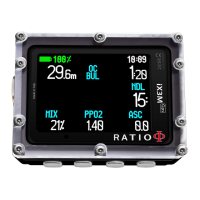
Overview of the RATIO iX3M's features and benefits for recreational and technical diving.
Essential safety guidelines for using the diving computer and understanding diving risks.
Critical warnings against non-professional use and risks associated with improper operation.
Guidance on using the iX3M in low temperatures and the need for specific training.
Information on iX3M compatibility with DAN DL7 and user data privacy policy.
Understanding diving computer limits and proper care and maintenance procedures.
Details on the computer's robust construction, screen resolution, and navigation system.
Explanation of decompression algorithms (Bühlmann, VPM) and software features.
Concise summary of saturation updates, gas capacities, memory, connectivity, GNSS, and alarms.
Instructions on how to recharge the Li-Ion battery using USB, including initial charge cycle.
Detailed explanation of the iX3M's main screen elements and data display.
Guide to accessing and navigating the main menu and system settings.
Configuration for dive settings like algorithms, stops, gas mixes, and dive modes.
Setting up dive alarms and using NDL/Decompression planners for dive preparation.
Customizing display, general settings, PC connection, and resetting the device.
Setting up, calibrating, and using the compass during diving activities.
Activating dive modes and understanding dive screen data, profiles, and saturation.
Visualizing decompression stops and analyzing dive profiles in detail.
Utilizing dive applications and managing gas mixes and conservatism during a dive.
Instructions for operating the iX3M in Gauge mode for depth and timer readings.
 General
| Connectivity | Bluetooth |
|---|---|
| Display | Color LCD |
| Battery | Rechargeable Lithium-Ion |
| Modes | Air, Nitrox, Gauge, Freedive |
| Compass | Yes |
| Depth Rating | 150 m (492 ft) |
| Firmware Updates | Yes |

 To Next Page