55
Mix change during the dive
If besides the bottom mix in the mix chart, decompressive mixes are set as well, the
computer will warn the user when it’s the right moment to change the mix, making
the MIX area (on bottom left of the main screen) fl ash in red.
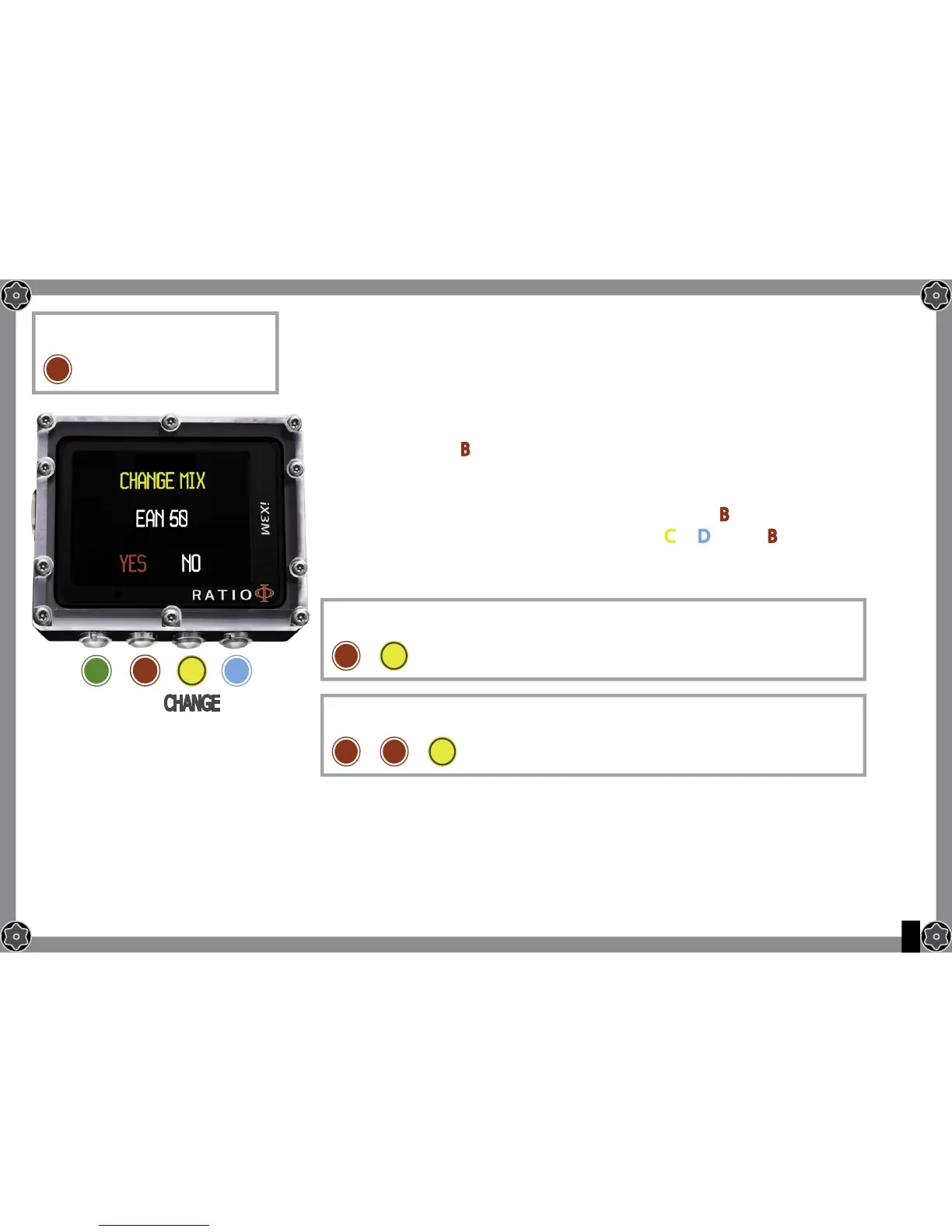
Pressing the button B you have access to the screen CHANGE MIX (only if a better
mix is available and the MIX paramtre fl ashes)
To confi rm the mix change select YES (in red) and press B
To refuse the mix change select NO (in red) with
C or D e press B
Do you know what?:
It’s possible to “refuse”. the mix change simply ignoring the change notice given by the iX3M
To reach this menu from the main
screen press in sequence:
To confi rm the mix change press
in sequence from the dive screen when the word MIX fl ashes
To refuse the mix change press
in sequence from the dive screen when the word MIX fl ashes
ATTENTION: possible only if a
a better mix is available.
C
C
B
B
B
B B
A C
C
C
D
OK CHANGECHANGE


 To Next Page