52
7.5.1 Operator interface display
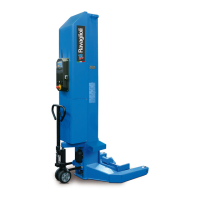
Identication of display controls:
D - Display
(yellow color) - Button for scrolling through the menu (UP)
(blue color) - Button for scrolling through the menu (DOWN)
(red color) - Button for quick scrolling through the sub-menu (UP)
(green color) - Button for quick scrolling through the sub-menu
(DOWN)
(black color) - “ENTER” button to conrm the changes made and
to enter and exit the MENU
D
Note: To select the display language, see instructions on page 55.
Start-up
Put the master switch to 1.
When the power lift starts, the display shows the following menu in which you can navigate with the Yellow and Blue arrow keys
and conrm the selection with the black Enter key;
The symbols >> e << indicate the selected option.
Upon start-up, the system prompts the user to congure the work: congurations can be of two types:
- New conguration (NEW Cong), in this case you will have to proceed with the new work conguration
- Conguration in use (LAST Cong), the system runs a test to verify that the current conditions correspond to the conditions
relating to the last conguration.
On delivery, trucks may not be on the descent limit switch so it is recommend to select (LAST Cong).
conrm with the black “ENTER” key on all columns
if
bring all trucks onto the descent limit switch by pressing the down button, if
necessary, press the individual button and then the descent button
when
it is possible, proceed with (NEW Cong).
7
> > L A S T C o n f i g < <
N E W C o n f i g
H e i g h t 1 1 1 1 mm
G R O U N D A L L
H e i g h t 0 0 0 0 mm
G R O U N D A L L
0526-M002-3


 To Next Page
 Loading...