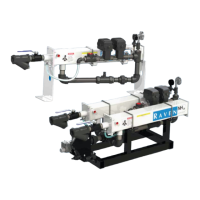
The ROS AccuBoom is a system designed to optimize chemical application in agricultural field operations by providing automatic section on and off control based on GPS position and existing coverage maps. This system aims to reduce chemical use and minimize overlapping application, thereby improving efficiency and potentially saving costs.
Function Description:
The core function of the AccuBoom system is automatic section control. When enabled during an active job, it automatically toggles sections of the implement (e.g., sprayer booms) on or off. This control is based on the implement's GPS position and a coverage map generated by the ROS device. As the implement enters an area previously covered, AccuBoom will shut off the relevant sections, and as it exits a covered area, sections will reactivate for normal operation. This basic operation does not require prior field scouting or operator input.
The system also integrates with field boundaries and zone maps. Zone maps can be created to identify "no-spray" or "no-plant" areas, such as well heads, waterways, tree lines, or rock piles. When the implement crosses into such a zone, AccuBoom automatically shuts off sections within that zone. Similarly, field boundaries can be recorded or loaded to control sections at the field perimeter, assigning the area within the boundary to a "spray" or "plant" zone and areas outside to a "no-spray" or "no-plant" zone.
For Raven rate control systems configured for automatic rate control, the AccuBoom system will automatically adjust the product application rate as section valves open or close, maintaining the desired coverage and spray/spread pattern.
Important Technical Specifications:
- Power Requirement: AccuBoom requires a constant 12 V on and 0 V off signal to properly monitor and control section status. Pulsed or momentary switches are not compatible.
- Hardware Compatibility: Several hardware options are available for integrating AccuBoom into existing application control systems. For CAN product control systems, a boom/speed node with program D or newer is required for proper AccuBoom operation.
- Look Ahead Settings: These settings adjust how far ahead of the current equipment position the system scans for coverage or zone map changes.
- Off-Look Ahead: This value (time or distance) determines when the system begins disabling section application to compensate for the time it takes for product flow to stop or the spray/spread pattern to dissipate. A value of 0 seconds is a good starting point and should not be higher than the On-Look Ahead value.
- On-Look Ahead: This value (time or distance) determines when the system begins activating section application to compensate for the time it takes to establish the desired spray/spread pattern. A value of 2 seconds is generally a good starting point and should not be lower than the Off-Look Ahead value.
- Look Ahead Type: Values can be entered in either time (seconds, determined by vehicle speed) or distance (inches or centimeters). The time option is recommended as it uses current vehicle speed for calculations. If distance is used, consistent vehicle speed is required to avoid skips or overlaps.
- On Override Value: This is the time (default 5 seconds) the system will override automatic section control, enabling any sections currently disabled by AccuBoom. This applies to on-screen override, not physical override switches.
- Turn Off Percent: This is the percentage of the section width that must cross a zone boundary or into a previously applied area before AccuBoom controls that section. The default is 99% to ensure complete coverage. Adjusting this value can help avoid skips or overlaps, especially over point rows.
Usage Features:
- Automatic Section Control: Automatically turns sections on and off based on GPS and coverage maps.
- Zone Mapping: Utilizes "no-spray" or "no-plant" zones to prevent application in specific areas.
- Field Boundary Control: Manages section control at the perimeter of a field.
- Rate Control Integration: Automatically adjusts application rates with compatible Raven rate control systems.
- AccuBoom Override Widget: Allows manual override of automatic section control during an active job for a configured time.
- On-Screen Switch Box: Provides a primary control interface for section, master, or product control status when connected with a Switch Pro or CAN switch box.
- Adjustable Look Ahead Settings: Allows operators to fine-tune the system's response for each control channel based on the time it takes for valves to open/close or patterns to establish.
- "Apply to All Products" Option: Quickly configures consistent AccuBoom settings across all control channels on the CANbus.
- Corrected Coverage: Affects how the system paints to coverage, applying Turn-On and Turn-Off Look-Aheads to the coverage map.
Maintenance Features:
- Pre-Season/Installation Verification: Before installing, activating, or operating AccuBoom components, and at the beginning of each season, verify the operation of section/boom on/off valves, control valves, and switches. Troubleshoot and replace any malfunctioning components.
- Product Control System Check: Ensure the factory product control system (e.g., pump, hydraulic motors, strainers, spray tips) is functioning correctly.
- Cleanliness: For liquid application systems, ensure spray tips, product strainers, or filters are clean and unobstructed.
- Testing with Clean Water: Use clean water in liquid tanks or an empty granular bin when testing the AccuBoom feature after installation or at the start of a season.
- Electrical Component Inspection: Regularly inspect all electrical components and connections for damage or corrosion. Repair or replace as necessary.
- Connection Maintenance: Ensure connections are clean, dry, and undamaged. Clean with low-pressure water, pressurized air, or aerosol electrical component cleaning agent, and allow to dry completely before reconnecting.
- Wire Routing Guidelines:
- Secure harnesses every 30 cm (12in) to the frame.
- Avoid contact with high-vibration lines, hot fluid lines, sharp edges, abrading surfaces, fastener threads, or hose/tube fittings.
- Ensure harnesses do not hang below the unit, are protected from exterior damage (tree limbs, debris), or contact machine components that develop high temperatures.
- Protect wiring routed near hot temperatures.
- Avoid sharp bends in harnessing.
- Allow sufficient clearance from machine operational zones (drive shafts, universal joints, hitches, pulleys, gears, sprockets).
- For moving harness sections, allow sufficient length for free movement without interference, clamp securely, avoid sharp twisting, and do not locate connectors/splices in moving sections.
- Protect harnesses from foreign objects, dirt/mud/snow/ice buildup, tree limbs, damage from service personnel, and passing through metal structures.
- Hose Routing Guidelines:
- Follow existing hoses as much as possible.
- Avoid contact with high-vibration components, hot fluid components, sharp edges, abrading surfaces, or fastener threads.
- Ensure hoses do not hang below the unit, are protected from exterior damage, or contact machine components that develop high temperatures.
- Protect hoses routed near hot temperatures.
- Avoid sharp bends in hoses.
- Allow sufficient clearance from machine operational zones.
- For moving hose sections, allow sufficient length for free movement, clamp securely, and avoid sharp twisting.
- Protect hoses from foreign objects, dirt/mud/snow/ice buildup, tree limbs, damage from service personnel, passing through metal structures, and high-pressure wash.

 Need help?
 General

 To Next Page