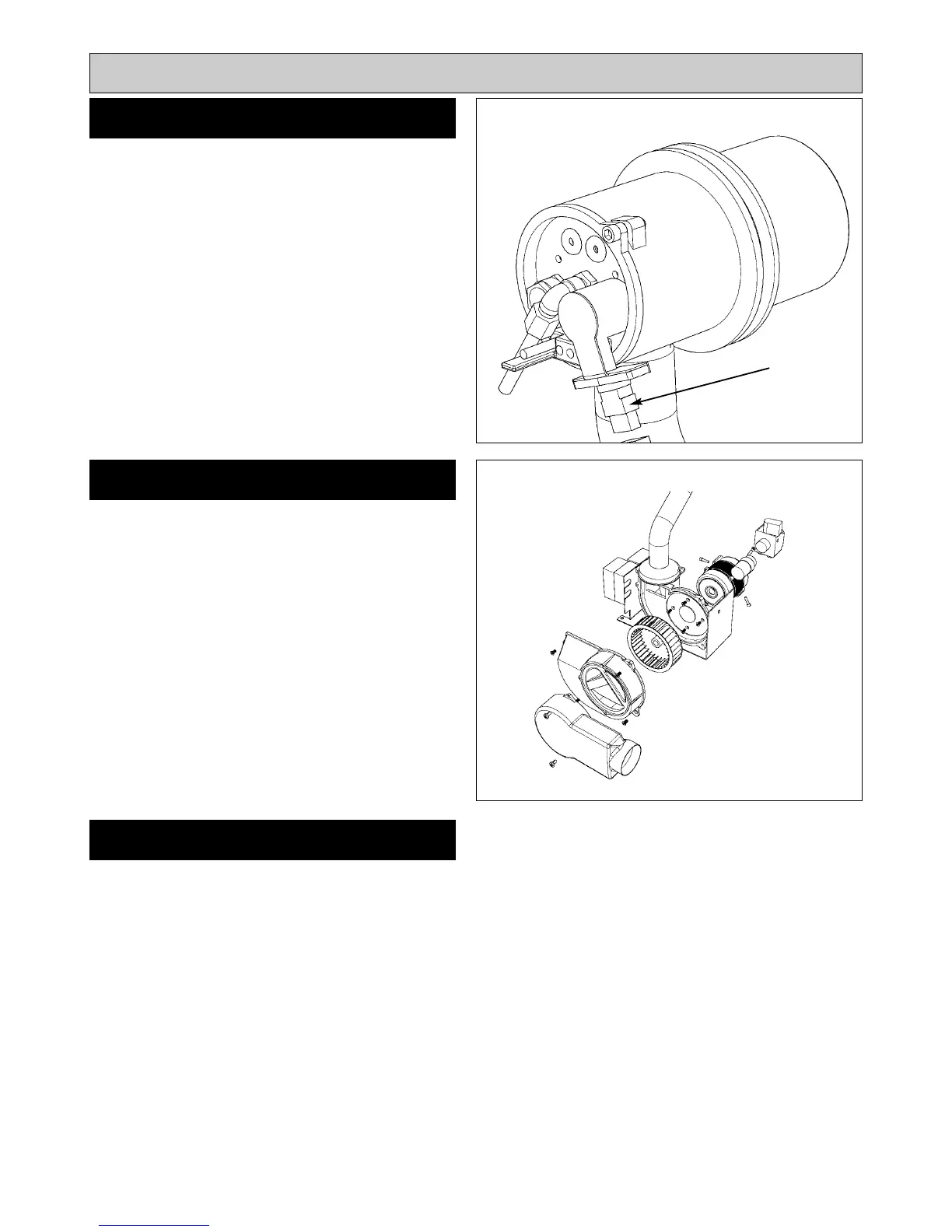
SEE FIG. 8
Withdraw Photo Electric Cell from the burner head. Clean
PEC sensing end with a soft brush taking care not to
scratch the light sensitive body. Re-insert PEC taking care
to insert the correct way round.
Should the cell show signs of distortion or cracking,
replacement will be necessary. See PEC replacement,
Page 15.
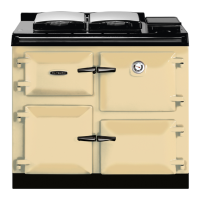
SEE FIG. 9
1. Remove two screws and air inlet snorkel.
2. Remove four screws and split fan case.
3. Clean between the blades of the fan impellor with a
small brush and remove any residue.
Re-assemble the burner in reverse order.
NOTE: Burner head gaskets should be renewed at each
service.
9
Burner Servicing
FAN CLEANING
PHOTO ELECTRIC CELL (PEC)
CLEANING
RE-ASSEMBLE BURNER
Fig. 8
Fig. 9
DESN 515767
DESN 515768
P.E.C








 To Next Page