10
The timer programme
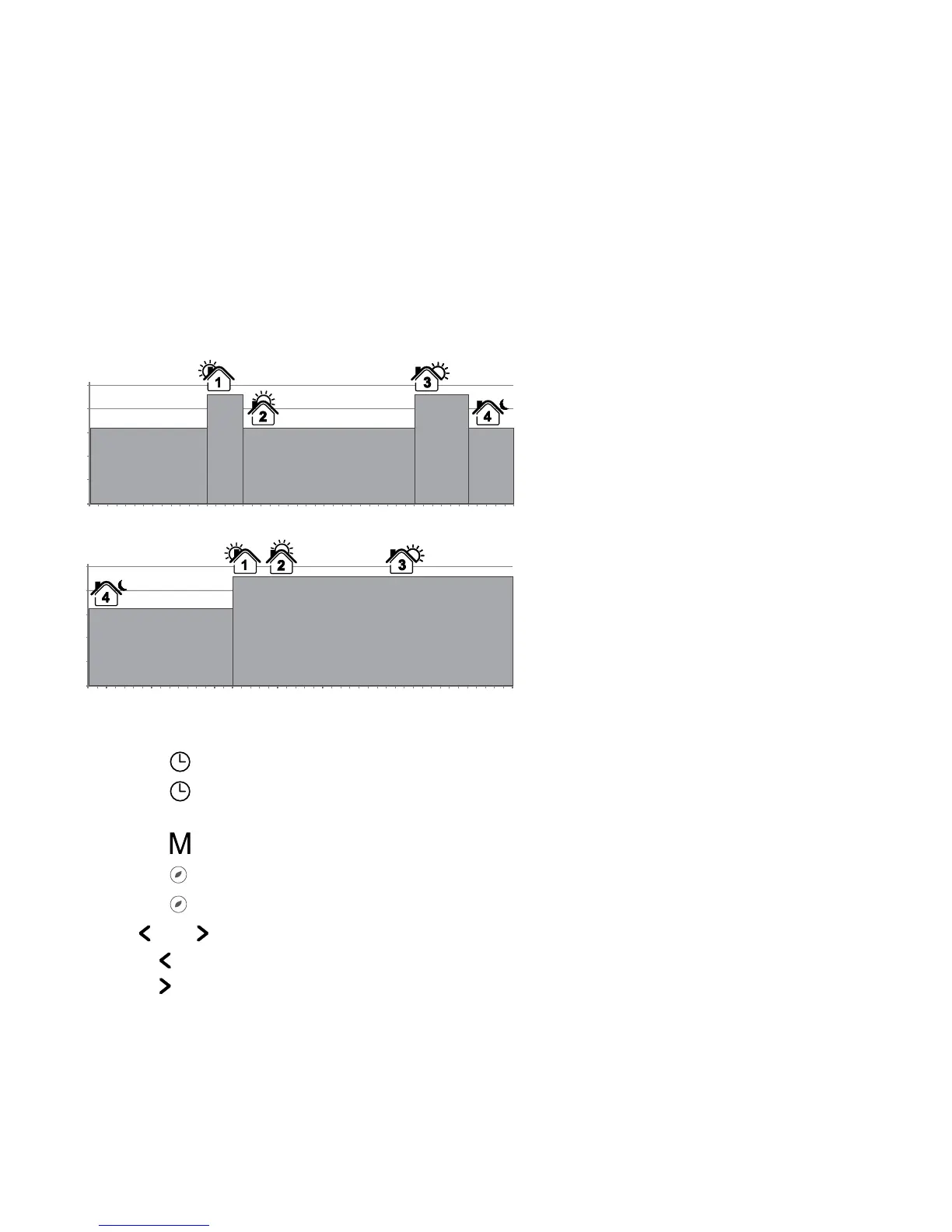
The Green Leaf can be programmed with 4 events per day. Different temperatures can be maintained
for each event of the day. The days can be programmed independently or per cluster of days.
The default Timer Programme is shown on the graph below. You can easily adapt the programme to
your needs (see PROGRAMMING THE TIMER PROGRAMME)
25
20
15
10
5
0
0:00
1:00
2:00
3:00
4:00
5:00
6:00
7:00
8:00
9:00
• Touch the “ ” button to set the clock and day of the week
• Touch the “
” button for 3 seconds to program the timer programme
(see page 14 for more details).
• Touch the “
” button for 5 seconds to enter the Installer Menu
• Touch the “
” button to switch from Timer to Manual ON/OFF mode
• Touch the “
” button for 2 seconds to put the Thermostat into OFF (standby) mode
• Touch “
” or “ ” to show the set point temperature. It will blink for 5 seconds
1. Touch “
” to decrease the temperature.
2. Touch “
” to decrease the temperature.
Remark: The adapted temperature is valid until the next timer Event.


 To Next Page