Advanced Settings and Read-Out
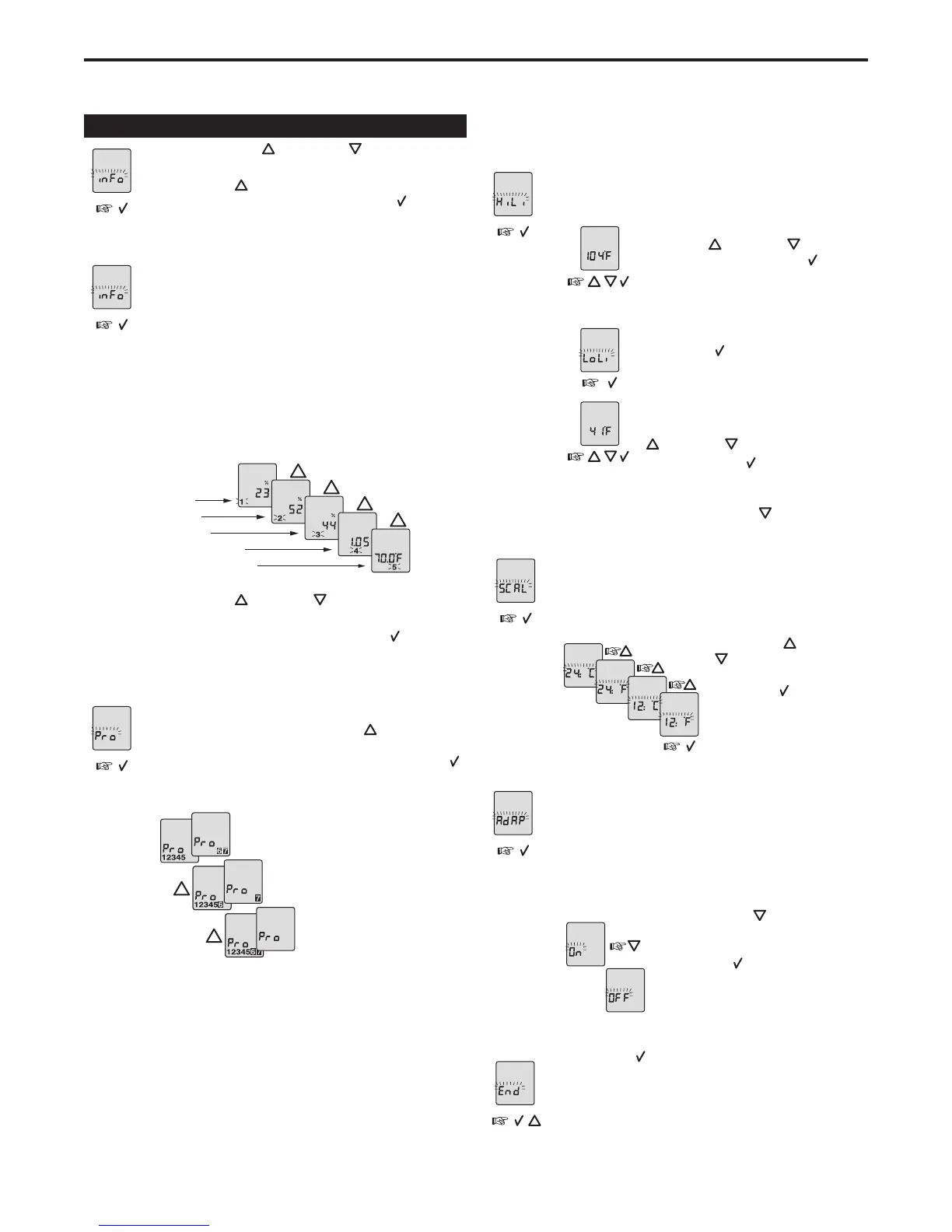
Press both the UP ( ) and DOWN ( ) buttons together
for3seconds.“INFO”isdisplayed.
Press the UP (
) button until you reach the desired
sub menu. Select the sub menu with the OK (
) button.
Monitoring energy consumption
The thermostat calculates the average time it has been
switched on allowing you to monitor your energy con-
sumption. The thermostat displays the total switch-on
time as a percentage for the last 2 days, 30 days or 365
days.
Calculation of operational costs per day:
(switch-on time:100) x kW x kWh-price x 24 h per day
Example:
Read-out: 30% in the latest 365 days
Sizeofheatingsystem:1.2kW(asktheinstaller)
Cost of power: 0.2 USD/ kWh - Calculation:
(30:100) x 1.2 kW x 0.2 USD/ kWh x 24 h = 1.7 USD per day
2 days
30 days
365 days
Software version
Temperature sensor
Press the UP ( ) or DOWN ( ) button to show the dif-
ferent readouts.
No changes can be made here. Use the OK (
) button to
end.
4-event sequence
The present event sequence flashes: Days 1-5, followed
by days 6-7. To change, press the UP (
) button until
you have days 1-6 and then day 7 flashing, or all 7 days
are flashing. Select the required sequence with the OK (
)
button.
5-2: 4 events in 5 days +
2 events in 2 days.
6-1: 4 events in 6 days +
2 events in 1 day
7-0: 4 events in 7 days
Maximum and minimum allowed temperature range
The temperature setting range of 41ºF to 104ºF can be
limited to prevent a too high or too low temperature from
being selected.
Set the maximum allowed temperature.
Use the UP (
) or DOWN ( ) button to
increase or reduce and the OK ( ) button
to accept.
Next “LoLi” is displayed.
Press the OK (
) button to continue.
Set the minimum temperature that the
floor should never fall below. Use the UP
(
) or DOWN ( ) button to increase or
reduce and the OK (
) button to accept.
Note:ItispossibletoselecttheheatingOFFasyour“LoLi”settingby
reducing the setting to 41ºF, and then pressing the (
) once more.
Time and temperature scale selection
YoucanselecteitherForCscale,and12or24hourclock
as follows:
Press the UP (
) or DOWN
( ) button to change settings.
Confirm the required scale
with the OK ( ) button.
Adaptive function
This function enables the thermostat to calculate when
it needs to switch ON so that the required temperature
is reached at the set time. With a start time of 7:00 a.m.
therefore, the thermostat may switch ON as early as 6:00
a.m. so that the desired temperature of 77ºF is achieved
by 7:00 a.m. Without this function set, the thermostat will
start to heat at the time you set.
Press the DOWN (
) button to switch
between on and off.
Press the OK ( ) button to confirm.
Ending the programming sequence
Press the OK (
) button to end programming and to
return to scheduled program.
QuickStat Installation & Operation Manual
5


 To Next Page
 Loading...