TROUBLESHOOTING / FAQ
https://rayconglobal.com
10
BLUETOOTH CONNECTION / SOUND INTERFERENCE:
CAPSULE WILL NOT CHARGE:
EARBUDS WILL NOT CHARGE:
MULTIPOINT IS NOT WORKING:
RESETTING YOUR EARBUDS:
• Ensure speaker is within 10 meters (33 feet) of connected Bluetooth device.
• Check the battery level: If the battery level of either the earbuds or your connected
device is low, it can cause the connection to be weak or to drop.
• Using the provided USB-C charging cable, make sure that the cable is firmly
plugged into the charging case and USB-C power adapter.
• If using a wireless charging pad, ensure that the cable is firmly plugged into the
charging pad and that the other end is correctly plugged into a power outlet.
• Ensure the charging case is charged, indicated by LED on the front: should be an
amber or green color.
• Confirm there is nothing blocking the earbuds from the connection to the case.
• Insert earbuds into the case, and confirm a blinking amber LED on the front of the
case, which indicates that the earbuds are charging.
• Confirm both earbuds are charged and that they are disconnected from any
Bluetooth device.
• Confirm Earbuds are in pairing mode and reconnect devices to Bluetooth.
• Delete “Raycon Everyday Earbuds” from the bluetooth settings on your device, and
place the earbuds back in its case.
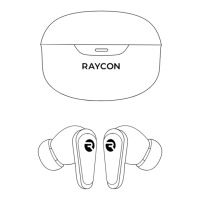
• For a hard reset, simply place both earbuds inside the charging capsule, close the
capsule lid and wait 5-10 seconds.



 To Next Page