Chapter 5: Digital Selective Calling (DSC) 43
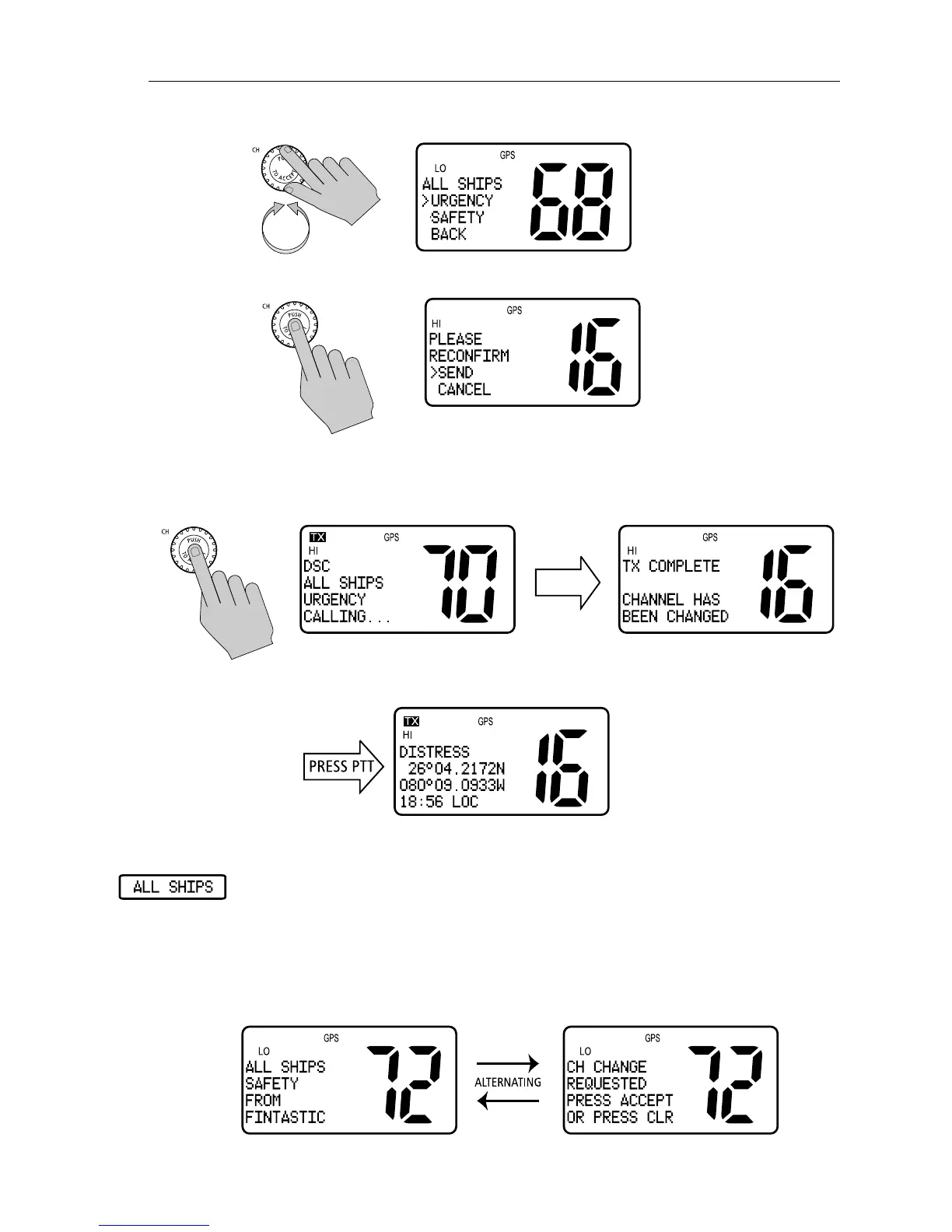
4. Rotate the CH knob to select URGENCY or SAFETY.
5. Press the CH knob again to send the call.
6. Push CH one more time to reconfirm the All Ships Call.
The call is transmitted on channel 70, and then the radio tunes to channel
16 at high power.
7. Press PTT to communicate on the channel 16.
Receiving an All Ships Call
When an All Ships Call is received, the radio sounds an alert tone and
displays the type of call, the name or MMSI number (if the caller’s MMSI
number has not been programmed into your Phonebook) of the caller and the
time the All Ships Call was initiated. You are prompted to accept or decline
the call. For Urgency Calls, the prompt appears only if you have disabled
automatic channel changing (see page 82).



 To Next Page
 Loading...





