2151 Eastman Ave., Oxnard, CA 93030 805-278-5300 Fax 800-777-7026 www.raypak.com
Technical support is available M-F, 5:30 AM to 5:00 PM PST, at 800-947-2975 or 800-627-2975
Page 4
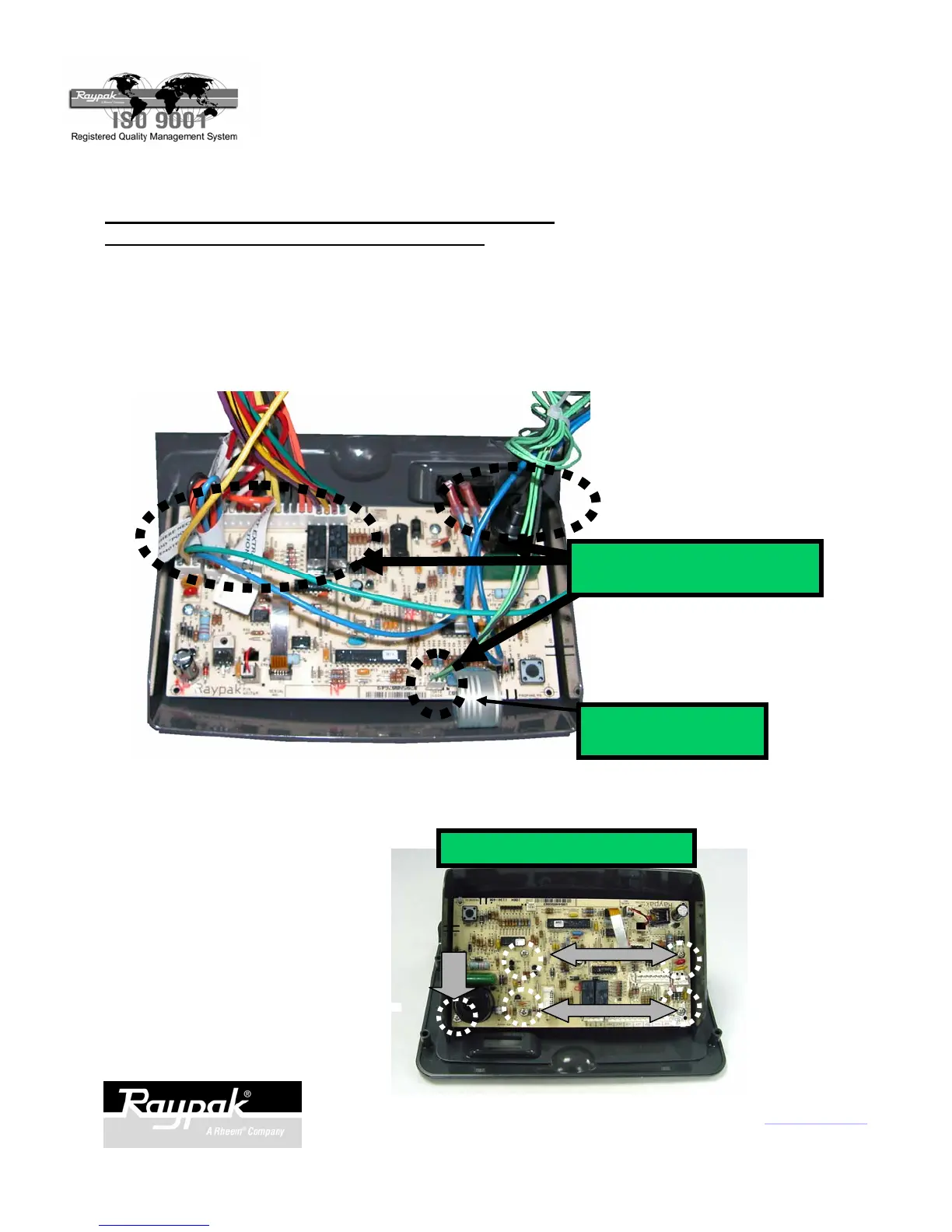
UNPLUG
ALL CONNECTORS
REMOVE MOUNTING SCREWS
Fig. 9
Fig. 10
REMOVING THE CIRCUIT BOARD - MODELS 206A,
207A, 266A, 267A, 336A, 337A, 406A, 407A:
Make sure the power and gas are off.
1. Unplug all connectors from old circuit board. Fig. 9.
2. Unplug keypad ribbon from old circuit board.
3. Remove screws as shown in Fig. 10.
4. Remove old circuit board.
REMOVE KEYBOARD
RIBBON
P/N 241169 Rev.-3



 To Next Page