MI2S-600D/700D/800D 16
6.4 Complete the AC Connection
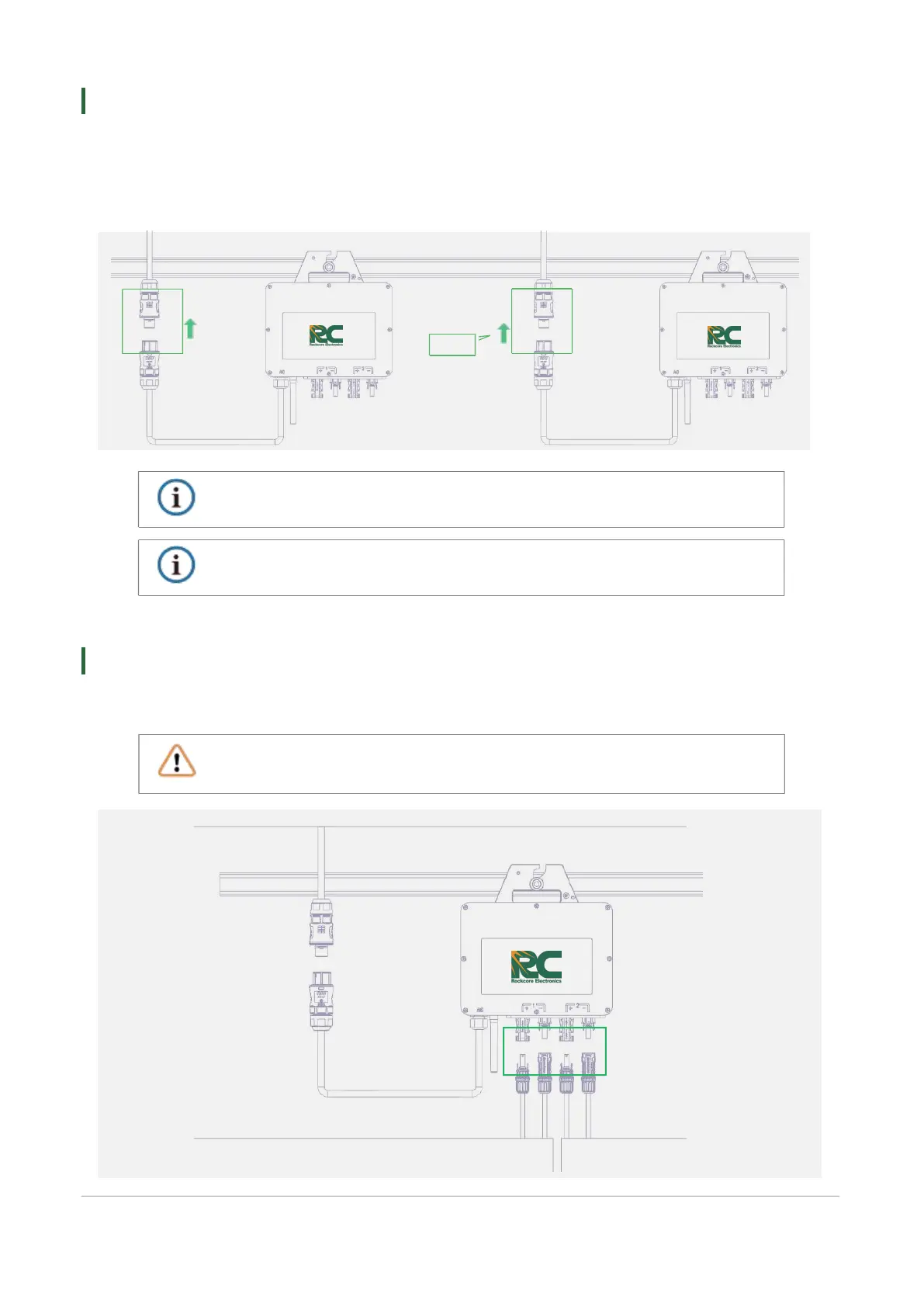
A ) Plug the AC Sub Connector of the micro inverter into the AC Trunk connector until you hear the click.
B ) Connect the AC end cable to the distribution box, and wire it to the local grid network.
C ) Please plug the AC Trunk Port Cap in any vacant AC Trunk Port to make it water and dust proof.
Make sure that the AC Trunk Connectors are kept away from any drainage channels.
If you want to remove the micro inverter AC cable from AC Trunk Connector, insert the AC
Trunk Port Disconnect Tool into the AC Sub Connector to complete the removal.
CA UT IO N
CA UT IO N
Make sure the PVn+ and PVn- of the same PV channel is corresponding to the same PV panel or it
will damage the inveter.
Connect the PV modules’ DC cables to the DC terminals of the micro inverter.
WARNING
6.5 Connect PV Modules
PV1
PV2


 To Next Page