4. Press 5 or 6 on the Navigation button to scroll through the options until
“Hold message” appears on the display.
5. Press the soft button.
6. Press 5 or 6 on the Navigation button to scroll through the options until
“Record message” appears on the display.
7. Press the soft button.
8. After a long beep, the display will show “Recording hold message...” Record the
hold message.
9. Press the soft button to stop recording.
10. The display will show “Updating hold message...” and return to the hold message
option screen.
11. The message will play. After the message plays, press the Exit button or wait for
the menu to time out to return to the Standby Mode.
Play a Hold Message
The hold message can be reviewed using the play message function.
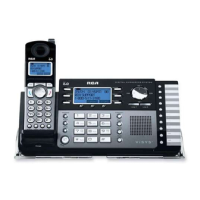
1. On the Base Unit, press the soft button.
2. Press 5 or 6 on the Navigation button to scroll through the options until
“System setting” appears on the display.
3. Press the soft button.
4. Press 5 or 6 on the Navigation button to scroll through the options until
“Hold message” appears on the display.
5. Press the soft button.
6. Press 5 or 6 on the Navigation button to scroll through the options until
“Play message” appears on the display.



 To Next Page