STEP 8: ACCESS THE MENUS
When you've completed Interactive Setup, try out the VCR's
regular on-screen menus. The MENU and number buttons let you
access,select, and change menu items. For example, to change
the Auto Play setting, you would do the following:
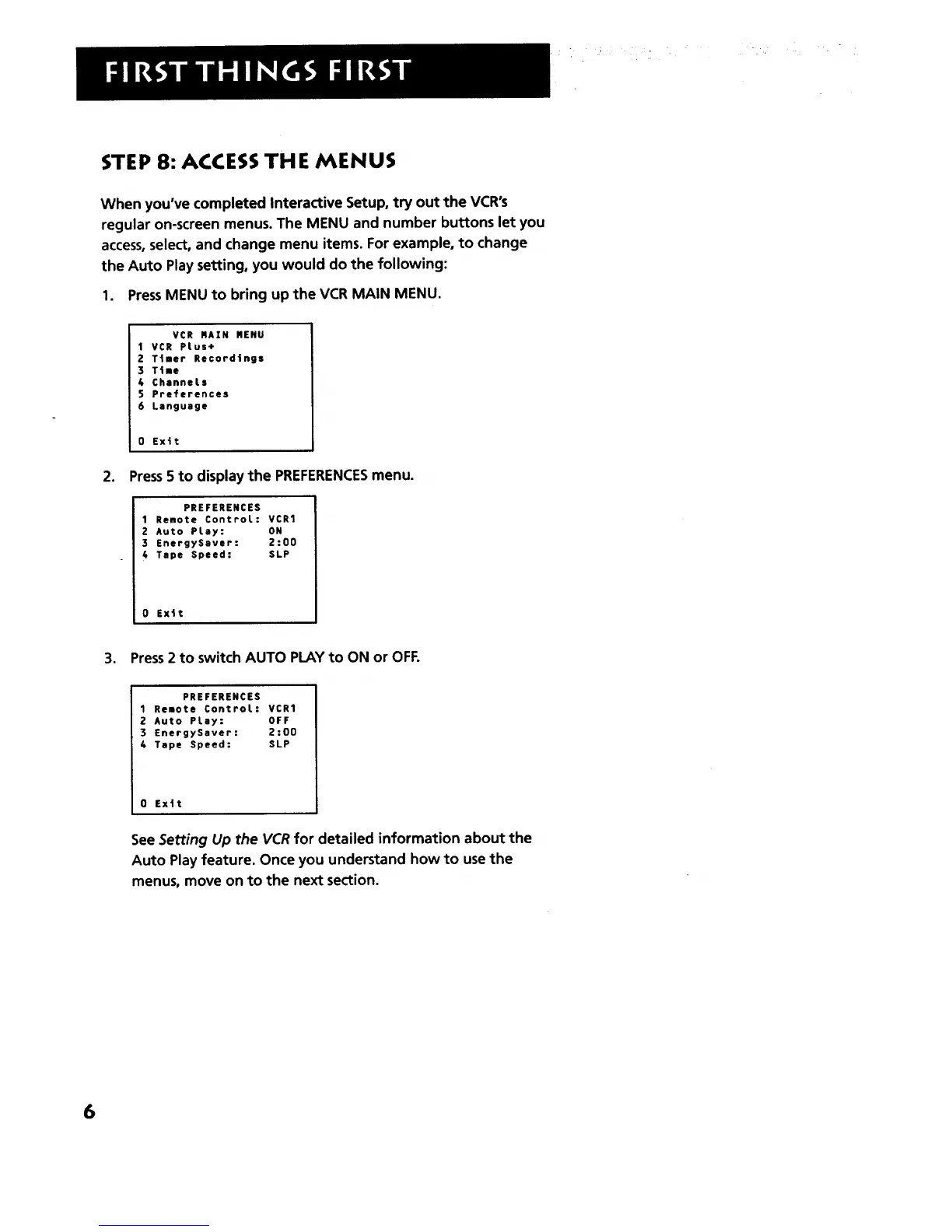
1. PressMENU to bring up the VCR MAIN MENU.
VCR RAZN NENU
1VCR PLus+
2 Ttmer Recordings
3 Time
4 ChanneLs
5 Preferences
6 Language
0 Exit
2. Press5 to display the PREFERENCESmenu.
PREFERENCES
1 Remote ControL: VCR1
2 Auto PLay: ON
3 EnergySaver: 2:00
4 Tape Speed: SLP
0 Exit
3. Press2 to switch AUTO PLAY to ON or OFF.
PREFERENCES
1 Remote ControL: VCR1
2 Auto PLay: OFF
3 EnergySaver: 2:00
4 Tape Speed: SLP
0 Ex|t
See Setting Up the VCR for detailed information about the
Auto Play feature. Once you understand how to use the
menus, move on to the next section.
6



 To Next Page