EasyManua.ls Logo

RCO R-COD 500 - User Manual

RCO R-COD 500
14 pages
Print Icon
To Next Page IconTo Next Page
Loading...
R-COD
RCO Security AB
Box 705
176 27 Järfälla
tel 08-546 560 00
info@rco.se
www.rco.se
© 2021 RCO Security AB. All rights reserved. February 2021.
R-COD 500 & 500 IR
Installing, Commissioning, Using
The manual describes how to mount, connect, program and
use the devices.
Question and Answer IconNeed help?

Do you have a question about the RCO R-COD 500 and is the answer not in the manual?

Summary

R-COD 500 & 500 IR Code Lock Overview

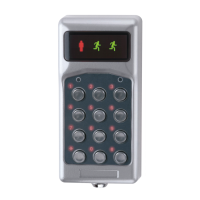
R-COD 500 Front Panel

Describes the front panel of the R-COD 500 model, highlighting its features and indicators.

R-COD 500 IR Front Panel

Describes the front panel of the R-COD 500 IR model, including the IR receiver and indicators.

R-COD 500 & 500 IR Daily Use

R-COD 500 Daily Use

Explains how to use the R-COD 500 for daily door access with keypad entry.

R-COD 500 IR Daily Use

Explains daily use of R-COD 500 IR, including keypad and IR transmitter access.

Mounting and Installation

R-COD 500 IR Mounting Considerations

Important points to consider when mounting the R-COD 500 IR unit to ensure optimal performance.

Surface Mounting

Details on how to perform surface mounting for the R-COD 500 and R-COD 500 IR units.

Recessed Box Mounting

Wiring and Connections

Commissioning Process

Commissioning Overview

General steps for commissioning the R-COD 500 and R-COD 500 IR units.

Activate IR Codes (R-COD 500 IR)

Procedure to activate IR codes for the R-COD 500 IR model using SW1.

Reset Individual IR Codes

Programming and Configuration

General Programming Information

General procedure for programming settings using the keypad and LED indicators.

Changing the System Code

How to change the system code for security and access control.

Programming Access Codes

Erasing Access Codes

Procedure for removing a single access code from the unit.

Adjusting Door Opening Time

Factory Reset Procedures

Factory Reset (System Code Known)

Procedure for factory reset when the system code is known.

Factory Reset (System Code Unknown)

Procedure for factory reset when the system code is unknown.

Product Specifications

Overview

The R-COD 500 and R-COD 500 IR are compact code locks designed for controlling access to a single door. These devices offer a combination of keypad entry and, in the case of the R-COD 500 IR, infrared (IR) code recognition, providing flexible access management solutions.

Function Description

The core function of both models is to grant access through a door upon the entry of a valid access code via the integrated keypad. The R-COD 500 supports 8 distinct access codes, each ranging from 3 to 6 digits in length, in addition to a single system code used for programming. The R-COD 500 IR extends this functionality by incorporating a built-in IR receiver, allowing for an additional five IR codes to be programmed. These IR codes can be used with compatible IR transmitters to unlock the door without needing to use the keypad.

The system code is a critical component for managing the device, as it provides access to the programming menu where access codes, IR codes, and other settings can be configured. It is imperative to change the default system code upon initial commissioning to prevent unauthorized access to the device's programming. Losing the system code necessitates a factory reset, which erases all stored information.

The devices provide visual feedback through LED indicators. On the R-COD 500, the two right symbols light up when the door is unlocked and when programming in a submenu. The red figure blinks when buttons are pressed and shines steadily when the unit is in menu mode. For the R-COD 500 IR, the two right symbols also light up when the door is unlocked and during submenu programming. The red figure blinks when buttons are pressed or an IR code is received, and it shines steadily when the unit is in menu mode or during commissioning.

Usage Features

  • Keypad Access: Users can unlock the door by entering one of the programmed access codes on the keypad. Each button press is acknowledged by a blink of the left symbol. Upon successful entry of a valid code, the door unlocks, and the two right symbols blink alternately (or the green figure lights up on the R-COD 500 IR).
  • IR Access (R-COD 500 IR only): In addition to keypad entry, the R-COD 500 IR allows access using an IR transmitter with one of the activated IR codes. When a valid IR code is received, the door unlocks, and the green figure lights up.
  • Door Opening Time Adjustment: The duration for which the door remains unlocked after a valid access code or IR code is entered/received can be adjusted. The default opening time is 5 seconds, but it can be configured from 1 second up to 59 minutes and 59 seconds.
  • Programming Access Codes: Up to eight access codes can be programmed. The process involves entering the system code, selecting the programming menu, choosing a code position (1-8), and then entering the desired access code. It's important to note that for access codes in positions 5-8 to function, pins P1/3 and P1/4 on the terminal block must be connected.
  • Erasing Access Codes: Individual access codes can be easily erased by entering the system code, navigating to the erase menu, and selecting the code position to be cleared.
  • Changing the System Code: The system code, which grants access to the programming menu, can be changed from its default setting. This is a crucial security measure to be performed during commissioning.
  • IR Code Activation/Deactivation (R-COD 500 IR only): IR codes are managed via a switch (SW1) on the circuit board. Individual IR codes can be activated or deactivated by setting the corresponding switches to ON or OFF. This allows for flexible control over which IR transmitters are recognized.
  • Resetting Individual IR Codes (R-COD 500 IR only): Specific IR codes can be reset without affecting others. This involves disconnecting power, setting the terminal switches for the desired IR codes to ON (and others to OFF), setting SW1/8 to ON, powering up the unit, and then setting all terminals to the desired mode. It is crucial to set SW1/8 back to OFF after the reset to prevent accidental resets upon restart.
  • Time Control for Access Codes: The device supports time control for access codes in positions 5-8. If pins P1/3 and P1/4 are not connected, these codes will not function, indicating a dependency on an external time control mechanism or a direct connection for continuous operation.
  • Sabotage Contact: The device includes a sabotage contact, which is a security feature designed to detect tampering with the unit.

Maintenance Features

  • Factory Reset: A factory reset can be performed to erase all stored information and revert the system code to its default (1234). This is typically done during commissioning, recommissioning, or if the system code has been lost. The procedure differs slightly depending on whether the system code is known or not. If the system code is known, it involves entering the system code, selecting menu 9, pressing 1 for master reset, and confirming. If the system code is unknown, it requires holding down '0' while powering up the unit, then pressing '1' and '#' to confirm the reset.
  • IR Receiver Placement Considerations (R-COD 500 IR only): For optimal performance and to ensure reliable IR code reception, the IR receiver should be positioned to be clearly visible from where the IR transmitter will be used. It is important to avoid mounting the code lock in direct sunlight or near other strong light sources like fluorescent or low-energy lamps, as these can interfere with IR signal reception.
  • Informing Mail/Delivery Services (R-COD 500 IR only): If IR codes are used for services like postal or newspaper delivery, it is recommended to inform these services that an IR reader is installed at the door to ensure they can utilize the system effectively.
  • Troubleshooting Visual Cues: The device provides specific blink patterns during startup and normal use to indicate various states or issues. For example, 1 blink at startup indicates a normal start, while 2 blinks indicate a start with SW 1/8 ON (all IR codes deleted). During normal use, 1 blink signifies an invalid IR code, 2 blinks indicate too many characters in a received IR code, 3 blinks mean the IR code is deactivated, 4 blinks suggest an incorrect IR control character, and 5 blinks indicate an unknown IR code received. These visual cues assist in diagnosing operational problems.

RCO R-COD 500 Specifications

General IconGeneral
MaterialZinc Alloy
Power Supply4 x AA Batteries
Operating Temperature-20°C to 60°C
Operation Voltage6V
Current Consumption≤200mA
Password Capacity100
RFID Card Capacity100
Lock Body MaterialZinc Alloy
Surface TreatmentElectroplating
Access MethodPIN, RFID, Mechanical Key
Backset60mm
Emergency Power9V Battery
CertificationsCE, FCC
Mechanical KeyYes
Weight2.5kg

Related product manuals