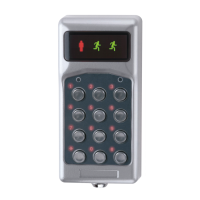
R-COD 500 & R-COD 500 IR
R-COD 500 DAILY USE
4
2 blinks Start with SW 1/8 ON. (All IR codes are deleted.)
During normal use 1 blink Invalid IR code.
Too many characters in received IR code.
3 blinks IR code deactivated.
4 blinks Incorrect IR control character.
Unknown IR code received.
R-COD 500 daily use
Access doors by using the keypad to enter one of the programmed access codes. Each
time a button is pressed, the left symbol blinks.
When a valid access code is entered, the door unlocks and the two right symbols blink
alternately.
R-COD 500 IR daily use
Access doors by using the keypad to enter one of the eight access codes that were
programmed. Each time a button is pressed, the left symbol blinks.
Alternatively, use an IR transmitter with one of the activated IR codes.
When a valid access code is entered/received, the door unlocks and the green figure
lights up.


 To Next Page