12
1212
12
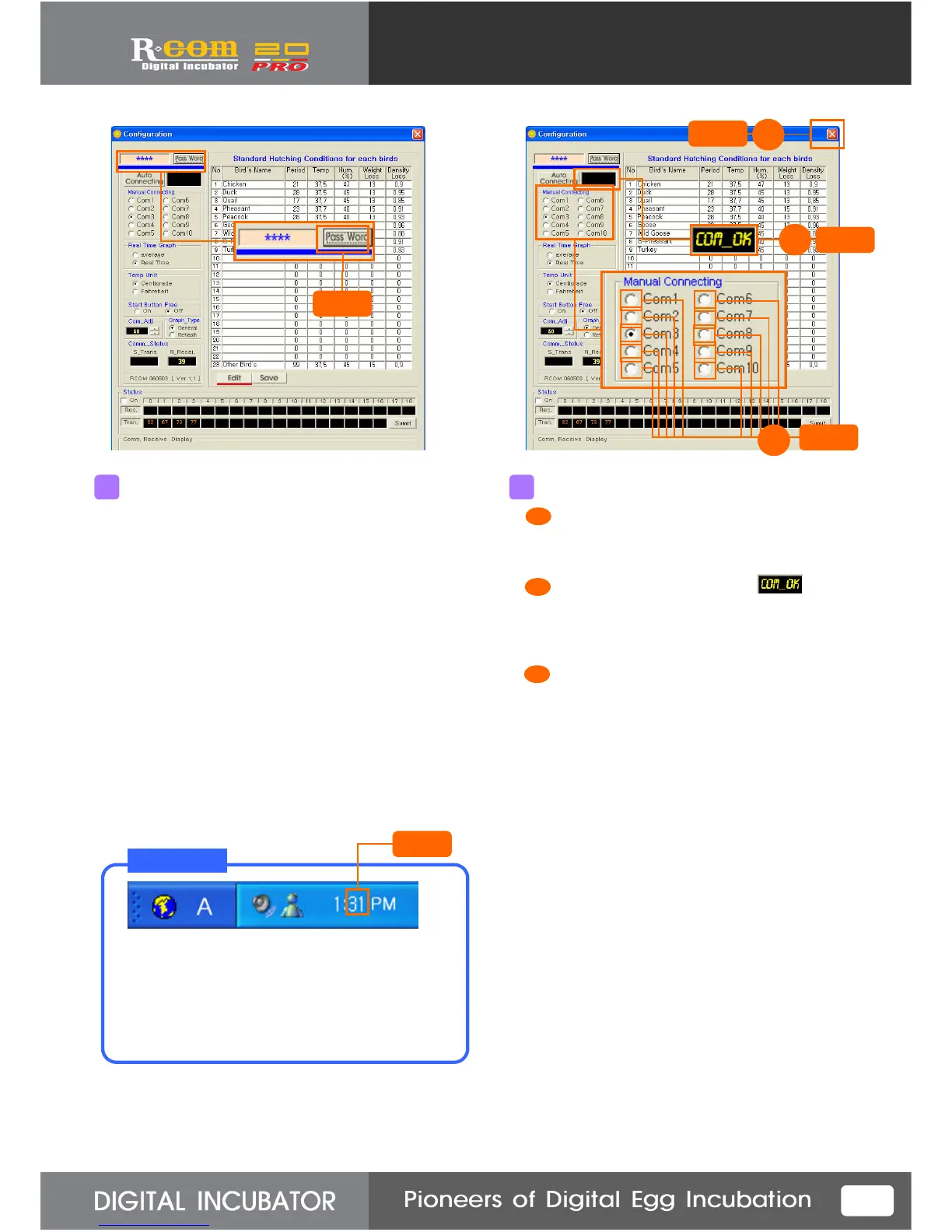
If the computer didn’t connect with incubator
automatically, you need to connect manually.
For manual connection, input password at the top.
Password is made of compounding of the date and
minute.
Refer to the example below, and input password.
Then, logo setup window will be unlocked, and
you can manually set up.
Ex1) May. 28 11 : 19 2819
Ex2) July. 9 10 : 08 0908
After input the password, click “Pass Word”
button.
5
Click
For connecting communication manually,
press Com1~ Com 10 button in order
at 5sec. intervals.
On the communication linkage, ( ) icon
will appear. When this icon comes out,
do not select other Com.
Incubator normally connected.
If you close the window, all connection will
be completed.
6
Click
확인
확인확인
확인
2
3
Click
1
2
3
1
When you input password, be sure to refer
the time of PC timekeeper.
If you don’t refer PC timekeeper,
the password input can fail.
T I P!
Refer



 To Next Page