11
1111
11
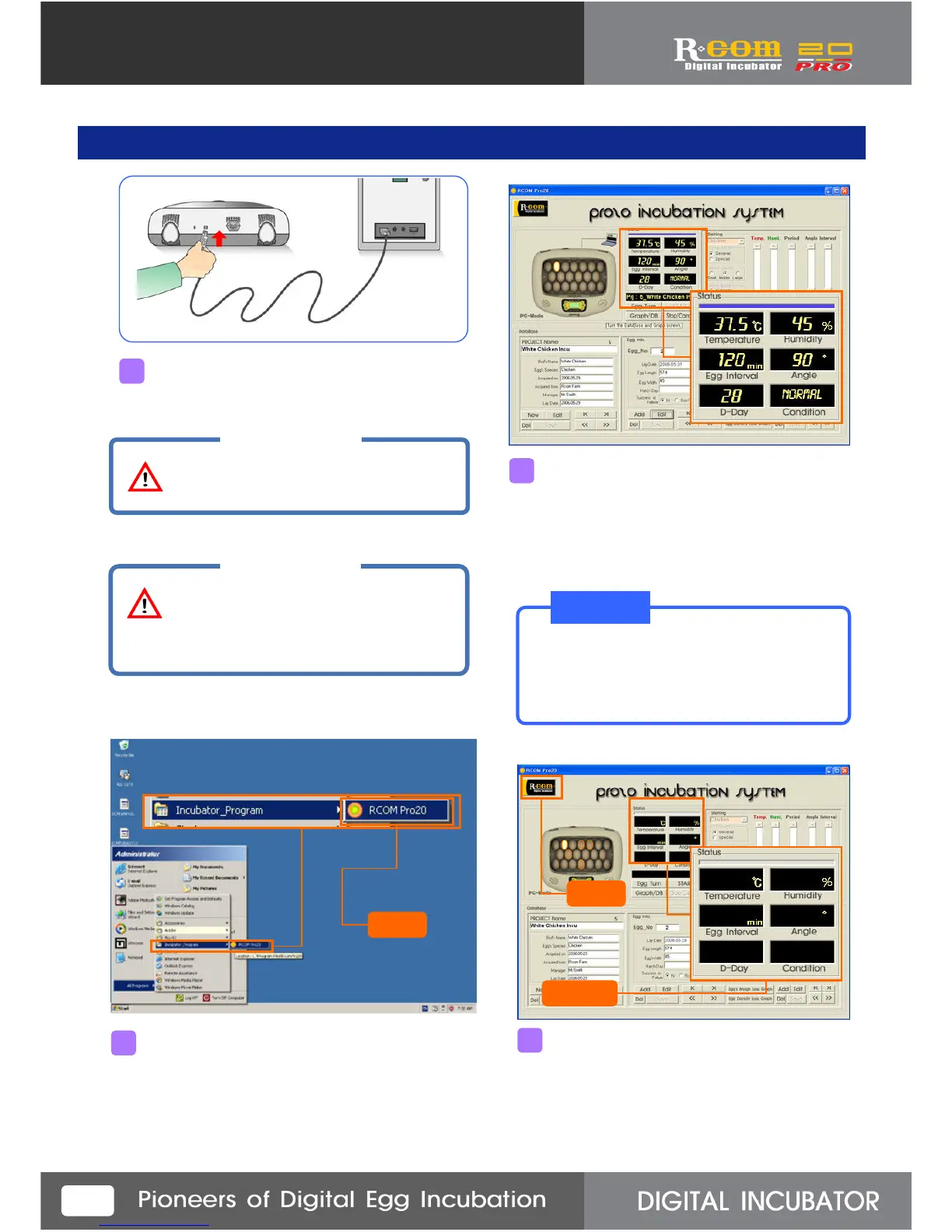
When you execute the program first, Com1~10
will be indicated on condition window for seeking
incubation connecting.
If black display gives the figure of Temp. and
humidity about 10~20sec. later, and computer
icon will display on the top, right side of incubator
icon, it means normally connected.
5. Communication Linkage between Incubator and Computer
If you click “RCOM Pro20”, program will executed.
2
3
If black display does not show Temp. and
humidity within 3min., and there is no computer
icon on top, right of the incubator icon, it means
the computer didn’t connected with the incubator.
In this case, click “Rcom” logo as above.
4
Connect the computer and USB cable on the
state of power cable connecting.
1
CAUTION
Be sure to connect USB and incubator
before starting program operation.
Click
Click
CAUTION
You would better to specify
an USB port for use.
Do not change the USB port position.
Confirm
T I P!
If computer icon is displayed on the top of
the incubator, it means normally connected.
In this case, pass to page10.



 To Next Page