34
3434
34
RCOM Manager File
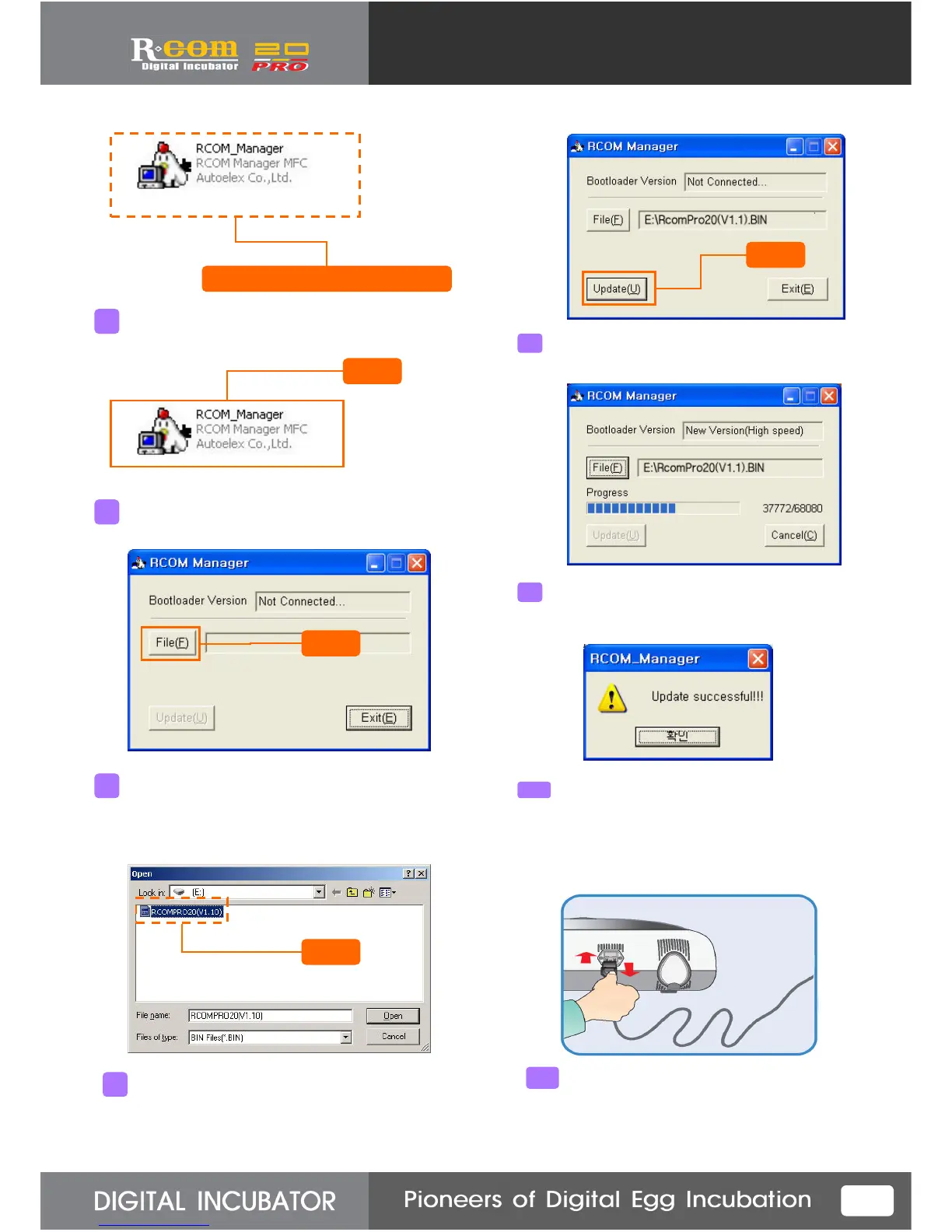
Select “RCOM_Manager” file above Window explorer.
6
Click
Double-click “RCOM_Manager” file.
7
The file as above will show.
Click “File”.
(Be sure to check the incubator is
(Be sure to check the incubator is (Be sure to check the incubator is
(Be sure to check the incubator is
connected with PC through USB cable.)
connected with PC through USB cable.)connected with PC through USB cable.)
connected with PC through USB cable.)
8
Click
Click
Select firmware file with “BIN” extension.
(The name can be different from the version.)
9
Select Firmware file and click “Update(U)” button.
10
Click
Wait a while during updating is on process.
New version Incubator (about 9min. is needed)
Old version Incubator (about 19min. is needed)
11
The message shows,
it means update is normally completed.
Then, it returns to initial condition.
When it failed, error message will show.
In this case, restart from first stage.
12
For normal operation, unplug the power
cord and re-plug again after firmware
upgrade completed.
13



 To Next Page