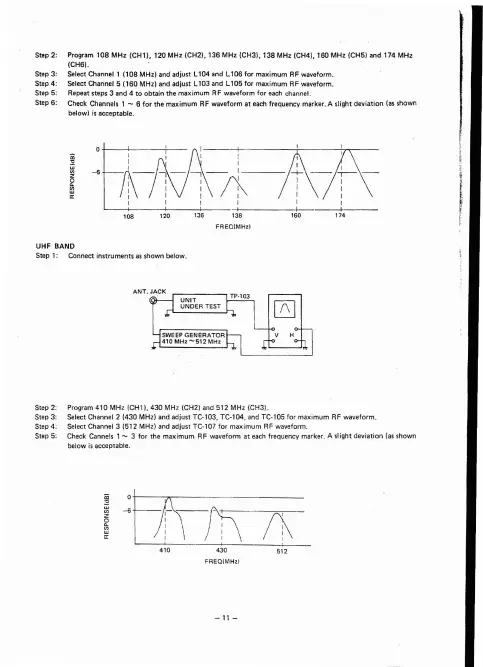
Step 2: Program 108 MHz (CH1), 120 MHz (CH2). 136 MHz (CH3). 138 MHz (CH4l. 160 MHz (CH5) and 174 MHz
(CH61.
Step 3:
SelectChannell
(108MHz)
and adjust
Ll04and
Ll06for
maximum
RF waveform.
Step 4 : Select Channel 5 (160 MHz) and adjust L103 and L 105 for max imum RF waveform .
Step 5: Repeat steps 3 and 4 to obtain the max imum RF waveform for each channel.
Step 6: Check Channels 1
- 6 for the
maximum
RF waveform at each frequency marker. A slight dev
iation
(as shown
below) isacceptable.
UHF BAND
Step 1: Conneet instr uments asshow n below .
Step 2: Program 410 MH z (CH1). 430 M Hz (CH2) and 51 2 MH z (CH31.
Step 3: Select Channel 2 (430 MH z) and adjust TC
·l03
.
TC-l04
. and TC-t05 tor max imum RF waveform .
Step 4 : Select Channel 3
(5t2
MHz ) and adjust
TC·tOl
for maximu m RF waveform.
Step 5: Check Cannels 1
- 3 for t he maximum RF waveform at each freq uency marker. A slight dev
iation
(as shown
below is
acceptable ,
430
FREQ(MHzi


 To Next Page