12
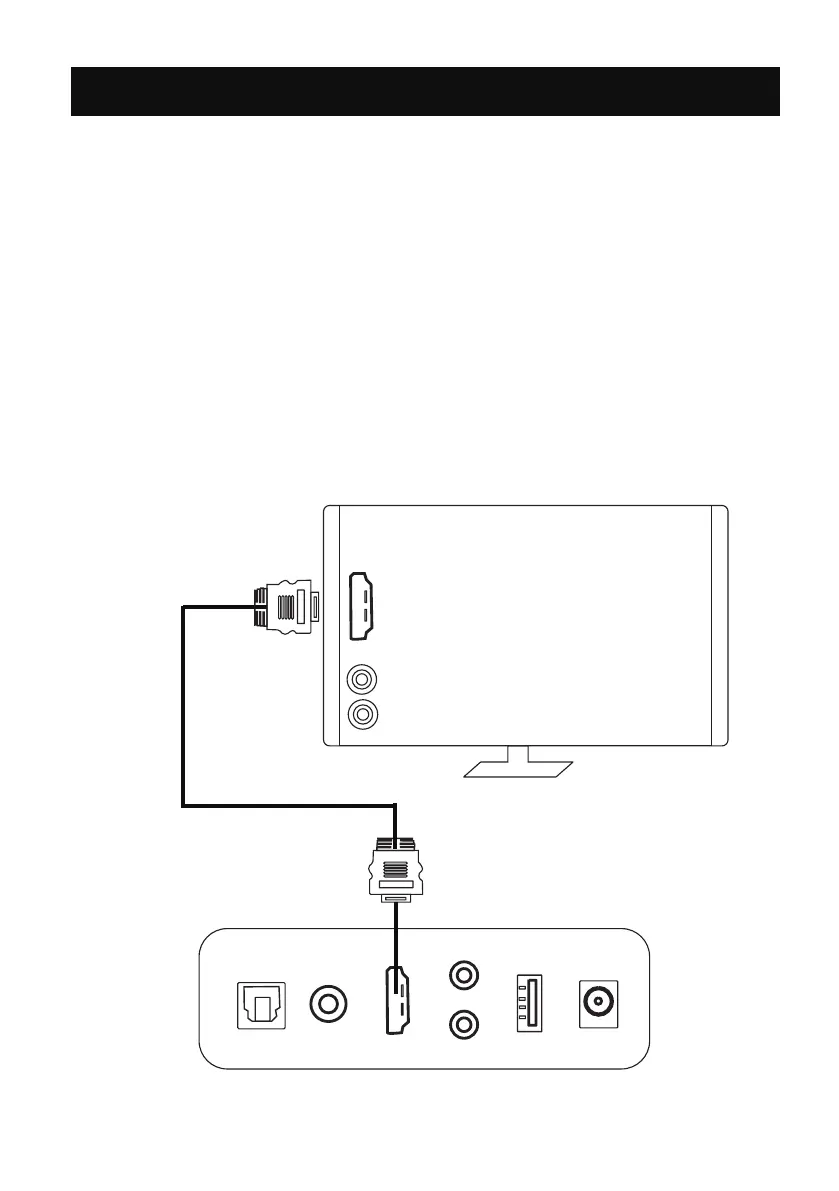
HDMI(ARC) IN OPERATION
1. You will need: An audio source with an ARC Audio Output and a ARC Audio
cable (not included).
2. Connect the ARC Audio cable to the ARC output on the audio source and to
the ARC Input on the soundbar.
3. Press the POWER button on the unit or the remote control to switch on
the unit.
4. Press the AUX/ARC button twice on the remote control or press the M button
on unit repeatedly until the LED 2 lighting blue to switch to ARC mode.
5. Using the native controls on your connected device, make sure the audio
settings are set to ARC or HDMI Audio and are turned on. Audio from the
connected audio source will now be played through the speakers.
OPT
COAX
ARC
USB
AUX
POWER
SUB
DC IN
L
R
TV
ARC
REAR PANEL
NOTE:Set the digital output mode to PCM mode only on TV.NOTE:Set the digital output mode to PCM mode only on TV.NOTE:Set the digital output mode to PCM mode only on TV.


 To Next Page